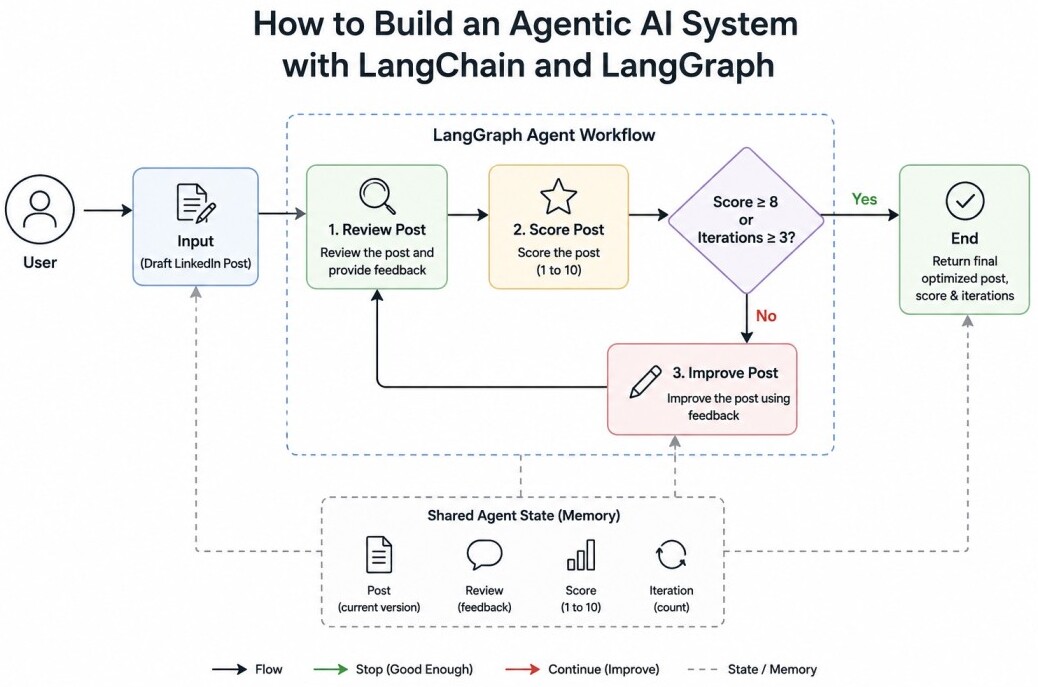
The workflow demonstrates the three most important characteristics of modern agentic systems:
Memory for maintaining state between iterations.
Iteration for continuously improving outputs.
Conditional Logic for deciding whether to continue or stop.
Unlike traditional prompt-response applications, this system evaluates its own work and adapts its behavior based on intermediate results.
Understanding the Workflow
Suppose a user provides the following LinkedIn post:"Spring Boot is good. I use it.
It helps build APIs."
A human reviewer would immediately recognize several issues. The post lacks detail, contains no personal insight, offers little engagement value, and does not include a call to action.
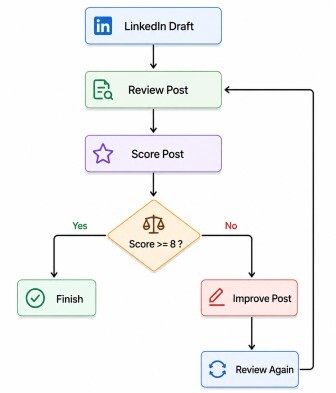
Instead of asking the language model to rewrite the post once, we will allow the agent to repeatedly review and improve the content until it reaches an acceptable quality score.
The workflow looks like this:
Installing Dependencies
Install the required packages:pip install langgraph
pip install langchain
pip install langchain-google-genai
pip install python-dotenv
GOOGLE_API_KEY=YOUR_GEMINI_API_KEYfrom dotenv import load_dotenv
from langchain_google_genai import (
ChatGoogleGenerativeAI
)
load_dotenv()
llm = ChatGoogleGenerativeAI(
model="gemini-2.5-flash",
temperature=0.3
)
Defining Agent State
Every LangGraph workflow revolves around a shared state object. The state stores information that flows between graph nodes. For our LinkedIn Post Optimizer, we need to store:1. The current version of the post.
2. The review generated by the evaluator.
3. The quality score.
4. The number of iterations performed.
from typing import TypedDict

class PostState(TypedDict):
    post: str
    review: str
    score: int
    iteration: int
Creating the Review Node
The first node reviews the LinkedIn post and identifies weaknesses.def review_post(
state: PostState
):
prompt = f"""
Review this LinkedIn post.
Post:
{state['post']}
Evaluate:
- Clarity
- Engagement
- Professional Tone
- Call To Action
Give detailed feedback.
"""
response = llm.invoke(
prompt
)
state["review"] = (
response.content
)
return state
Creating the Scoring Node
After reviewing the content, the agent assigns a quality score.import re
def score_post(
state: PostState
):
prompt = f"""
Score this LinkedIn post
from 1 to 10.
Post:
{state['post']}
Return ONLY:
SCORE: X
"""
response = llm.invoke(
prompt
)
text = response.content
match = re.search(
r"(\\d+)",
text
)
state["score"] = int(
match.group(1)
)
return state
Creating the Improvement Node
If the score is unsatisfactory, the agent rewrites the post using feedback from the reviewer.def improve_post(
state: PostState
):
prompt = f"""
Improve this LinkedIn post.
Original Post:
{state['post']}
Feedback:
{state['review']}
Create a stronger version.
"""
response = llm.invoke(
prompt
)
state["post"] = (
response.content
)
state["iteration"] += 1
return state
Adding Conditional Logic
A key characteristic of agentic systems is their ability to make decisions. After scoring the post, the agent must decide whether it should stop or continue improving the content.from langgraph.graph import END
def should_continue(
state: PostState
):
if state["score"] >= 8:
return END
if state["iteration"] >= 3:
return END
return "improve_post"
1. If the score reaches 8 or higher, stop.
2. If three optimization attempts have already occurred, stop.
3. Otherwise, improve the post and evaluate again.
This decision-making capability is what differentiates an agent from a simple workflow.
Building the Graph
1. Create the graph:
from langgraph.graph import (
    StateGraph,
    START
)

builder = StateGraph(
    PostState
)
2. Register the nodes:
builder.add_node(
    "review_post",
    review_post
)

builder.add_node(
    "score_post",
    score_post
)

builder.add_node(
    "improve_post",
    improve_post
)
3. Define the execution flow:
builder.add_edge(
    START,
    "review_post"
)

builder.add_edge(
    "review_post",
    "score_post"
)

builder.add_conditional_edges(
    "score_post",
    should_continue
)

builder.add_edge(
    "improve_post",
    "review_post"
)
4. Compile the graph:
graph = builder.compile()
Executing the Agent
Provide a draft LinkedIn post:draft_post = """
Spring Boot is good.
I use it.
It helps build APIs.
"""
result = graph.invoke(
{
"post": draft_post,
"review": "",
"score": 0,
"iteration": 0
}
)
print(
"Final Score:",
result["score"]
)
print(
"\nIterations:",
result["iteration"]
)
print(
"\nOptimized Post:\n"
)
print(
result["post"]
)
Complete Code
Here's a complete working version that we can run immediately with Gemini, LangChain, and LangGraph.from dotenv import load_dotenv
from langchain_google_genai import ChatGoogleGenerativeAI
from langgraph.graph import (
StateGraph,
START,
END
)
from typing import TypedDict
import re
# Load Environment Variables
load_dotenv()
# Gemini LLM
llm = ChatGoogleGenerativeAI(
model="gemini-2.5-flash",
temperature=0.3
)
# State Definition
class PostState(TypedDict):
post: str
review: str
score: int
iteration: int
# Review Node
def review_post(
state: PostState
):
print(
f"\n========== REVIEW "
f"(Iteration {state['iteration']}) =========="
)
prompt = f"""
Review this LinkedIn post.
Post:
{state['post']}
Evaluate:
1. Clarity
2. Engagement
3. Professional Tone
4. Call To Action
Provide detailed feedback.
"""
response = llm.invoke(prompt)
state["review"] = response.content
print("\nReview:")
print(state["review"])
return state
# Score Node
def score_post(
state: PostState
):
print("\n========== SCORING ==========")
prompt = f"""
Score the following LinkedIn post.
Post:
{state['post']}
Return ONLY:
SCORE: X
Where X is a number between 1 and 10.
"""
response = llm.invoke(prompt)
text = response.content
match = re.search(r"(\d+)", text)
score = 5
if match:
score = int(match.group(1))
state["score"] = score
print(f"Score: {score}")
return state
# Improve Node
def improve_post(
state: PostState
):
print(
"\n========== IMPROVING POST =========="
)
prompt = f"""
Improve the LinkedIn post below.
Original Post:
{state['post']}
Reviewer Feedback:
{state['review']}
Requirements:
- Improve clarity
- Increase engagement
- Improve professional tone
- Add a strong call to action
Return only the improved post.
"""
response = llm.invoke(prompt)
state["post"] = response.content
state["iteration"] += 1
print("\nImproved Version:\n")
print(state["post"])
return state
# Conditional Logic
def should_continue(
state: PostState
):
print(
"\n========== DECISION =========="
)
print(
f"Current Score: "
f"{state['score']}"
)
print(
f"Iterations: "
f"{state['iteration']}"
)
if state["score"] >= 8:
print(
"\nScore threshold reached."
)
return END
if state["iteration"] >= 3:
print(
"\nMaximum iterations reached."
)
return END
print(
"\nImproving again..."
)
return "improve_post"
# Build Graph
builder = StateGraph(
PostState
)
builder.add_node(
"review_post",
review_post
)
builder.add_node(
"score_post",
score_post
)
builder.add_node(
"improve_post",
improve_post
)
# Flow
builder.add_edge(
START,
"review_post"
)
builder.add_edge(
"review_post",
"score_post"
)
builder.add_conditional_edges(
"score_post",
should_continue
)
builder.add_edge(
"improve_post",
"review_post"
)
# Compile
graph = builder.compile()
# Input
draft_post = """
Spring Boot is good.
I use it.
It helps build APIs.
"""
# Execute
result = graph.invoke(
    {
        "post": draft_post,
        "review": "",
        "score": 0,
        "iteration": 0
    }
)
# Final Result
print(
"\n\n=============================="
)
print(
"FINAL RESULT"
)
print(
"=============================="
)
print(
f"\nFinal Score: "
f"{result['score']}"
)
print(
f"\nIterations: "
f"{result['iteration']}"
)
print(
"\nOptimized Post:\n"
)
print(
result["post"]
)
Output
========== REVIEW (Iteration 0) ==========

Review:
This LinkedIn post is extremely brief and lacks the depth and context typically expected on a professional platform. While the statements are factually correct, they don't offer much value or insight to the reader.

Let's break it down:

---

### Evaluation:

**1. Clarity**
*   **Feedback:** Each individual sentence is clear and easy to understand. There's no ambiguity in the words used. However, the *purpose* or *main point* of the post is unclear. It reads like a series of disconnected facts rather than a cohesive message with a specific goal (e.g., sharing a tip, asking a question, celebrating a feature, starting a discussion).
*   **Detailed Feedback:** While grammatically sound and simple, the post lacks overall clarity in its *intent*. What are you trying to achieve by posting this? Are you looking for agreement, sharing a specific use case, or prompting a discussion? Without this, the clarity of the message as a whole is diminished.
*   **Suggestions for Improvement:**
    *   Start with a clear hook or a specific problem/solution you want to discuss.
    *   Elaborate on *why* Spring Boot is good, *how* it specifically helps build APIs (e.g., "rapid development," "microservices," "robust ecosystem"), or a particular feature you find useful.
    *   Provide context for your personal use.

**2. Engagement**
*   **Feedback:** Engagement is extremely low. The post is purely declarative and offers no hook, question, or valuable insight to draw readers in or encourage interaction. There's nothing for a reader to react to, agree with, disagree with, or learn from beyond the most basic information.
*   **Detailed Feedback:** LinkedIn thrives on value, insights, and interaction. This post provides none of these. It's too short and generic to spark curiosity or prompt any kind of response. It's like saying "The sky is blue" – true, but not engaging.
*   **Suggestions for Improvement:**
    *   **Share a specific story:** "I recently used Spring Boot to build a high-performance payment API, and it significantly cut down development time thanks to its auto-configuration."
    *   **Ask a question:** "What are your favorite Spring Boot features for API development?" or "Any tips for optimizing Spring Boot APIs?"
    *   **Provide a tip:** "One feature I love in Spring Boot for APIs is its built-in support for [X] which makes [Y] so much easier."
    *   **Use emojis or formatting:** While not suitable for this post's current state, once content is added, emojis can help break up text and add personality.

**3. Professional Tone**
*   **Feedback:** The tone is overly simplistic and lacks the professionalism expected on LinkedIn. It sounds more like a casual chat message than a thought-out professional post designed to showcase expertise or contribute to a professional dialogue.
*   **Detailed Feedback:** Phrases like "Spring Boot is good" are too blunt and lack the nuance or elaboration that demonstrates expertise. On LinkedIn, professionals aim to share knowledge, insights, and build their personal brand. This post, in its current form, doesn't achieve that. It doesn't reflect well on the poster's communication skills or depth of understanding.
*   **Suggestions for Improvement:**
    *   **Elevate the language:** Instead of "is good," consider "offers robust capabilities," "streamlines development," "is an excellent choice for," or "provides a powerful framework for."
    *   **Elaborate:** Explain *why* it's good, providing specific benefits or features that demonstrate your understanding.
    *   **Show, don't just tell:** Instead of "I use it," describe *how* you use it or the *results* you achieve with it.

**4. Call To Action (CTA)**
*   **Feedback:** There is no explicit or implicit call to action. The post ends abruptly without prompting any further interaction from the reader.
*   **Detailed Feedback:** A CTA is crucial for driving engagement on LinkedIn. Without one, readers are left with no direction on what to do next, and the opportunity for discussion or connection is lost.
*   **Suggestions for Improvement:**
    *   **Direct Question:** "What are your thoughts on Spring Boot for microservices?"
    *   **Invitation to Share:** "Share your favorite Spring Boot tips in the comments below!"
    *   **Prompt for Discussion:** "I'm curious to hear about your experiences with Spring Boot – what challenges have you overcome?"
    *   **Link to Resource (if applicable):** "If you're new to Spring Boot, check out [link to a relevant article/tutorial]."

---

### Overall Recommendation:

This post has the potential to be much more impactful. By adding detail, context, a professional tone, and a clear call to action, you can transform it into a valuable piece of content that resonates with your network and showcases your expertise.

**Example of a revised post incorporating these suggestions:**

> "Spring Boot continues to be my go-to framework for building robust and scalable APIs. Its convention-over-configuration approach significantly streamlines development, allowing me to focus more on business logic and less on boilerplate setup.
>
> I've personally leveraged it for several projects, from microservices to complex enterprise solutions, and it consistently delivers. The extensive ecosystem and vibrant community are huge advantages.
>
> What are your favorite features of Spring Boot when developing APIs, or what challenges has it helped you overcome? Share your insights below! 👇
>
> \#SpringBoot \#APIdevelopment \#Java \#SoftwareDevelopment \#Tech"

========== SCORING ==========
Score: 3

========== DECISION ==========
Current Score: 3
Iterations: 0

Improving again...

========== IMPROVING POST ==========

Improved Version:

Spring Boot continues to be my go-to framework for building robust and scalable APIs. Its powerful features and convention-over-configuration approach significantly streamline development, allowing me to focus more on business logic and less on boilerplate setup.

I've personally leveraged it for various projects, from microservices to complex enterprise solutions, and it consistently delivers efficiency and reliability. The extensive ecosystem and vibrant community are invaluable assets.

What are your favorite features of Spring Boot when developing APIs, or what's a recent challenge it helped you overcome? Share your insights and experiences below!

#SpringBoot #APIdevelopment #Java #SoftwareDevelopment #Tech

========== REVIEW (Iteration 1) ==========

Review:
This is a well-structured and effective LinkedIn post. Here's a detailed evaluation:

---

### LinkedIn Post Review

**Post:**
Spring Boot continues to be my go-to framework for building robust and scalable APIs. Its powerful features and convention-over-configuration approach significantly streamline development, allowing me to focus more on business logic and less on boilerplate setup.

I've personally leveraged it for various projects, from microservices to complex enterprise solutions, and it consistently delivers efficiency and reliability. The extensive ecosystem and vibrant community are invaluable assets.

What are your favorite features of Spring Boot when developing APIs, or what's a recent challenge it helped you overcome? Share your insights and experiences below!

#SpringBoot #APIdevelopment #Java #SoftwareDevelopment #Tech

---

#### 1. Clarity

**Evaluation: Excellent**

*   **Feedback:** The language is direct and easy to understand, avoiding excessive jargon while still conveying technical concepts effectively. Phrases like "convention-over-configuration" and "boilerplate setup" are standard in the development community and clearly communicate the benefits. The post clearly articulates *why* Spring Boot is valued (robust, scalable, streamlined development, efficiency, reliability). There's no ambiguity about the author's stance or the topic being discussed.

#### 2. Engagement

**Evaluation: Strong**

*   **Feedback:**
    *   **Hook:** The post starts with a clear, personal endorsement ("my go-to framework"), which immediately establishes credibility and a relatable tone.
    *   **Personal Touch:** Sharing your personal experience ("I've personally leveraged it for various projects...") adds authenticity and makes the post more engaging than a purely theoretical discussion.
    *   **Question Quality:** The open-ended question at the end is well-crafted. By offering two distinct prompts ("favorite features" *or* "recent challenge it helped you overcome"), it lowers the barrier to entry for comments and encourages diverse responses. This is a very effective way to spark conversation.
    *   **Hashtags:** The relevant and popular hashtags (SpringBoot, APIdevelopment, Java, SoftwareDevelopment, Tech) significantly boost visibility and ensure the post reaches the right audience, increasing potential engagement.
*   **Suggestion for even higher engagement (Optional):** While already strong, you could consider adding a *very brief* specific example of a feature or a challenge overcome in the body text (e.g., "For instance, its auto-configuration saved me hours on X project...") to make it even more concrete, but this is not strictly necessary as the current post is already effective.

#### 3. Professional Tone

**Evaluation: Excellent**

*   **Feedback:** The tone is confident, knowledgeable, and professional throughout. It balances personal enthusiasm for the framework with a respectful and informative approach. There's no overly casual language or slang. The post positions the author as an experienced professional who understands the value of the tools they use. It's suitable for a professional networking platform like LinkedIn.

#### 4. Call To Action (CTA)

**Evaluation: Excellent**

*   **Feedback:**
    *   **Clarity:** The CTA is crystal clear: "Share your insights and experiences below!"
    *   **Specificity:** It's highly specific, guiding the audience on *what* to share ("favorite features of Spring Boot when developing APIs, or what's a recent challenge it helped you overcome?"). This specificity is crucial for getting relevant and thoughtful responses.
    *   **Placement:** It's perfectly placed at the end of the post, after the context has been provided, making it a natural conclusion and invitation.
    *   **Effectiveness:** By offering two distinct avenues for response, it caters to different experiences and encourages more people to participate.

---

### Overall Recommendation:

This is a **highly effective and well-crafted LinkedIn post**. It clearly communicates your expertise and enthusiasm for Spring Boot, effectively engages your audience, maintains a professional tone, and provides a clear, actionable call to action. It's a great example of how to leverage LinkedIn to share insights and foster community interaction.

**No significant changes are needed.** You've hit all the right notes.

========== SCORING ==========
Score: 9

========== DECISION ==========
Current Score: 9
Iterations: 1

Score threshold reached.


==============================
FINAL RESULT
==============================

Final Score: 9

Iterations: 1

Optimized Post:

Spring Boot continues to be my go-to framework for building robust and scalable APIs. Its powerful features and convention-over-configuration approach significantly streamline development, allowing me to focus more on business logic and less on boilerplate setup.

I've personally leveraged it for various projects, from microservices to complex enterprise solutions, and it consistently delivers efficiency and reliability. The extensive ecosystem and vibrant community are invaluable assets.

What are your favorite features of Spring Boot when developing APIs, or what's a recent challenge it helped you overcome? Share your insights and experiences below!

#SpringBoot #APIdevelopment #Java #SoftwareDevelopment #Tech
Where Memory Appears?
Although we did not explicitly create a separate memory component, the graph state itself acts as memory. The post, review, score, and iteration count persist across every execution cycle.At any point in the workflow, the agent has access to:
- Current Post
- Current Review
- Current Score
- Current Iteration Count
Without this state management, the agent would lose context after every step and would be unable to perform iterative improvements.
Why This Is an Agent?
Traditional LLM applications typically follow this pattern:Prompt → LLM → AnswerDraft → Review → Score → Decision → Improve → Repeat → Final OutputThis combination of state management, iterative execution, and conditional decision making is the essence of Agentic AI. LangChain provides the LLM integration layer, while LangGraph provides the orchestration engine that transforms a language model into a true autonomous workflow.
