This article explains how a chatbot using LLM + RAG works, why it matters, how to build one in Python, and where it is used in real-world systems.
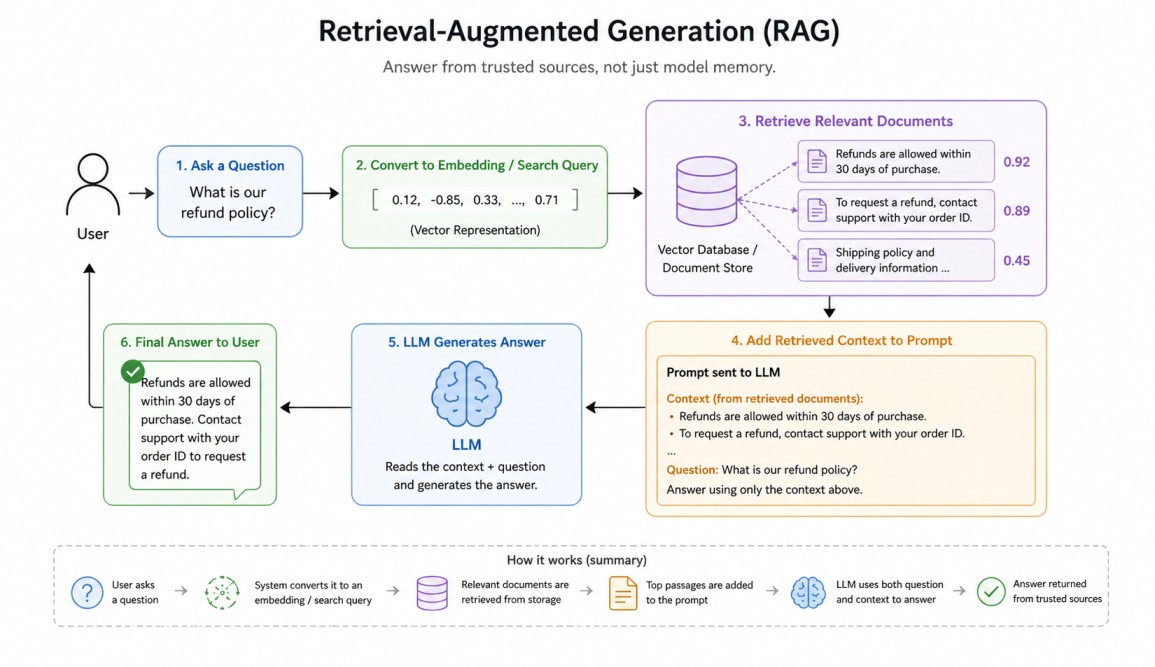
The final answer is generated using both the user question and retrieved evidence.
A user asks a question. The system converts the question into an embedding or search query. Relevant documents are retrieved from storage. The most useful passages are added to the prompt. The LLM reads that context and writes an answer.
This allows the chatbot to answer from trusted sources rather than guessing.
A vector database is a specialized system designed to store, index, and query high-dimensional vector embeddings—numerical representations of unstructured data like text, images, or audio. Unlike traditional databases that search for exact matches, vector databases use Approximate Nearest Neighbor (ANN) algorithms to find semantic similarities.
Why LLM + RAG is Powerful?
RAG gives several major advantages. It enables access to private company knowledge. It improves factual grounding. It allows updates without retraining the model. It reduces hallucinations when retrieval quality is strong. It supports citations and traceability.LLM hallucinations are confident, grammatically correct, yet factually incorrect or nonsensical outputs generated by large language models (LLMs).Instead of retraining an LLM every time documents change, teams simply update the knowledge base.
These errors occur due to the probabilistic nature of AI, which prioritizes pattern completion over factual accuracy, stemming from biased, outdated, or incomplete training data. Common in LLMs like GPT-4, they often arise when models are pushed to respond to ambiguous queries.
Companies use LLM + RAG chatbots for customer support, internal employee assistants, legal document search, healthcare knowledge access, policy Q&A, technical documentation help, IT support desks, educational tutoring, and research copilots.
For example, an employee may ask, "What is our leave policy for parental benefits?" The chatbot retrieves HR policy documents and answers using the official source.
Architecture Overview
A production RAG chatbot is usually built using four main parts that work together.1. The first part is the user interface, where people type questions and receive answers through a website, app, or chat window.
2. The second part is the retrieval system, which searches for useful information related to the user's question. It looks inside the chatbot's stored knowledge sources and finds the most relevant content.
3. The third part is the data source layer, which stores the knowledge used by the chatbot. This may include PDFs, manuals, wiki pages, databases, emails, FAQs, or support articles.
4. The fourth part is the LLM generation layer, where the language model reads the question along with retrieved information and creates the final response.
When a user asks something, the retrieval system first tries to find the most relevant information from these sources. To do this intelligently, many systems use embeddings and a vector database. Tools such as FAISS, Pinecone, Weaviate, Chroma, or enterprise search platforms are commonly used for this purpose.
Embeddings are number-based representations of text meaning. They help the system understand similarity between sentences, even when the exact words are different. For example, "refund policy" and "return money policy" may have similar meanings, so their embeddings are placed close together. This allows the chatbot to search by meaning rather than only matching keywords.
Large documents are usually divided into smaller sections called chunks. Instead of searching an entire book or long PDF at once, the system searches these smaller pieces. When a question is asked, it retrieves only the most relevant chunks and sends them to the LLM.
This makes the chatbot faster, more accurate, and more efficient because it focuses only on the useful information needed to answer the question.
Python Example: Simple RAG Chatbot
Below is a conceptual Python example using local text documents and similarity search.import os
os.environ["TOKENIZERS_PARALLELISM"] = "false"
from sentence_transformers import SentenceTransformer
from sklearn.metrics.pairwise import cosine_similarity
import google.generativeai as genai
import numpy as np
# ---------------------------------
# Load Gemini API Key from System Variable
# ---------------------------------
api_key = os.getenv("GEMINI_API_KEY")
if not api_key:
raise ValueError(
"GEMINI_API_KEY not found in environment variables."
)
genai.configure(api_key=api_key)
model = genai.GenerativeModel("gemini-2.5-flash")
# ---------------------------------
# Knowledge Base
# ---------------------------------
documents = [
"Employees receive 20 days of annual leave every year.",
"Parental leave is available for 6 months.",
"IT support is available 24/7.",
]
# ---------------------------------
# Embedding Model
# ---------------------------------
embed_model = SentenceTransformer("all-MiniLM-L6-v2")
doc_vectors = embed_model.encode(documents)
# ---------------------------------
# Retrieval Function
# ---------------------------------
def retrieve(query, top_k=2):
q_vec = embed_model.encode([query])
scores = cosine_similarity(q_vec, doc_vectors)[0]
top_ids = np.argsort(scores)[::-1][:top_k]
return [documents[i] for i in top_ids]
# ---------------------------------
# Gemini + RAG Answer Generator
# ---------------------------------
def ask_bot(user_query):
docs = retrieve(user_query)
context = "\n".join(docs)
prompt = f"""
Answer using ONLY the context below.
Context:
{context}
Question:
{user_query}
If answer is not found in context, say:
I could not find that in the provided documents.
"""
response = model.generate_content(prompt)
return response.text
# ---------------------------------
# Chat Loop
# ---------------------------------
print("Mini Gemini RAG Chatbot Ready!")
print("Type 'exit' to stop.\n")
while True:
q = input("You: ")
if q.lower() == "exit":
print("Bot: Goodbye!")
break
answer = ask_bot(q)
print("\nBot:", answer)
print("-" * 50)
Output:
Loading weights: 100%|███████████████████████████████████████████████████████████████████████████████████████████████████████████████████████████| 103/103 [00:00<00:00, 8911.53it/s]
Mini Gemini RAG Chatbot Ready!
Type 'exit' to stop.

You: How many annual leave days do employees get?

Bot: Employees receive 20 days of annual leave every year.
--------------------------------------------------
You: Is IT support available at night?

Bot: Yes, IT support is available at night.
--------------------------------------------------
You: What employee benefits are available?

Bot: Employee benefits available are:
* 20 days of annual leave every year.
* Parental leave for 6 months.
--------------------------------------------------
You: exit
Bot: Goodbye!
A small internal knowledge base is created using company-related documents such as annual leave policy, parental leave, and IT support availability. These documents act as the chatbot's trusted source of information.
To make search intelligent, the script uses the SentenceTransformer model to convert each document into embeddings, which are numerical representations of meaning.
When the user asks a question, the same embedding process is applied to the query. The program then uses cosine similarity to compare the user query with all stored document vectors and selects the most relevant matching documents. This is the retrieval layer of the chatbot.This line loads a pre-trained SentenceTransformer model named all-MiniLM-L6-v2, which converts text into numerical vectors called embeddings.embed_model = SentenceTransformer("all-MiniLM-L6-v2")This line converts all items in documents into numerical embedding vectors using the loaded model. These vectors represent the meaning of each document and are later used for similarity search during retrieval.doc_vectors = embed_model.encode(documents)This line compares the user query vector q_vec with all stored document vectors doc_vectors using cosine similarity. It returns similarity scores showing which documents are most semantically related to the query.scores = cosine_similarity(q_vec, doc_vectors)[0]This line sorts the similarity scores from highest to lowest and selects the indexes of the top top_k matching documents. These indexes are then used to retrieve the most relevant results.top_ids = np.argsort(scores)[::-1][:top_k]
After retrieval, the selected context is sent to the Gemini model inside a prompt that instructs it to answer using only the provided information. Gemini then generates a natural language response based on that retrieved context.
Finally, a chat loop allows the user to keep asking questions until typing exit. In short, this script demonstrates how modern AI assistants combine search + LLM reasoning to produce grounded answers instead of guessing.
The current script is a great prototype, but still a toy RAG chatbot. To make it production-grade, scalable, secure, and reliable, we need to improve each layer: data ingestion, retrieval, LLM orchestration, API serving, security, monitoring, and evaluation.
1. Replace hardcoded documents[] with real sources like PDFs, databases, wikis, emails, and websites.
2. Use a real vector database such as FAISS, Pinecone, Chroma, or Weaviate for scalable retrieval.
3. Split large files into chunks with overlap for better search accuracy.
4. Store metadata like source name, page number, department, and update date.
5. Upgrade to stronger embedding models for better semantic search quality.
6. Add a re-ranking layer to improve top retrieved document relevance.
7. Use better prompt templates with rules, tone, and hallucination control.
8. Add conversation memory so follow-up questions keep context.
9. Replace CLI input with FastAPI / Flask APIs for real applications.
10.Track hallucination rate, retrieval quality, and user satisfaction metrics.
Conclusion
A Chatbot using LLM + RAG combines the language power of modern models with the reliability of external knowledge retrieval. The LLM provides fluent reasoning and communication, while RAG provides fresh, private, and grounded information.This combination is one of the most practical architectures in modern AI because it turns general-purpose intelligence into domain-specific usefulness.
