The emergence of LangChain and Model Context Protocol (MCP) has dramatically simplified the process of building such agents. LangChain provides the orchestration layer while MCP provides a standardized mechanism for connecting tools and data sources.
Together they form one of the most powerful stacks currently available for building production-grade AI systems.
What Makes an Agent?
Consider the following request: Analyze yesterday's sales data, identify the top-selling product, create a summary report, and send it to Slack.A simple LLM cannot perform this task because it lacks access to:
- Sales database
- Report generation system
- Slack workspace
An agent, however, can reason about the request and decide:
Step 1: Query sales database
Step 2: Analyze results
Step 3: Generate report
Step 4: Send report to Slack
Step 5: Confirm completion
This ability to combine reasoning and action is what differentiates agents from chatbots.
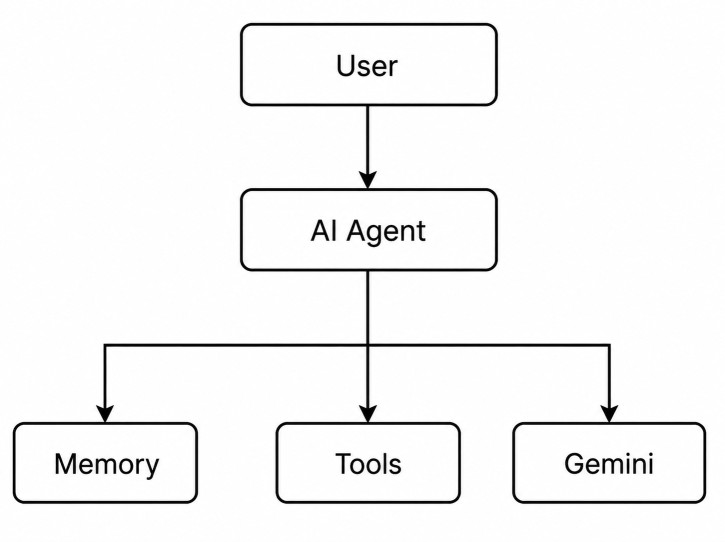
Core Components of an AI Agent
Every practical AI agent consists of four major layers.1. The first layer is the Language Model. This is usually GPT, Claude, Gemini, Llama, or another foundation model responsible for reasoning and decision-making.
2. The second layer is Memory. Memory allows the system to remember previous interactions and maintain context.
3. The third layer is Tools. Tools allow the model to interact with external systems.
4. The fourth layer is Agent Logic, which decides which tools should be used and in what sequence.
A simplified architecture looks like:
Setting Up LangChain
Let us start with a minimal project.pip install langchain
pip install langchain-google-genai
pip install langgraph
pip install python-dotenv
from langchain_google_genai import ChatGoogleGenerativeAI

llm = ChatGoogleGenerativeAI(
    model="gemini-2.5-pro",
    temperature=0
)
Creating Your First Tool
Tools are what transform a model into an agent. Suppose we want the model to retrieve weather information.from langchain.tools import tool
@tool
def get_weather(city: str):
"""
Returns weather information.
"""
return f"Weather in {city} is 32°C."
Building a Tool Calling Agent
LangChain makes tool integration extremely simple.from langchain.agents import create_agent
from langchain.tools import tool
from langchain_google_genai import ChatGoogleGenerativeAI
@tool
def get_weather(city: str) -> str:
"""Returns weather information."""
return f"Weather in {city} is 32°C."
llm = ChatGoogleGenerativeAI(
model="gemini-2.5-flash",
temperature=0
)
agent = create_agent(
model=llm,
tools=[get_weather],
system_prompt="You are a helpful AI assistant."
)
response = agent.invoke(
{
"messages": [
{
"role": "user",
"content": "What's the weather in Delhi?"
}
]
}
)
print(response["messages"][-1].content)
The weather in Delhi is 32°C.Why Traditional Tool Integration Becomes a Problem?
Imagine building an enterprise assistant. It needs access to:- GitHub
- Slack
- Jira
- Confluence
- PostgreSQL
- Google Drive
- AWS
Without MCP, every integration must be implemented manually.
github_client = Github(...)
jira_client = Jira(...)
slack_client = Slack(...)
aws_client = boto3(...)
This repetitive integration overhead is exactly the problem that MCP was created to address.
Understanding MCP
Think of MCP as a universal adapter.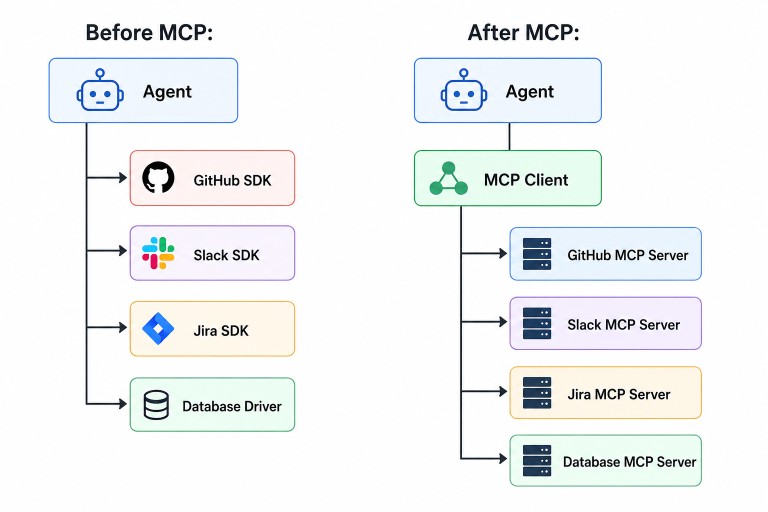
Installing MCP Support
Install MCP adapters.pip install langchain-mcp-adaptersConnecting to an MCP Server
Suppose we want filesystem access.from langchain_mcp_adapters.client import MultiServerMCPClient
client = MultiServerMCPClient(
{
"filesystem": {
"command": "npx",
"args": [
"-y",
"@modelcontextprotocol/server-filesystem",
"./workspace"
]
}
}
)
tools = await client.get_tools()Creating an MCP-Powered Agent
Now let us combine MCP tools with LangChain. First, connect to an MCP server and retrieve the available tools.from langchain_mcp_adapters.client import MultiServerMCPClient
client = MultiServerMCPClient(
{
"filesystem": {
"command": "npx",
"args": [
"-y",
"@modelcontextprotocol/server-filesystem",
"./workspace"
]
}
}
)
tools = await client.get_tools()
from langchain.agents import create_agent
from langchain_google_genai import ChatGoogleGenerativeAI

llm = ChatGoogleGenerativeAI(
    model="gemini-2.5-pro",
    temperature=0
)

agent = create_agent(
    model=llm,
    tools=tools,
    system_prompt="""
    You are a helpful AI assistant that can
    interact with files and external systems
    using available tools.
    """
)
A user can now ask: Read all Java files inside the src directory and provide a summary of the codebase.
The agent execution flow looks like:
User Request → Gemini Agent → list_directory() → read_file() → Analyze Source Code → Generate Summary
Building a GitHub Engineering Assistant
Let us build a GitHub-powered engineering assistant using MCP and LangChain. First, connect to a GitHub MCP server and load the available tools.import asyncio
from langchain.agents import create_agent
from langchain_google_genai import ChatGoogleGenerativeAI
from langchain_mcp_adapters.client import MultiServerMCPClient
async def main():
client = MultiServerMCPClient(
{
"github": {
"command": "npx",
"args": [
"-y",
"@modelcontextprotocol/server-github"
],
"env": {
"GITHUB_PERSONAL_ACCESS_TOKEN":
"YOUR_GITHUB_TOKEN"
}
}
}
)
tools = await client.get_tools()
llm = ChatGoogleGenerativeAI(
model="gemini-2.5-flash",
temperature=0
)
agent = create_agent(
model=llm,
tools=tools,
system_prompt="""
You are a senior software engineering assistant.
Help developers analyze GitHub repositories.
"""
)
response = agent.invoke(
{
"messages": [
{
"role": "user",
"content": """
Find all TODO comments inside
the payment-service repository.
"""
}
]
}
)
print(
response["messages"][-1].content
)
asyncio.run(main())
search_repository
read_file
create_issue
get_pull_requests
search_repository(
    repo="payment-service",
    query="TODO"
)

read_file(
    path="src/main/java/com/company/service/PaymentService.java"
)

read_file(
    path="src/main/java/com/company/service/RefundService.java"
)
Output
TODO Report for payment-service
================================

1. PaymentService.java

Line 45:
TODO: Add retry mechanism for failed payments

Line 128:
TODO: Move validation logic to dedicated service


2. RefundService.java

Line 67:
TODO: Handle partial refund edge cases

Line 92:
TODO: Add integration tests


Summary
--------------------------------

Total TODOs Found: 4

Priority Areas:
- Payment retry handling
- Refund edge cases
- Validation refactoring
- Missing integration tests
Multi-Agent Enterprise Workflows
The real power emerges when multiple MCP servers are connected. Imagine:- GitHub MCP
- Slack MCP
- Jira MCP
- Database MCP
A manager asks: Give me a status update for Sprint 42.
The agent can:
Read Jira tickets → Inspect Pull Requests → Check Deployment Status → Generate Summary → Post To Slack
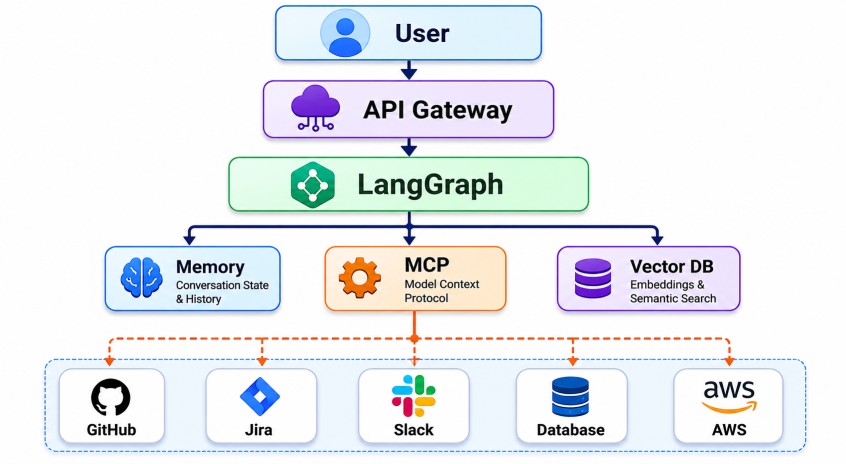
1. The language model focuses on reasoning.
2. MCP handles connectivity.
3. LangGraph manages workflows.
4. Vector databases provide retrieval.
5. Memory stores user context.
This separation of concerns creates systems that are easier to scale, test, and maintain.
Adding Long-Term Memory
Agents become more useful when they remember information. LangChain supports persistent memory using databases.
Example:Now the agent remembers:from langchain.memory import ConversationBufferMemory memory = ConversationBufferMemory( return_messages=True )
- User prefers Java
- User works with Spring Boot
- User uses PostgreSQL
Future responses become more contextual.
Conclusion
LangChain solves the orchestration problem by providing tools, memory, agents, and workflow abstractions. MCP solves the integration problem by offering a standardized protocol for exposing tools and data sources.When combined, they allow developers to build agents capable of reading repositories, querying databases, managing cloud infrastructure, coordinating enterprise workflows, and performing real work rather than simply generating text.
