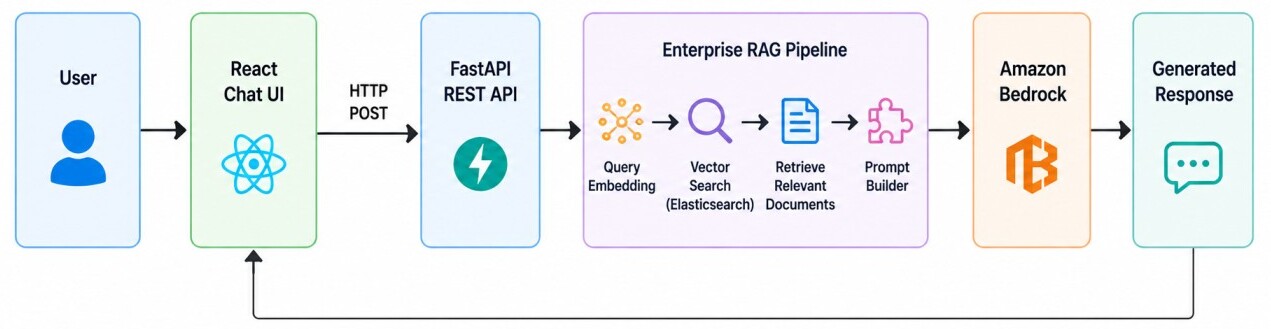
The application accepts user questions through a FastAPI REST API and generates a query embedding using Amazon Titan Embeddings to perform semantic vector search against Elasticsearch.
The retrieved business documents are then used to build a prompt for Amazon Bedrock, which generates and returns a natural language response.
In this article, we will build a modern React application that communicates with our FastAPI backend.
The UI will provide a clean ChatGPT-style chat experience where users can ask business questions, view AI-generated responses, and interact with the RAG system through a simple conversational interface.
The frontend architecture is intentionally lightweight. All AI processing remains in the backend while React focuses only on rendering the user interface and communicating with the REST API.
Project Structure
We will keep the frontend intentionally simple. The project contains only the components required to build a production-ready chat interface.enterprise-rag-ui/
├── src/
│ └── assets
│ └── services/
│ └── chatService.js
├── App.jsx
├── App.css
├── index.css
├── main.jsx
└── .env
Creating the React Application
We will use React with Vite because it provides a lightweight development environment, fast startup time, and an optimized production build.The frontend will communicate with the FastAPI backend through a REST API while keeping all AI processing on the server.
Create a new React project.
npm create vite@latest enterprise-rag-ui -- --template react
cd enterprise-rag-ui
npm install
npm install axios
npm run dev
http://localhost:5173
VITE_API_BASE_URL=http://localhost:8000/api
Creating the API Service
The React application communicates with the FastAPI backend through a single REST endpoint.Instead of making HTTP requests directly from React components, we create a dedicated service responsible for all backend communication.
Create src/services/chatService.js.
import axios from "axios";

const API = axios.create({
    baseURL: import.meta.env.VITE_API_BASE_URL
});

export async function askQuestion(question) {
    const response = await API.post("/chat", {
        question: question
    });

    return response.data.answer;
}
Building the Chat Interface
The main user interface consists of a single chat window where users can enter business questions and view AI-generated responses.The page maintains the conversation history and communicates with the backend through the chatService created in the previous section.
src/App.jsx
import { useState } from "react";
import ReactMarkdown from "react-markdown";

import "./App.css";
import { askQuestion } from "./services/chatService";


function App() {
    const [messages, setMessages] = useState([]);
    const [question, setQuestion] = useState("");
    const [loading, setLoading] = useState(false);

    async function sendQuestion() {
        if (!question.trim()) {
            return;
        }

        const userQuestion = question;

        setMessages(previous => [
            ...previous,
            {
                sender: "user",
                text: userQuestion
            }
        ]);

        setQuestion("");
        setLoading(true);

        try {
            const answer = await askQuestion(userQuestion);

            setMessages(previous => [
                ...previous,
                {
                    sender: "assistant",
                    text: answer
                }
            ]);

        } catch (error) {
            setMessages(previous => [
                ...previous,
                {
                    sender: "assistant",
                    text: "Something went wrong while contacting the server."
                }
            ]);

        } finally {
            setLoading(false);
        }
    }

    return (
        <div className="container py-4">
            <div className="card shadow-sm border-0 mb-4">
                <div className="card-body text-center">

                    <div className="hero-logo">
                        AI
                    </div>

                    <h2 className="hero-title">
                        Enterprise Intelligence Hub
                    </h2>

                    <p className="hero-description">
                        Explore enterprise data using natural language.
                        Powered by semantic search, vector embeddings and
                        generative AI to deliver accurate insights from
                        <strong> Orders</strong>,
                        <strong> Inventory</strong> and
                        <strong> Sales</strong>.
                    </p>

                    <div className="hero-badges">

                        <span className="badge bg-primary">
                            Elasticsearch
                        </span>

                        <span className="badge bg-success">
                            Vector Search
                        </span>

                        <span className="badge bg-warning text-dark">
                            Amazon Bedrock
                        </span>

                    </div>

                </div>
            </div>

            <div className="card shadow-sm border-0 flex-grow-1">
                <div className="card-body chat-window">

                    {messages.map((message, index) => (
                        <div
                            key={index}
                            className={`d-flex mb-3 ${
                                message.sender === "user"
                                    ? "justify-content-end"
                                    : "justify-content-start"
                            }`}
                        >

                            <div
                                className={
                                    message.sender === "user"
                                        ? "user-message"
                                        : "assistant-message"
                                }
                            >
                                <ReactMarkdown>
                                    {message.text}
                                </ReactMarkdown>
                            </div>

                        </div>
                    ))}

                    {loading && (
                        <div className="d-flex align-items-center">

                            <div
                                className="spinner-border spinner-border-sm text-primary me-2"
                            ></div>

                            <span className="text-muted">
                                Thinking...
                            </span>

                        </div>
                    )}

                </div>
            </div>

            <div className="input-group mt-3">

                <input
                    type="text"
                    className="form-control"
                    placeholder="Ask about orders, inventory or sales..."
                    value={question}
                    disabled={loading}
                    onChange={(event) => setQuestion(event.target.value)}
                    onKeyDown={(event) => {
                        if (event.key === "Enter" && !loading) {
                            sendQuestion();
                        }
                    }}
                />

                <button
                    className="btn btn-primary px-4"
                    disabled={loading}
                    onClick={sendQuestion}
                >
                    Send
                </button>

            </div>

        </div>
    );
}

export default App;
src/App.css
The App.css file contains the custom styling for the React application, defining the layout, colors, typography, chat bubbles, and responsive user interface.It gives the chatbot a clean, modern appearance while complementing the Bootstrap 5 components used throughout the application.
body {
    background: linear-gradient(180deg, #f4f7fb 0%, #edf2f8 100%);
    font-family: Inter, Arial, sans-serif;
    color: #1f2937;
}

.container {
    max-width: 980px;
    height: 100vh;
    display: flex;
    flex-direction: column;
    padding-top: 25px;
    padding-bottom: 25px;
}

.card {
    border: none;
    border-radius: 20px;
    box-shadow: 0 12px 30px rgba(15, 23, 42, .08);
}

.card:first-child {
    background: linear-gradient(135deg, #ffffff, #f8fbff);
    border: 1px solid #e6eef8;
}

.card-body {
    padding: 28px;
}

/* ---------------- Hero ---------------- */

.hero-logo {
    width: 72px;
    height: 72px;
    margin: auto;
    margin-bottom: 18px;
    border-radius: 20px;
    background: linear-gradient(135deg, #2563eb, #4f46e5);
    color: white;
    display: flex;
    align-items: center;
    justify-content: center;
    font-size: 34px;
    box-shadow: 0 10px 25px rgba(37, 99, 235, .25);
}

.hero-title {
    font-size: 32px;
    font-weight: 700;
    margin-bottom: 10px;
    color: #111827;
}

.hero-description {
    max-width: 760px;
    margin: auto;
    color: #6b7280;
    line-height: 1.7;
    font-size: 15px;
}

.hero-badges {
    margin-top: 18px;
}

.hero-badges .badge {
    margin: 4px;
    padding: 8px 14px;
    font-size: 13px;
    border-radius: 999px;
}

/* ---------------- Chat ---------------- */

.chat-window {
    height: 610px;
    overflow-y: auto;
    background: #f8fafc;
    border-radius: 16px;
}

.user-message,
.assistant-message {
    max-width: 75%;
    padding: 14px 18px;
    border-radius: 18px;
    font-size: 15px;
    line-height: 1.6;
    transition: .2s;
    word-break: break-word;
}

.user-message {
    background: linear-gradient(135deg, #2563eb, #3b82f6);
    color: white;
    border-radius: 20px 20px 6px 20px;
}

.assistant-message {
    background: white;
    border: 1px solid #e5e7eb;
    color: #111827;
    border-radius: 20px 20px 20px 6px;
}

.user-message:hover,
.assistant-message:hover {
    transform: translateY(-2px);
    box-shadow: 0 8px 20px rgba(0, 0, 0, .08);
}

.user-message p,
.assistant-message p {
    margin-bottom: .5rem;
}

.user-message p:last-child,
.assistant-message p:last-child {
    margin-bottom: 0;
}

/* ---------------- Markdown ---------------- */

.assistant-message h1,
.assistant-message h2,
.assistant-message h3,
.assistant-message h4 {
    margin: 12px 0;
    font-size: 18px;
    font-weight: 600;
}

.assistant-message ul,
.assistant-message ol {
    padding-left: 20px;
    margin: 10px 0;
}

.assistant-message li {
    margin-bottom: 5px;
}

.assistant-message table {
    width: 100%;
    margin: 14px 0;
    border-collapse: collapse;
    font-size: 14px;
}

.assistant-message th,
.assistant-message td {
    border: 1px solid #dee2e6;
    padding: 10px;
}

.assistant-message th {
    background: #2563eb;
    color: white;
}

.assistant-message tr:nth-child(even) {
    background: #f8fafc;
}

.assistant-message code {
    background: #eef2ff;
    color: #2563eb;
    padding: 2px 6px;
    border-radius: 4px;
}

.assistant-message pre {
    background: #111827;
    color: white;
    padding: 16px;
    border-radius: 10px;
    overflow-x: auto;
}

.assistant-message blockquote {
    border-left: 4px solid #2563eb;
    background: #eff6ff;
    padding: 12px 16px;
    margin: 12px 0;
}

/* ---------------- Input ---------------- */

.input-group {
    margin-top: 18px;
}

.form-control {
    height: 56px;
    border-radius: 14px;
    border: 1px solid #d9e2ec;
    padding-left: 18px;
}

.form-control:focus {
    box-shadow: 0 0 0 .2rem rgba(37, 99, 235, .12);
    border-color: #2563eb;
}

.btn-primary {
    border-radius: 14px;
    padding: 0 30px;
    font-weight: 600;
    background: linear-gradient(135deg, #2563eb, #1d4ed8);
    border: none;
}

.btn-primary:hover {
    background: linear-gradient(135deg, #1d4ed8, #1e40af);
}

/* ---------------- Scrollbar ---------------- */

.chat-window::-webkit-scrollbar {
    width: 8px;
}

.chat-window::-webkit-scrollbar-thumb {
    background: #cbd5e1;
    border-radius: 20px;
}

.chat-window::-webkit-scrollbar-thumb:hover {
    background: #94a3b8;
}npm run dev
http://localhost:5173
Testing the Chatbot
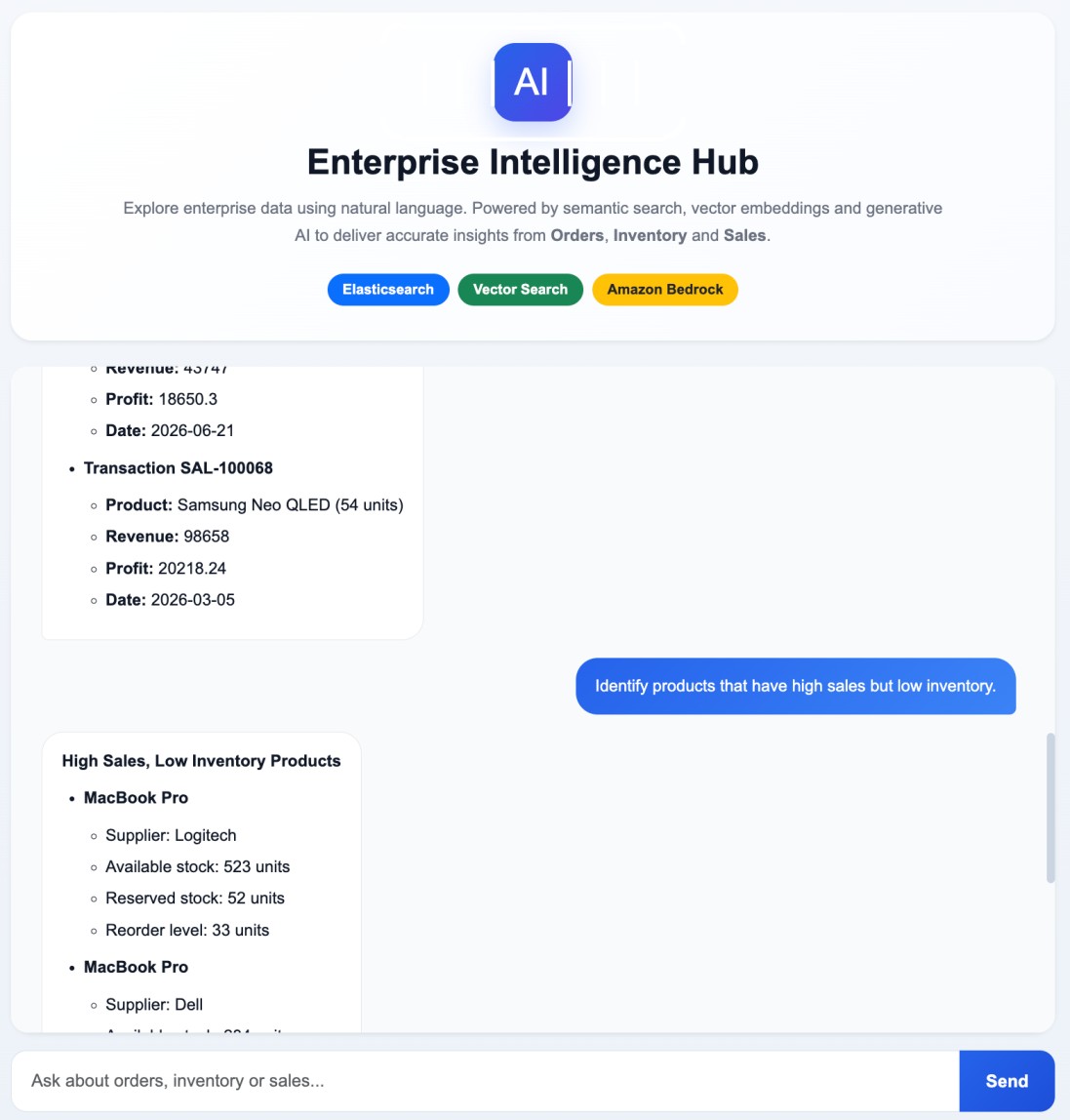
The chatbot can answer a wide range of business questions using the enterprise data stored in Elasticsearch.• Show all pending laptop orders in Europe.
• Compare sales performance between Europe and APAC.
• Identify products with high sales but low inventory.
• Which products generated the highest revenue this year?
• Which inventory items should be restocked immediately?
• Provide an executive summary of current orders, inventory, and sales.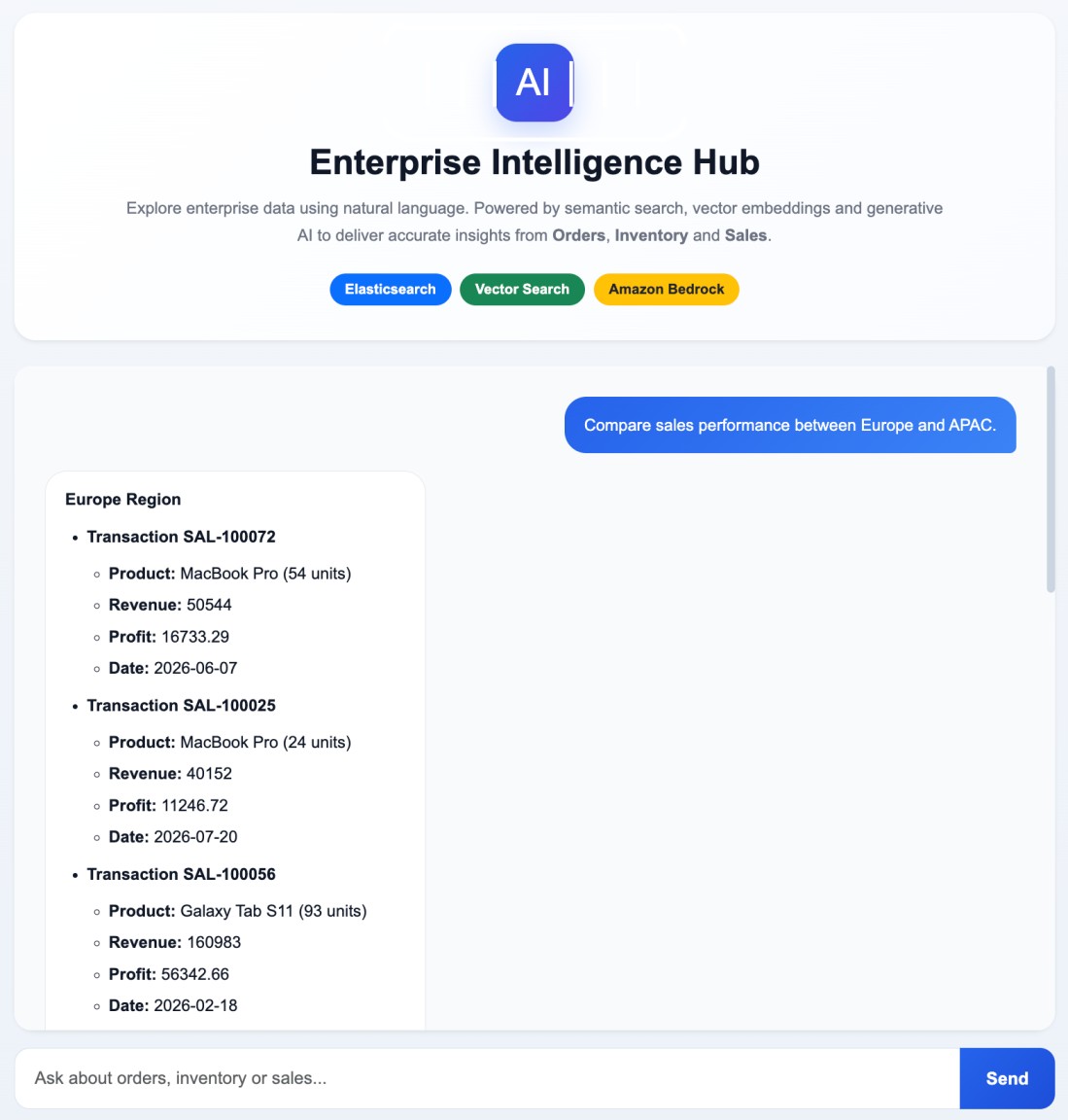
Conclusion
In this article, we built the complete online query pipeline for our Enterprise RAG chatbot. The application begins by accepting a user's question through the FastAPI REST API.It then generates a query embedding using Amazon Titan Embeddings, performs semantic vector search against Elasticsearch, retrieves the most relevant business documents, and constructs a contextual prompt.
Finally, the prompt is sent to Amazon Bedrock, which generates a natural language response that is returned to the client application.
