In this article, we will build the online query pipeline.
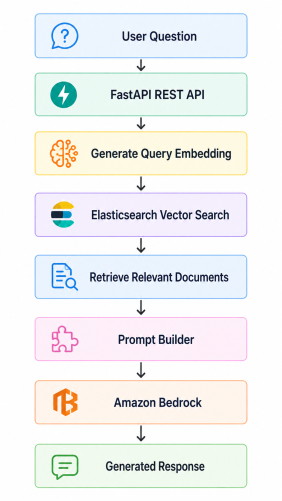
Instead of indexing documents, our application will accept user questions, generate query embeddings, perform semantic vector search against Elasticsearch, retrieve the most relevant business documents, construct a prompt, invoke Amazon Bedrock, and return a natural language response through a FastAPI REST API.
The complete request flow looks as follows.
Creating the FastAPI Application
This serves as the application's entry point, registers the REST controllers, and exposes a simple health endpoint for verifying that the service is running correctly.from fastapi import FastAPI
from fastapi.middleware.cors import CORSMiddleware
from app.api.chat_controller import router as chat_router
from app.config import settings
app = FastAPI(
title=settings.APP_NAME,
version="1.0.0",
description="Enterprise RAG Chatbot using Amazon Bedrock and Elasticsearch"
)
app.add_middleware(
CORSMiddleware,
allow_origins=["http://localhost:5173"],
allow_credentials=True,
allow_methods=["*"],
allow_headers=["*"]
)
app.include_router(chat_router, prefix="/api")
@app.get("/")
def health():
return {
"application": settings.APP_NAME,
"status": "UP"
}
Creating Request & Response Models
The REST API accepts a user question and returns the generated answer. We define two simple request and response models using Pydantic.app/models/chat_request.py
from pydantic import BaseModel

class ChatRequest(BaseModel):
    question: str
from pydantic import BaseModel

class ChatResponse(BaseModel):
    answer: str
Building the Search Service
The SearchService is responsible for retrieving relevant enterprise documents from Elasticsearch. It first generates an embedding for the user's question using Amazon Titan Embeddings.The generated vector is then used to perform a KNN Vector Search against the embedding field stored in Elasticsearch.
Rather than performing traditional keyword matching, Elasticsearch compares vector similarity and returns the most semantically relevant business documents.
import json

import boto3
from botocore.exceptions import BotoCoreError, ClientError
from app.config import settings

class EmbeddingService:

    def __init__(self):
        self.client = boto3.client(
            "bedrock-runtime",
            region_name=settings.AWS_REGION
        )

    def generate(self, text: str) -> list[float]:
        if not text or not text.strip():
            raise ValueError("Input text cannot be empty.")

        request = {
            "inputText": text,
            "dimensions": settings.EMBEDDING_DIMENSIONS,
            "normalize": True
        }

        try:
            response = self.client.invoke_model(
                modelId=settings.EMBEDDING_MODEL_ID,
                contentType="application/json",
                accept="application/json",
                body=json.dumps(request)
            )

            result = json.loads(response["body"].read())
            embedding = result.get("embedding")

            if embedding is None:
                raise RuntimeError("Embedding not returned by Bedrock.")

            return embedding

        except (ClientError, BotoCoreError) as error:
            raise RuntimeError(f"Embedding generation failed: {error}") from error
Building the Prompt
Once the relevant documents have been retrieved, they are combined with the user's question to construct the prompt that will be sent to the Large Language Model.The prompt instructs the model to answer only from the retrieved enterprise data and avoid generating unsupported information.
class PromptService:

    @staticmethod
    def build(question: str, context: list[str]) -> str:
        documents = "\n\n".join(context)

        return f"""
        You are an Enterprise Business Assistant.

        Answer ONLY using the retrieved enterprise data.

        Rules:

        - Keep responses concise.
        - Never write introductions.
        - Never write conclusions.
        - Never say "Feel free to ask..."
        - Use short headings only when useful.
        - For multiple records, use bullet lists.
        - Keep each bullet under 4 lines.
        - Avoid Markdown tables.
        - Bold important values.
        - Never repeat information.

        Enterprise Data:

        {documents}

        Question:

        {question}

        Answer:
        """
Invoking Amazon Bedrock
The BedrockService is responsible for communicating with Amazon Bedrock. It receives the generated prompt, invokes the configured foundation model, and returns the generated response.import json
import boto3
from botocore.exceptions import BotoCoreError, ClientError
from app.config import settings
class BedrockService:
def __init__(self):
self.client = boto3.client(
"bedrock-runtime",
region_name=settings.AWS_REGION
)
def generate(self, prompt: str) -> str:
request = {
"messages": [
{
"role": "user",
"content": [
{
"text": prompt
}
]
}
]
}
try:
response = self.client.invoke_model(
modelId=settings.BEDROCK_MODEL_ID,
contentType="application/json",
accept="application/json",
body=json.dumps(request)
)
result = json.loads(response["body"].read())
return result["output"]["message"]["content"][0]["text"]
except (ClientError, BotoCoreError) as error:
raise RuntimeError(f"Bedrock invocation failed: {error}") from error
Building the Chat Service
The ChatService orchestrates the complete Retrieval-Augmented Generation (RAG) workflow.It coordinates the search, prompt construction, and Amazon Bedrock invocation, while keeping the controller independent of the underlying implementation.
from app.services.bedrock_service import BedrockService
from app.services.prompt_service import PromptService
from app.services.search_service import SearchService

class ChatService:

    def __init__(self):
        self.search_service = SearchService()
        self.prompt_service = PromptService()
        self.bedrock_service = BedrockService()

    def chat(self, question: str) -> str:
        context = self.search_service.search(question)
        prompt = self.prompt_service.build(question, context)
        answer = self.bedrock_service.generate(prompt)
        return answer
Creating the REST API
Finally, we expose the chatbot through a FastAPI REST endpoint.from fastapi import APIRouter
from app.models.chat_request import ChatRequest
from app.models.chat_response import ChatResponse
from app.services.chat_service import ChatService
router = APIRouter(tags=["Chat"])
chat_service = ChatService()
@router.post("/chat", response_model=ChatResponse)
def chat(request: ChatRequest):
answer = chat_service.chat(request.question)
return ChatResponse(answer=answer)
Running the Application
Start the FastAPI application.uvicorn main:app --reload http://127.0.0.1:8000/ {
"application": "Enterprise RAG Chatbot",
"status": "UP"
}http://localhost:8000/docs 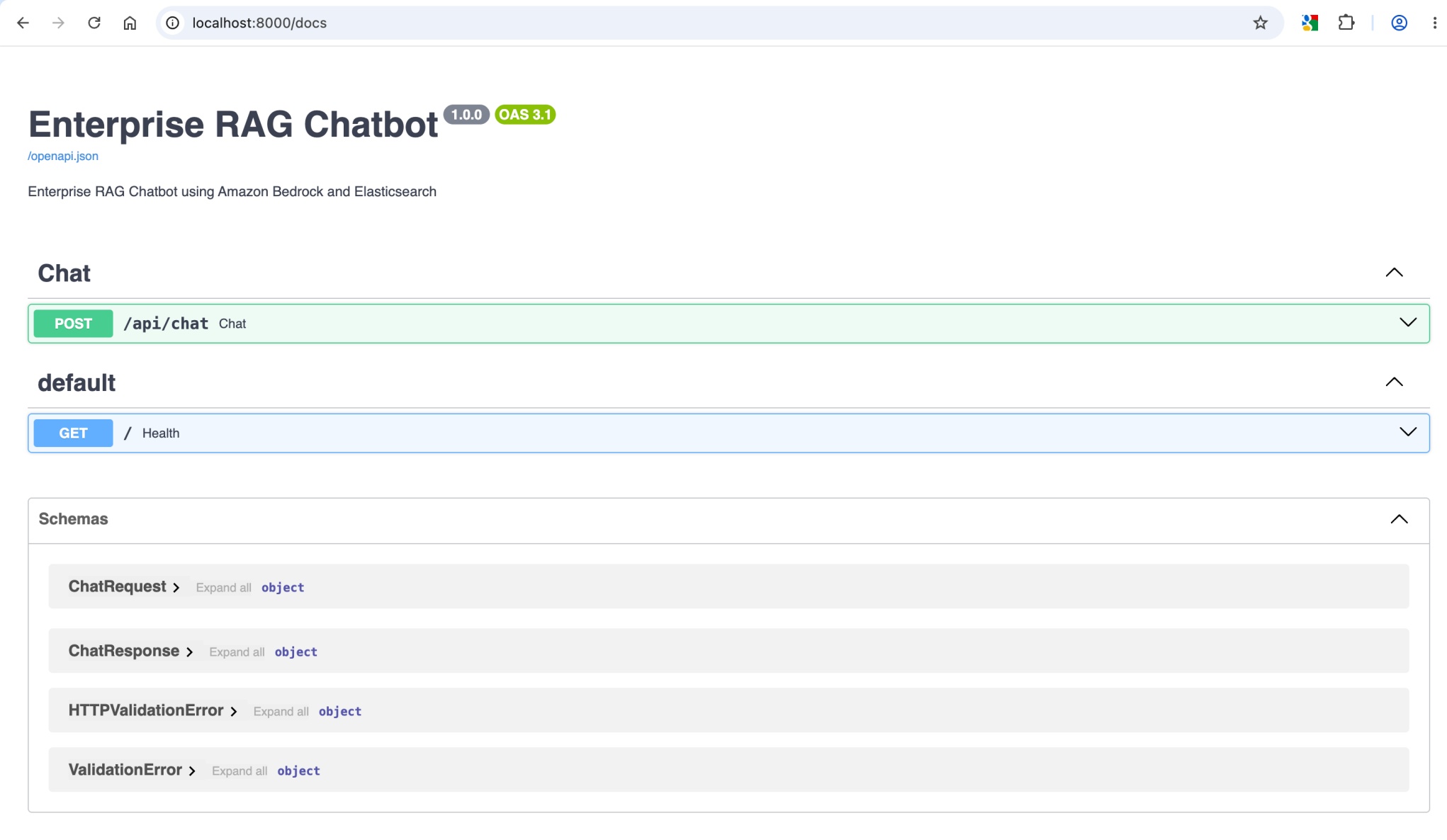
Testing APIs
The chatbot can now be tested directly through Swagger UI or using cURL.curl --location 'http://localhost:8000/api/chat' \
--header 'Content-Type: application/json' \
--data '{
"question": "Show all pending laptop orders in Europe."
}'{
"answer": "Here are all the pending laptop orders in the Europe region:
1. Order ORD-100014 placed by Prime Electronics contains 11 Dell XPS 15 laptops and is currently pending.
2. Order ORD-100007 placed by Value Retail contains 24 Dell XPS 15 laptops and is currently pending."
}User questions are transformed into vector embeddings, Elasticsearch retrieves the most relevant enterprise documents through semantic search, and Amazon Bedrock generates accurate responses based on the retrieved business context.
In the next article, we will build a modern React-based chat interface that communicates with the FastAPI backend and provides a complete ChatGPT-style user experience.
