The application will use Amazon Titan Embeddings to convert documents into vector embeddings, Elasticsearch as the vector database for semantic similarity search, and Amazon Bedrock to generate natural language responses.
The final application will answer questions such as:
- Which products are running low in US?
- Compare sales performance between Europe and APAC.
Every answer will be generated using live data instead of relying solely on the model's pre-trained knowledge.
RAG Architecture
Our application consists of five major components.1. Elasticsearch stores both the original business documents and their embedding vectors, making it function as a high-performance vector database.
2. Amazon Titan Embeddings converts documents and user questions into dense vector embeddings.
3. The FastAPI application acts as the orchestration layer. It receives the user request, generates a query embedding, performs semantic search in Elasticsearch, builds the final prompt, invokes Amazon Bedrock, and returns the generated response.
4. The React application provides a ChatGPT-like interface where users submit business questions.
5. Finally, Amazon Bedrock hosts the Large Language Model responsible for generating the final response.
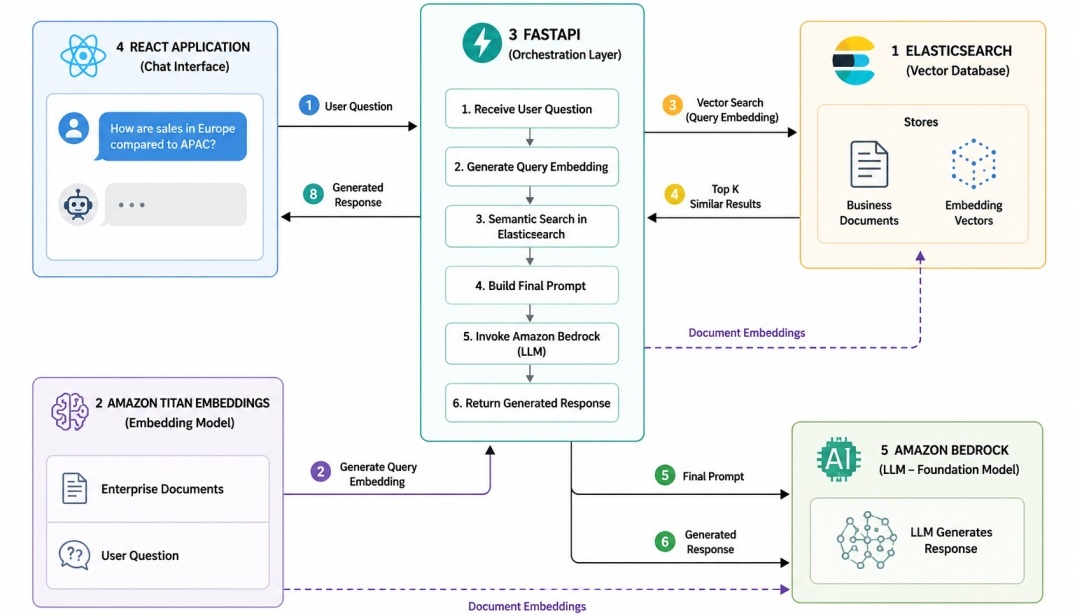
Project Structure
Instead of placing all logic in a single application file, we will build a modular project that separates responsibilities into independent services.enterprise-rag-chatbot/
│
├── app/
│ ├── api/
│ │ └── chat_controller.py
│ │
│ ├── models/
│ │ ├── chat_request.py
│ │ └── chat_response.py
│ │
│ ├── services/
│ │ ├── bedrock_service.py
│ │ ├── chat_service.py
│ │ ├── prompt_service.py
│ │ └── search_service.py
│ │
│ └── config.py
│
├── es/
│ ├── chunking/
│ │ └── chunk_generator.py
│ │
│ ├── data/
│ │ └── generate_data.py
│ │
│ ├── indexing/
│ │ ├── embedding_service.py
│ │ └── indexing_pipeline.py
│ │
│ ├── mappings/
│ │ └── create_indices.py
│ │
│ └── elasticsearch_client.py
│
├── .env
├── docker-compose.yml
├── main.py
└── requirements.txt
requirements.txt
The requirements.txt file contains all the Python dependencies required to run the RAG application.fastapi==0.136.3
uvicorn[standard]==0.46.0
pydantic==2.13.0
pydantic-settings==2.11.0
boto3==1.43.49
botocore==1.43.49
elasticsearch==9.5.0
python-dotenv==1.1.1
httpx==0.28.1
orjson==3.11.3
python-multipart==0.0.20
loguru==0.7.3
apscheduler==3.11.0
tenacity==9.1.2
cachetools==6.2.0
pip install -r requirements.txt before starting the indexing pipeline or the FastAPI server.
pip install -r requirements.txtRunning Elasticsearch & Kibana
Docker Compose
We will use Docker Compose to run Elasticsearch and Kibana locally.docker-compose.yml
services:
  elasticsearch:
    image: docker.elastic.co/elasticsearch/elasticsearch:9.3.3
    container_name: es
    environment:
      - discovery.type=single-node
      - xpack.security.enabled=false
    ports:
      - "9200:9200"
  kibana:
    image: docker.elastic.co/kibana/kibana:9.3.3
    container_name: kibana
    environment:
      ELASTICSEARCH_HOSTS: http://elasticsearch:9200
    ports:
      - "5601:5601"
docker compose up -d
Create Indexes
Before indexing any data, we first create the Elasticsearch indices with the required mappings, including the dense_vector field used to store embedding vectors.create_indices.py
from es.elasticsearch_client import client

ES_URL = "http://localhost:9200"

def create_orders_index():
    if client.indices.exists(index="orders"):
        print("Orders index already exists.")
        return

    client.indices.create(
        index="orders",
        mappings={
            "properties": {
                "orderId": {"type": "keyword"},
                "customer": {"type": "text"},
                "product": {"type": "text"},
                "category": {"type": "keyword"},
                "warehouse": {"type": "keyword"},
                "region": {"type": "keyword"},
                "quantity": {"type": "integer"},
                "amount": {"type": "double"},
                "status": {"type": "keyword"},
                "orderDate": {"type": "date"},
                "embedding": {
                    "type": "dense_vector",
                    "dims": 1024,
                    "index": True,
                    "similarity": "cosine"
                }
            }
        }
    )
    print("Orders index created.")

def create_inventory_index():
    if client.indices.exists(index="inventory"):
        print("Inventory index already exists.")
        return

    client.indices.create(
        index="inventory",
        mappings={
            "properties": {
                "inventoryId": {"type": "keyword"},
                "product": {"type": "text"},
                "category": {"type": "keyword"},
                "supplier": {"type": "text"},
                "warehouse": {"type": "keyword"},
                "region": {"type": "keyword"},
                "availableStock": {"type": "integer"},
                "reservedStock": {"type": "integer"},
                "reorderLevel": {"type": "integer"},
                "lastRestocked": {"type": "date"},
                "embedding": {
                    "type": "dense_vector",
                    "dims": 1024,
                    "index": True,
                    "similarity": "cosine"
                }
            }
        }
    )
    print("Inventory index created.")

def create_sales_index():
    if client.indices.exists(index="sales"):
        print("Sales index already exists.")
        return

    client.indices.create(
        index="sales",
        mappings={
            "properties": {
                "saleId": {"type": "keyword"},
                "customer": {"type": "text"},
                "product": {"type": "text"},
                "category": {"type": "keyword"},
                "warehouse": {"type": "keyword"},
                "region": {"type": "keyword"},
                "quantitySold": {"type": "integer"},
                "revenue": {"type": "double"},
                "profit": {"type": "double"},
                "saleDate": {"type": "date"},
                "embedding": {
                    "type": "dense_vector",
                    "dims": 1024,
                    "index": True,
                    "similarity": "cosine"
                }
            }
        }
    )
    print("Sales index created.")

def create_indices():
    print("Creating Elasticsearch indices...")

    create_orders_index()
    create_inventory_index()
    create_sales_index()

    print("All indices are ready.")

if __name__ == "__main__":
    create_indices()
Building the Indexing Pipeline
To enable semantic search, every business document must be converted into meaningful text, transformed into a vector embedding using Amazon Titan Embeddings, and finally indexed into Elasticsearch together with both the original business data and its embedding.Instead of manually creating JSON files, we will generate realistic data directly from Python.
Generating Data
The generate_data.py module creates realistic records for three business domains.import random
from datetime import datetime, timedelta
random.seed(42)
CUSTOMERS = [
"ABC Retail",
"XYZ Stores",
"GlobalMart",
"TechWorld",
"Prime Electronics",
"NextGen Retail",
"Urban Mart",
"SmartShop",
"Value Retail",
"Mega Stores",
"Digital World",
"Future Electronics",
"Retail Hub",
"Electro Mart",
"Tech Bazaar"
]
PRODUCTS = [
("MacBook Pro", "Laptop"),
("Dell XPS 15", "Laptop"),
("ThinkPad X1 Carbon", "Laptop"),
("HP Spectre x360", "Laptop"),
("iPhone 16 Pro", "Mobile"),
("Samsung Galaxy S26", "Mobile"),
("Google Pixel 11", "Mobile"),
("iPad Pro", "Tablet"),
("Galaxy Tab S11", "Tablet"),
("Sony WH-1000XM6", "Headphones"),
("AirPods Pro", "Headphones"),
("Apple Watch Ultra", "Wearable"),
("Galaxy Watch 9", "Wearable"),
("Canon EOS R8", "Camera"),
("Nikon Z6 II", "Camera"),
("LG OLED C6", "Television"),
("Samsung Neo QLED", "Television"),
("PlayStation 5", "Gaming"),
("Xbox Series X", "Gaming"),
("Logitech MX Keys", "Keyboard"),
("Logitech MX Master 4", "Mouse")
]
SUPPLIERS = [
"Apple",
"Dell",
"HP",
"Lenovo",
"Samsung",
"Sony",
"Canon",
"Nikon",
"Logitech",
"Microsoft"
]
WAREHOUSES = {
"Delhi": "India",
"Mumbai": "India",
"Bangalore": "India",
"Berlin": "Europe",
"London": "Europe",
"Paris": "Europe",
"New York": "North America",
"Chicago": "North America",
"Singapore": "APAC",
"Tokyo": "APAC",
"Sydney": "APAC"
}
ORDER_STATUS = [
"PENDING",
"PROCESSING",
"SHIPPED",
"DELIVERED",
"CANCELLED"
]
def random_date(days=180):
return (
datetime.now() -
timedelta(days=random.randint(0, days))
).strftime("%Y-%m-%d")
def random_product():
return random.choice(PRODUCTS)
def random_customer():
return random.choice(CUSTOMERS)
def random_supplier():
return random.choice(SUPPLIERS)
def random_warehouse():
warehouse = random.choice(
list(WAREHOUSES.keys())
)
return warehouse, WAREHOUSES[warehouse]
def generate_orders(count):
orders = []
for i in range(count):
warehouse, region = random_warehouse()
product, category = random_product()
quantity = random.randint(1, 25)
unit_price = random.randint(500, 5000)
orders.append({
"orderId": f"ORD-{100001 + i}",
"customer": random_customer(),
"product": product,
"category": category,
"warehouse": warehouse,
"region": region,
"quantity": quantity,
"amount": quantity * unit_price,
"status": random.choice(ORDER_STATUS),
"orderDate": random_date()
})
return orders
def generate_inventory(count):
inventory = []
for i in range(count):
warehouse, region = random_warehouse()
product, category = random_product()
inventory.append({
"inventoryId": f"INV-{100001 + i}",
"product": product,
"category": category,
"supplier": random_supplier(),
"warehouse": warehouse,
"region": region,
"availableStock": random.randint(50, 1000),
"reservedStock": random.randint(0, 100),
"reorderLevel": random.randint(20, 150),
"lastRestocked": random_date(60)
})
return inventory
def generate_sales(count):
sales = []
for i in range(count):
warehouse, region = random_warehouse()
product, category = random_product()
quantity = random.randint(1, 100)
unit_price = random.randint(500, 5000)
revenue = quantity * unit_price
cost = revenue * random.uniform(0.55, 0.85)
profit = round(revenue - cost, 2)
sales.append({
"saleId": f"SAL-{100001 + i}",
"customer": random_customer(),
"product": product,
"category": category,
"warehouse": warehouse,
"region": region,
"quantitySold": quantity,
"revenue": revenue,
"profit": profit,
"saleDate": random_date()
})
return sales
Creating Semantic Chunks
Documents are converted into natural language semantic chunks before generating embeddings.Since each order, inventory, and sales record is already a complete business entity, every document is treated as a single chunk rather than being split into smaller pieces.
from typing import Any

def order_to_chunk(order: dict[str, Any]) -> str:
    """
    Convert an order document into semantic text.
    The complete order is treated as one chunk because each order
    document is already a small, self-contained business record.
    """
    return (
        f"Order {order['orderId']} was placed by {order['customer']}. "
        f"The order contains {order['quantity']} units of "
        f"{order['product']} in the {order['category']} category. "
        f"The order is associated with the {order['warehouse']} warehouse "
        f"in the {order['region']} region. "
        f"The total order amount is {order['amount']}. "
        f"The current order status is {order['status']}. "
        f"The order date is {order['orderDate']}."
    )

def inventory_to_chunk(item: dict[str, Any]) -> str:
    """
    Convert an inventory document into semantic text.
    The complete inventory record is treated as one chunk.
    """
    return (
        f"Inventory record {item['inventoryId']} contains "
        f"{item['product']} in the {item['category']} category. "
        f"The product is supplied by {item['supplier']}. "
        f"It is stored at the {item['warehouse']} warehouse "
        f"in the {item['region']} region. "
        f"The available stock is {item['availableStock']} units, "
        f"with {item['reservedStock']} units currently reserved. "
        f"The reorder level is {item['reorderLevel']} units. "
        f"The inventory was last restocked on {item['lastRestocked']}."
    )

def sales_to_chunk(sale: dict[str, Any]) -> str:
    """
    Convert a sales document into semantic text.
    The complete sales transaction is treated as one chunk.
    """
    return (
        f"Sales transaction {sale['saleId']} was made for "
        f"{sale['customer']}. "
        f"The transaction contains {sale['quantitySold']} units of "
        f"{sale['product']} in the {sale['category']} category. "
        f"The sale was associated with the {sale['warehouse']} warehouse "
        f"in the {sale['region']} region. "
        f"The total revenue was {sale['revenue']}, "
        f"with a profit of {sale['profit']}. "
        f"The sale date was {sale['saleDate']}."
    )
Generating Vector Embeddings
Each semantic chunk is converted into a high-dimensional vector embedding using Amazon Titan Embeddings.These embeddings capture the semantic meaning of the content, enabling Elasticsearch to perform similarity search based on meaning rather than simple keyword matching.
import json
import boto3
from botocore.exceptions import BotoCoreError, ClientError
from app.config import settings

class EmbeddingService:
    def __init__(self):
        self.client = boto3.client(
            "bedrock-runtime",
            region_name=settings.AWS_REGION
        )

    def generate(self, text: str) -> list[float]:
        if not text or not text.strip():
            raise ValueError("Input text cannot be empty.")

        request = {
            "inputText": text,
            "dimensions": settings.EMBEDDING_DIMENSIONS,
            "normalize": True
        }

        try:
            response = self.client.invoke_model(
                modelId=settings.EMBEDDING_MODEL_ID,
                contentType="application/json",
                accept="application/json",
                body=json.dumps(request)
            )

            result = json.loads(response["body"].read())
            embedding = result.get("embedding")

            if embedding is None:
                raise RuntimeError("Embedding not returned by Bedrock.")
            return embedding

        except (ClientError, BotoCoreError) as error:
            raise RuntimeError(f"Embedding generation failed: {error}") from error
Bulk Indexing Documents
After all documents have been enriched, they are inserted into Elasticsearch using the Bulk API.from elasticsearch.helpers import bulk
from app.config import settings
from es.chunking.chunk_generator import (
inventory_to_chunk,
order_to_chunk,
sales_to_chunk,
)
from es.data.generate_data import (
generate_inventory,
generate_orders,
generate_sales,
)
from es.elasticsearch_client import client
from es.indexing.embedding_service import EmbeddingService
embedding_service = EmbeddingService()
def bulk_index(index_name, documents):
actions = [{"_index": index_name, "_source": document} for document in documents]
bulk(client, actions)
print(f"Indexed {len(documents)} documents into '{index_name}'.")
def process_orders():
print("Generating Orders...")
orders = generate_orders(settings.DOCUMENTS_PER_INDEX)
for order in orders:
content = order_to_chunk(order)
order["content"] = content
order["embedding"] = embedding_service.generate(content)
bulk_index("orders", orders)
def process_inventory():
print("Generating Inventory...")
inventory = generate_inventory(settings.DOCUMENTS_PER_INDEX)
for item in inventory:
content = inventory_to_chunk(item)
item["content"] = content
item["embedding"] = embedding_service.generate(content)
bulk_index("inventory", inventory)
def process_sales():
print("Generating Sales...")
sales = generate_sales(settings.DOCUMENTS_PER_INDEX)
for sale in sales:
content = sales_to_chunk(sale)
sale["content"] = content
sale["embedding"] = embedding_service.generate(content)
bulk_index("sales", sales)
def run():
print("----------------------------------------")
print(settings.APP_NAME)
print("Offline Indexing Pipeline")
print("----------------------------------------")
process_orders()
process_inventory()
process_sales()
print("----------------------------------------")
print("Indexing Completed Successfully")
print("----------------------------------------")
if __name__ == "__main__":
run()
python -m es.indexing.indexing_pipeline-----------------------------------------
Enterprise RAG Chatbot
Offline Indexing Pipeline
----------------------------------------
Generating Orders...
Indexed 100 documents into 'orders'.
Generating Inventory...
Indexed 100 documents into 'inventory'.
Generating Sales...
Indexed 100 documents into 'sales'.
----------------------------------------
Indexing Completed Successfully
----------------------------------------
Indexed Document Structure
After the pipeline completes, every document stored in Elasticsearch contains the original business fields together with the generated semantic content and embedding.{
"took": 12,
"timed_out": false,
"_shards": {
"total": 1,
"successful": 1,
"skipped": 0,
"failed": 0
},
"hits": {
"total": {
"value": 100,
"relation": "eq"
},
"max_score": 1,
"hits": [
{
"_index": "orders",
"_id": "RT8G1p8BwTCWZ0_jLFgi",
"_score": 1,
"_ignored": [
"content.keyword"
],
"_source": {
"product": "HP Spectre x360",
"amount": 2753,
"quantity": 1,
"orderId": "ORD-100001",
"category": "Laptop",
"warehouse": "Sydney",
"region": "APAC",
"orderDate": "2026-07-02",
"content": "Order ORD-100001 was placed by TechWorld. The order contains 1 units of HP Spectre x360 in the Laptop category. The order is associated with the Sydney warehouse in the APAC region. The total order amount is 2753. The current order status is PROCESSING. The order date is 2026-07-02.",
"customer": "TechWorld",
"status": "PROCESSING"
},
"fields": {
"embedding": [
-0.0073103816,
.
.
.
-0.027169796
]
}
}
]
}
}In the next article, we will build the online query pipeline that generates embeddings for user questions, performs semantic vector search, retrieves the most relevant business documents, and prepares the context that will be sent to Amazon Bedrock for answer generation.
