Introduced in Java 8, the Stream API allows developers to perform filtering, transformation, aggregation, searching, and reduction operations in a concise and declarative manner.
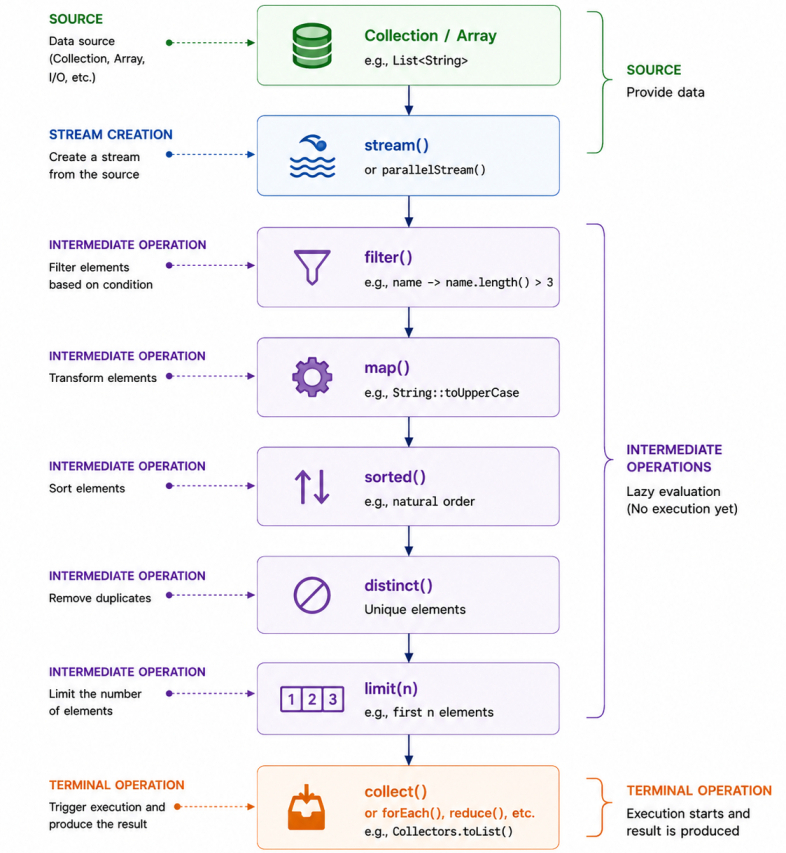
Unlike collections, streams do not store data. Instead, they process data from a source such as a collection, array, or I/O channel and produce a result through a pipeline of operations.
A stream consists of three parts:
1. Source
2. Intermediate Operations
3. Terminal Operation
Source
Streams can be created from various data sources including collections, arrays, files, and generated values.Creating a stream from a collection.
List names = List.of("John", "Alice", "Bob");
Stream stream = names.stream(); String[] names = {"John", "Alice", "Bob"};
Stream stream = Arrays.stream(names); Stream stream = Stream.of(10, 20, 30, 40); Stream numbers =
Stream.iterate(1, n -> n + 1);
numbers.limit(5)
.forEach(System.out::println); Intermediate Operations
Intermediate operations transform one stream into another stream. They are lazy, meaning they are not executed until a terminal operation is invoked.Some commonly used intermediate operations are:
| Operation | Purpose |
|---|---|
| filter() | Selects elements that match a condition. |
| map() | Transforms each element into another value. |
| flatMap() | Flattens nested streams into a single stream. |
| sorted() | Sorts the elements. |
| distinct() | Removes duplicate elements. |
| limit() | Limits the stream to the specified number of elements. |
| skip() | Skips the specified number of elements. |
| peek() | Performs an action on each element without modifying the stream. |
List result = names.stream()
        .filter(name -> name.length() > 3)
        .map(String::toUpperCase)
        .sorted()
        .toList();
Terminal Operations
A terminal operation triggers execution of the stream pipeline and produces a result or side effect.Common terminal operations include:
| Operation | Purpose |
|---|---|
| collect() | Collects stream elements into a collection or another result. |
| forEach() | Performs an action for each element. |
| count() | Returns the number of elements. |
| reduce() | Combines all elements into a single result. |
| findFirst() | Returns the first element, if present. |
| findAny() | Returns any element, especially useful with parallel streams. |
| anyMatch() | Returns true if any element matches the condition. |
| allMatch() | Returns true if all elements match the condition. |
| noneMatch() | Returns true if no elements match the condition. |
long count = names.stream()
        .filter(name -> name.startsWith("A"))
.count();Stream stream = names.stream();
stream.count();
stream.forEach(System.out::println);
java.lang.IllegalStateException: stream has already been operated upon or closed Lazy Evaluation
One of the most important characteristics of the Stream API is lazy evaluation.Intermediate operations such as filter(), map(), and sorted() do not process elements immediately. Instead, they simply build the stream pipeline.
Actual processing begins only when a terminal operation such as collect(), count(), or forEach() is invoked.
Consider the following example.
List names = List.of("John", "Alice", "Bob");

Stream stream = names.stream()
        .filter(name -> {
            System.out.println("Filtering: " + name);
            return name.length() > 3;
        });

System.out.println("Pipeline Created"); Pipeline Created names.stream()
.filter(name -> {
System.out.println("Filtering: " + name);
return name.length() > 3;
})
.count();Filtering: John
Filtering: Alice
Filtering: BobStream Pipeline
A stream processes data by passing elements through a sequence of operations known as a stream pipeline.Each element flows through every intermediate operation before reaching the terminal operation. The pipeline typically consists of:
Source → Intermediate Operations → Terminal Operation
List result = names.stream()
        .filter(name -> name.length() > 3)
        .map(String::toUpperCase)
        .sorted()
.toList(); ... → filter() → map() → sorted() → ...Filtering, Mapping and FlatMap
The most frequently used intermediate operations are filter(), map(), and flatMap().filter() removes elements that do not satisfy a condition.
List names = List.of("John", "Alice", "Bob");

List result = names.stream()
        .filter(name -> name.length() > 3)
.toList(); List result = names.stream()
.map(String::toUpperCase)
.toList(); 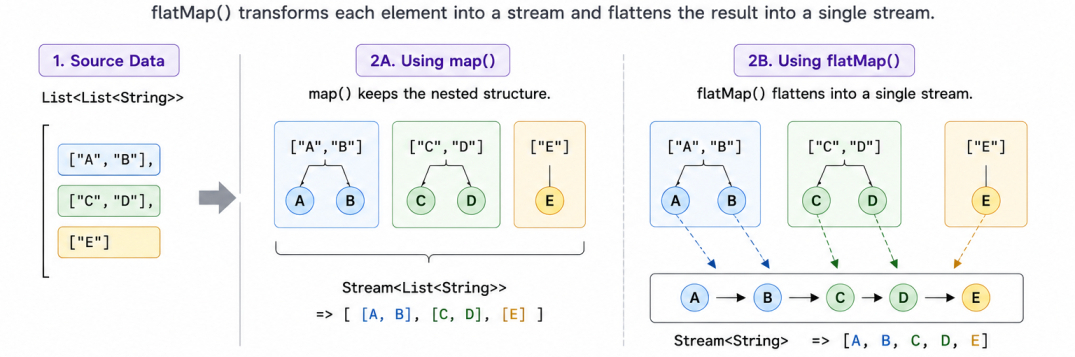
List> data = List.of(
        List.of("A", "B"),
        List.of("C", "D"),
        List.of("E")
); List> result = data.stream()
.map(list -> list)
.toList(); List result = data.stream()
.flatMap(List::stream)
.toList(); [A, B, C, D, E] Sorting, Distinct, Skip and Limit
The Stream API provides several intermediate operations for ordering and selecting elements.The sorted() operation sorts elements according to their natural ordering or a custom comparator.
List result = names.stream()
        .sorted()
.toList(); List numbers = List.of(3, 2, 3, 5, 2, 1);
List unique = numbers.stream()
.distinct()
.toList(); List firstThree = numbers.stream()
.limit(3)
.toList(); List remaining = numbers.stream()
.skip(3)
.toList(); Primitive Streams
The standard StreamTo avoid this, Java provides specialized primitive streams:
- IntStream
- LongStream
- DoubleStream
These streams provide operations optimized for primitive values.
Creating an IntStream.
IntStream numbers = IntStream.of(10, 20, 30, 40);int sum = IntStream.rangeClosed(1, 5).sum();15 OptionalDouble average = IntStream.of(10, 20, 30).average();Collectors
The collect() terminal operation transforms the elements of a stream into another data structure or performs mutable reduction.The behavior of collect() is defined using the utility class Collectors. Some commonly used collectors include:
- toList()
- toSet()
- joining()
- groupingBy()
- partitioningBy()
- mapping()
- counting()
- summarizingInt()
Collecting elements into a list.
List result = names.stream()
        .map(String::toUpperCase)
.collect(Collectors.toList()); String result = names.stream()
.collect(Collectors.joining(", "));John, Alice, Bob Grouping and Partitioning
One of the most powerful features of collectors is the ability to group or partition data. The groupingBy() collector groups elements according to a classification function.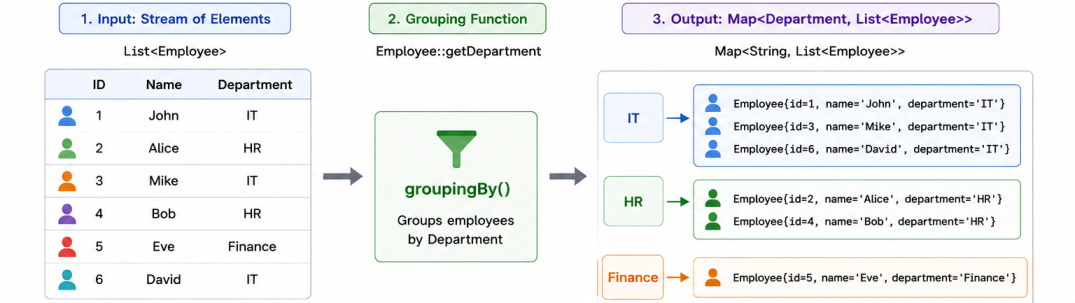
record Employee(
        String name,
        String department
) {
}Map> employees = list.stream()
.collect(Collectors.groupingBy(
Employee::department
)); The partitioningBy() collector divides elements into exactly two groups based on a predicate.
Map> result = numbers.stream()
        .collect(Collectors.partitioningBy(
                n -> n % 2 == 0
)); Reduction Operations (reduce)
Reduction combines multiple elements into a single result. The reduce() method repeatedly applies an accumulator function until a single value remains.Calculating the sum.
int sum = List.of(1, 2, 3, 4, 5)
        .stream()
.reduce(0, Integer::sum);Optional max = List.of(5, 8, 2, 9)
.stream()
.reduce(Integer::max); Finding and Matching
The Stream API provides several terminal operations for searching and evaluating elements. Finding the first element.Optional first = names.stream()
.findFirst(); boolean exists = names.stream()
.anyMatch(name -> name.startsWith("A"));boolean valid = names.stream()
.allMatch(name -> name.length() > 2);boolean none = names.stream()
.noneMatch(name -> name.isBlank());Parallel Streams
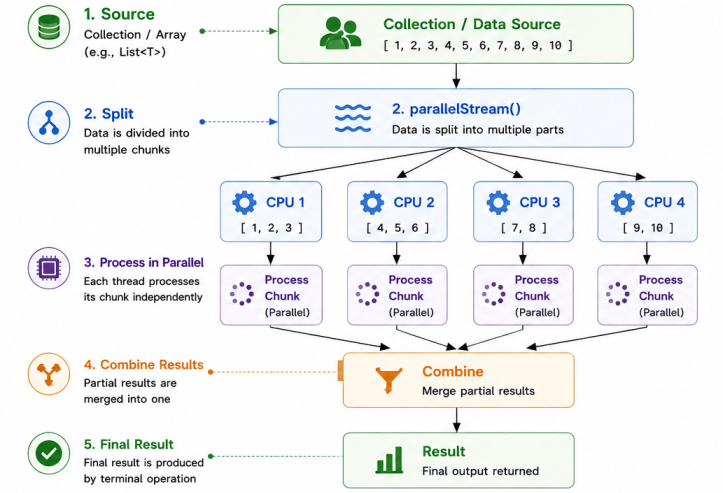
A parallel stream divides work across multiple threads, allowing elements to be processed concurrently using the Fork/Join Framework.This can improve performance for CPU-intensive operations on large datasets.
Instead of using stream(), a parallel stream is created using parallelStream() or by invoking parallel() on an existing stream.
List numbers = IntStream.rangeClosed(1, 10)
        .boxed()
        .toList();

numbers.parallelStream()
.forEach(System.out::println); numbers.parallelStream()
.forEachOrdered(System.out::println);For small collections or lightweight operations, however, the overhead of splitting tasks, scheduling threads, synchronizing execution, and merging results can outweigh the benefits.
Final Notes
The Stream API introduced a declarative approach to processing collections, allowing developers to express filtering, transformation, aggregation, and reduction operations using functional-style pipelines.When used appropriately, the Stream API improves code readability, encourages functional programming practices, and has become an essential part of modern Java development.
