Callable instead of Runnable, understand how Future represents the result of an asynchronous computation, and explore how ScheduledExecutorService simplifies delayed and periodic task execution.
Limitations of Runnable
Throughout the previous chapters, we used theRunnable interface to represent units of work executed by a thread or an ExecutorService.
Runnable task = () -> {
    System.out.println("Processing order...");
};Runnable interface is intentionally simple.
public interface Runnable {
    void run();
}run() method has a void return type and does not declare any checked exceptions. This design makes Runnable ideal for background tasks that simply perform some work without producing a result.
However, a task may also need to calculate and return a result. Since
Runnable cannot return a value, developers often resort to storing the result in shared variables or mutable objects.
This makes the code more complex and increases the risk of synchronization issues. Another limitation is that the
run() method cannot throw checked exceptions.
If a database query or file operation fails, the task must catch the exception internally, making it difficult for the calling code to determine whether the task completed successfully.
These limitations make
Runnable unsuitable for many asynchronous computations where returning results and propagating exceptions are important.
Introducing Callable
To overcome these limitations, Java introduced theCallable interface as part of the java.util.concurrent package.
Unlike
Runnable, a Callable represents a task that returns a result and may throw checked exceptions.
public interface Callable {
    V call() throws Exception;
} V represents the type of value returned by the task. This generic design allows a Callable to return any type of object. A simple example is shown below.
Callable task = () -> {
    return 100;
}; Integer instead of simply performing an action.
Another important advantage is that the
call() method is allowed to throw checked exceptions. A simple example is reading a file asynchronously.
Since
Files.readString() throws the checked exception IOException, Callable can propagate it directly.
Callable readFile = () -> {
    return Files.readString(Path.of("config.txt"));
}; Callable is submitted to an ExecutorService, any exception thrown by call() is captured by the Future and can be handled by the calling thread:
Future future = executor.submit(readFile);
try {
    String content = future.get();
    System.out.println(content);
} catch (Exception e) {
    System.out.println(e.getCause());
} Future
When aCallable task is submitted to an ExecutorService, the task executes asynchronously on one of the worker threads. Since the computation may not complete immediately, the calling thread cannot obtain the result directly.
Instead, the
submit() method returns a Future, which represents the result of an asynchronous computation that may become available at some point in the future.
A
Future acts as a placeholder for the result of the task. It allows the calling thread to monitor the task's execution, wait for its completion, retrieve the computed result, cancel the task if necessary, and determine whether the task has already finished.
The relationship between
Callable and Future can be visualized as follows:
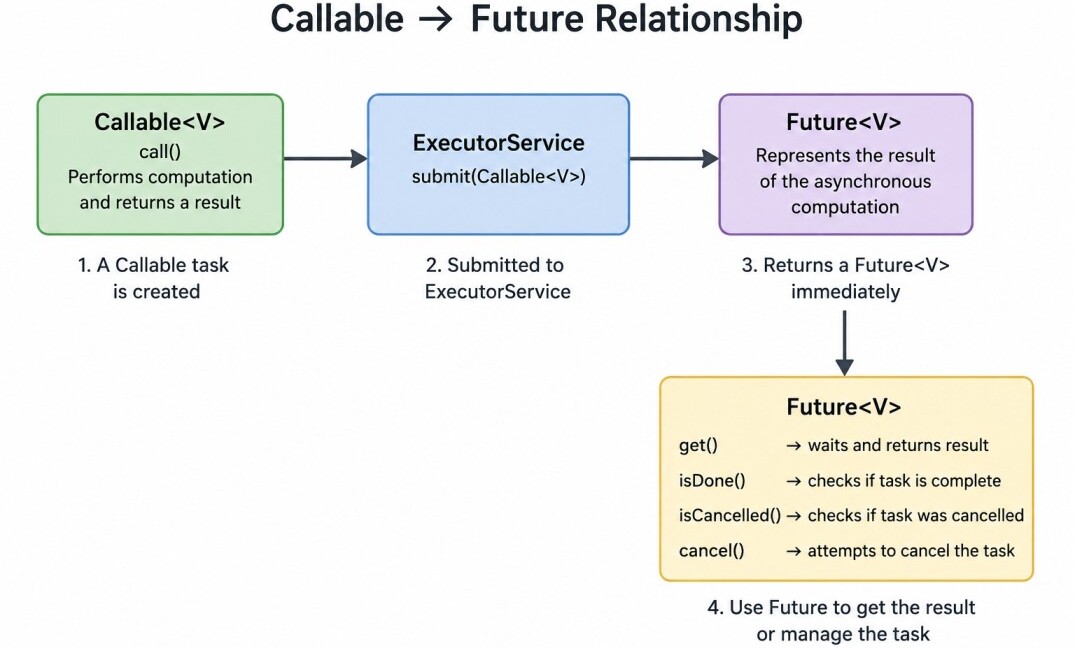
Submitting a Callable Task
When aCallable is submitted using the submit() method, the method immediately returns a Future while the task continues executing in the background.
Future future = executor.submit(() -> {
    Thread.sleep(3000);
    return 100;
});
Future, which can later be used to obtain the result once the background task completes.
Retrieving the Result with get()
The most commonly used method of theFuture interface is get().
Integer result = future.get();get() method waits until the asynchronous computation completes and then returns the computed value.
For example:
ExecutorService executor = Executors.newFixedThreadPool(2);
Future future = executor.submit(() -> {
    Thread.sleep(3000);
    return 100;
});

System.out.println("Doing other work...");
Integer value = future.get();
System.out.println(value);
executor.shutdown(); Doing other work...
100 future.get() is called does the main thread wait for the computation to finish.
One important characteristic of
Future.get() is that it is a blocking method. If the computation has not yet completed, the calling thread remains blocked until the result becomes available.
Waiting with a Timeout
Sometimes waiting indefinitely is undesirable.For example, a remote API call may never respond due to a network failure. To avoid blocking forever,
Future provides a timeout version of get().
Integer result = future.get(5, TimeUnit.SECONDS); TimeoutException is thrown.
This prevents the application from waiting indefinitely for a slow or unresponsive task.
Checking Completion with isDone()
Instead of immediately blocking usingget(), an application can first determine whether the task has already completed.
Future future = executor.submit(() -> {
    Thread.sleep(5000);
    return "Monthly report generated";
});

while (!future.isDone()) {
    System.out.println("Main thread is doing other work...");
    Thread.sleep(1000);
}

System.out.println("Task completed");
System.out.println(future.get()); Main thread is doing other work...
Main thread is doing other work...
Main thread is doing other work...
Task completed
Monthly report generated
isDone() method returns true if the task has completed, regardless of whether it finished successfully, threw an exception, or was cancelled.
Cancelling a Task
Sometimes a submitted task is no longer needed before it completes. For example, a user may cancel a report generation request or close a screen before the background computation finishes.The
Future interface allows tasks to be cancelled using the cancel() method.
future.cancel(true); If
true is passed, the executor attempts to interrupt the thread currently executing the task. If false is passed, the task is cancelled only if it has not yet started. A running task is allowed to continue normally.
Example:
Future future = executor.submit(() -> {
    Thread.sleep(10000);
    return 100;
});

future.cancel(true); After attempting cancellation, the application can determine whether the task was successfully cancelled using
isCancelled().
if (future.isCancelled()) {
    System.out.println("Task cancelled");
}Complete Example
Together, these methods allow applications to retrieve results, wait for completion, specify timeouts, cancel running tasks, and monitor task status.import java.util.concurrent.ExecutorService;
import java.util.concurrent.Executors;
import java.util.concurrent.Future;
public class FutureExample {
public static void main(String[] args) throws Exception {
ExecutorService executor = Executors.newFixedThreadPool(2);
Future future = executor.submit(() -> {
Thread.sleep(2000);
return 500;
});
System.out.println("Main thread continues...");
Integer result = future.get();
System.out.println("Result = " + result);
executor.shutdown();
}
} Main thread continues...
Result = 500ScheduledExecutorService
Many applications need to execute tasks not immediately, but at a later time or repeatedly at fixed intervals.Examples include sending periodic heartbeat messages, refreshing application caches, generating reports every night, monitoring system health, or retrying failed operations after a delay.
While it is possible to implement such functionality manually using
Thread.sleep(), this approach is inflexible, blocks threads unnecessarily, and quickly becomes difficult to manage.
To solve these problems, Java provides the
ScheduledExecutorService, which extends the ExecutorService interface with support for delayed and periodic task execution.
Instead of manually managing sleeping threads or timers, developers simply schedule tasks, and the framework ensures they execute at the appropriate time using a pool of worker threads.
Creating a Scheduled Thread Pool
A scheduled executor is created using theExecutors utility class.
ScheduledExecutorService scheduler = Executors.newScheduledThreadPool(2);Scheduling a Task Once
Theschedule() method executes a task once after a specified delay.
scheduler.schedule(
    () -> System.out.println("Task executed"),
    5,
    TimeUnit.SECONDS
);During the waiting period, the worker thread is managed efficiently by the scheduler, allowing other tasks to execute if necessary.
This method is useful for retry operations, delayed notifications, timeout handling, and deferred background processing.
Executing Tasks Periodically
Many applications require the same task to execute repeatedly rather than only once.Examples include refreshing cache entries every few minutes, collecting application metrics, or monitoring server health.
The
ScheduledExecutorService provides two methods for periodic execution: scheduleAtFixedRate() and scheduleWithFixedDelay().
Although these methods appear similar, they behave differently and are designed for different use cases.
scheduleAtFixedRate()
ThescheduleAtFixedRate() method attempts to execute a task at regular intervals measured from the scheduled start time of the previous execution.
scheduler.scheduleAtFixedRate(
    () -> System.out.println("Health Check"),
    2,
    5,
    TimeUnit.SECONDS
);Its behavior can be visualized as follows:
Time ─────────────────────────────────────────▶

      2s       7s       12s      17s
      │        │         │        │
   ┌─────┐  ┌─────┐   ┌─────┐  ┌─────┐
   │Task │  │Task │   │Task │  │Task │
└─────┘ └─────┘ └─────┘ └─────┘scheduleWithFixedDelay()
ThescheduleWithFixedDelay() method behaves differently.
Instead of measuring from the scheduled start time, it waits for the current execution to finish and then waits for the specified delay before starting the next execution.
scheduler.scheduleWithFixedDelay(
    () -> System.out.println("Refreshing cache"),
    2,
    5,
    TimeUnit.SECONDS
);Time ─────────────────────────────────────────────────────────▶
2s 9s 16s 25s
│ │ │ │
┌───────┐ ┌───────┐ ┌───────┐ ┌───────┐
│ Start │ │ Start │ │ Start │ │ Start │
│ Task │ │ Task │ │ Task │ │ Task │
└───────┘ └───────┘ └───────┘ └───────┘
│ │ │ │
Took 2s Took 2s Took 4s Took 2s
│ │ │ │
Wait 5s Wait 5s Wait 5s Wait 5sThis makes
scheduleWithFixedDelay() particularly suitable for maintenance tasks where each execution should complete fully before the next one begins.
Conclusion
TheCallable, Future, and ScheduledExecutorService APIs greatly extend the capabilities of the Executor Framework by enabling asynchronous computations that return results and supporting delayed as well as periodic task execution.
Together, they provide a solid foundation for building responsive, concurrent applications. However, as application workflows become more complex, the limitations of
Future become increasingly evident.
Modern Java applications therefore rely heavily on CompletableFuture, which offers a far more powerful and flexible approach to asynchronous programming.
