It provides an abstraction between Java bytecode and the underlying operating system, allowing the same compiled program to run on any platform that has a compatible JVM installed.
This architecture is the foundation of Java's "Write Once, Run Anywhere (WORA)" philosophy.
JDK, JRE and JVM
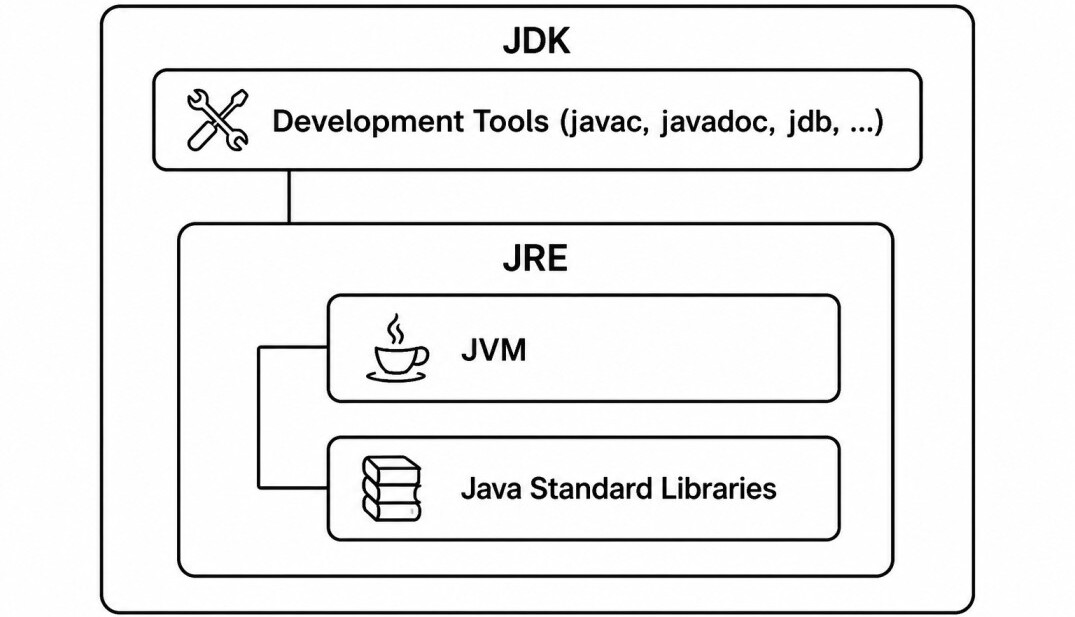
JDK (Java Development Kit) is used to develop Java applications. It includes the compiler (javac), debugging tools, documentation tools, and the JRE.
JRE (Java Runtime Environment) provides everything required to run Java applications. It contains the JVM along with the standard Java libraries.
JVM (Java Virtual Machine) is the runtime engine that loads, verifies, and executes Java bytecode. The relationship can be summarized as:
Java Execution Flow
When a Java program is executed, it passes through several stages before the processor runs native machine instructions.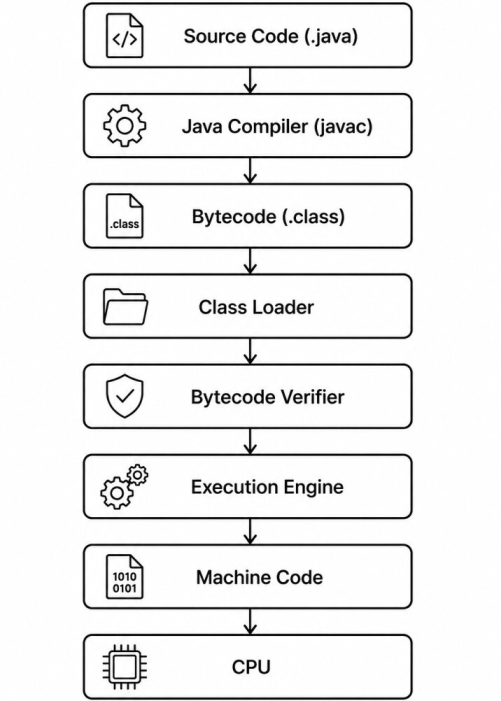
1. The developer writes Java source code (
.java).2. The
javac compiler converts the source code into platform-independent bytecode stored in .class files.3. The Class Loader loads the required classes into memory.
4. The Bytecode Verifier validates the bytecode to ensure it is safe and follows JVM rules.
5. The Execution Engine interprets or compiles the bytecode into native machine code using the JIT compiler.
6. The generated machine code is executed directly by the processor.
Because only the JVM is platform-specific while the bytecode remains the same, the same Java application can run on Windows, Linux, macOS, or any other platform with a compatible JVM installed.
JVM Architecture
The JVM consists of several major components that work together to execute Java programs.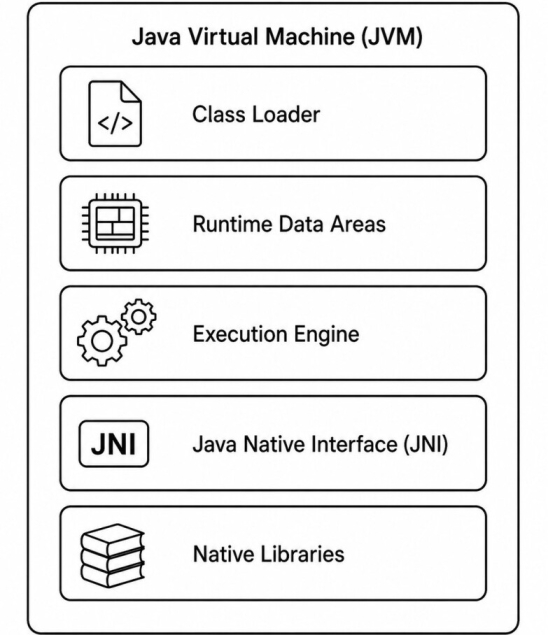
- The Class Loader loads Java classes into memory.
- The Runtime Data Areas store objects, stacks, class metadata, and execution information.
- The Execution Engine interprets and compiles bytecode into machine code.
- The Java Native Interface (JNI) enables interaction with native code written in languages such as C and C++.
- Native Libraries provide operating system-specific functionality required by the application.
Together, these components enable the JVM to execute Java applications efficiently while maintaining portability and security. The following sections examine each of these components in greater detail.
Class Loader Subsystem
The Class Loader Subsystem is responsible for locating, loading, and initializing Java classes at runtime.Rather than loading every class when the JVM starts, classes are loaded on demand the first time they are referenced. This approach reduces startup time and memory usage.
Every loaded class passes through the class loading process before it can be used by the application. The JVM provides three built-in class loaders that work together using the Parent Delegation Model.
1. Bootstrap ClassLoader
The Bootstrap ClassLoader is the parent of all class loaders.It is implemented in native code and loads the core Java runtime classes from the JDK, such as those in the
java.lang, java.util, and java.io packages.
Since it is part of the JVM itself, it is not a regular Java object and cannot be accessed directly.
2. Platform ClassLoader
The Platform ClassLoader (known as the Extension ClassLoader before Java 9) loads platform-specific modules and standard libraries that extend the core Java runtime.It acts as the parent of the Application ClassLoader while delegating requests to the Bootstrap ClassLoader whenever necessary.
3. Application ClassLoader
The Application ClassLoader, also known as the System ClassLoader, loads classes from the application's classpath or module path.Most application classes, third-party libraries, and framework classes are loaded by this class loader.
In a typical Java application, this is the class loader responsible for loading the majority of user-written code.
Parent Delegation Model
Java follows the Parent Delegation Model to ensure that classes are loaded consistently and securely.Instead of immediately loading a requested class, a class loader first delegates the request to its parent. Only if the parent cannot find the class does the child attempt to load it.
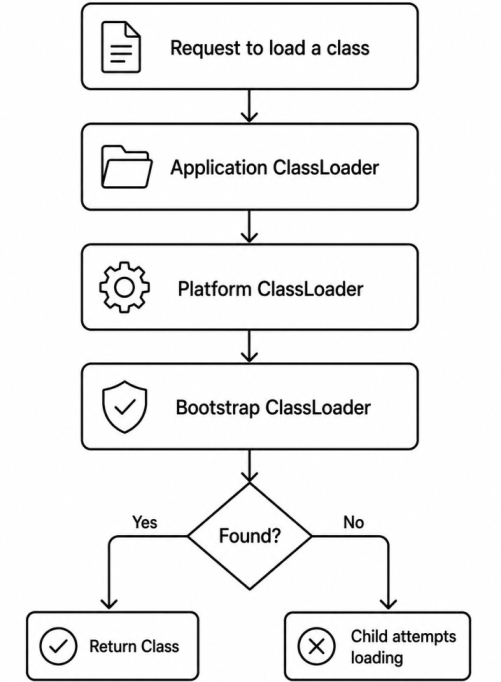
For example, an application cannot override
java.lang.String with its own implementation because the Bootstrap ClassLoader always loads the trusted version first.
Class Loading Process
After locating a class, the JVM performs a series of steps before the class becomes available for execution.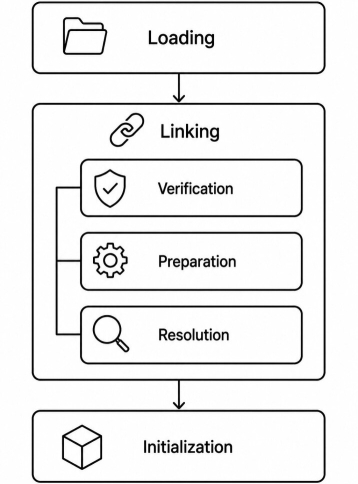
1. Loading
During the Loading phase, the Class Loader locates the class file, reads its bytecode, and creates an internal representation of the class in memory.2. Linking
The Linking phase prepares the loaded class for execution and consists of three steps.A) Verification
The JVM verifies that the bytecode is structurally correct and follows the JVM specification. This helps prevent corrupted or malicious bytecode from executing.B) Preparation
Memory is allocated for static fields, and they are initialized with their default values.static int count;count is initialized to 0, not to any explicit value assigned in the source code.
C) Resolution
Symbolic references in the constant pool are replaced with direct references to classes, methods, and fields, allowing the JVM to efficiently access them during execution.3. Initialization
Finally, the JVM executes static variable initializers and static initialization blocks in the order they appear in the source code.class Employee {
static int count = 100;
static {
System.out.println("Class Initialized");
}
}
Once initialization completes, the class is ready for use by the application.
Runtime Data Areas
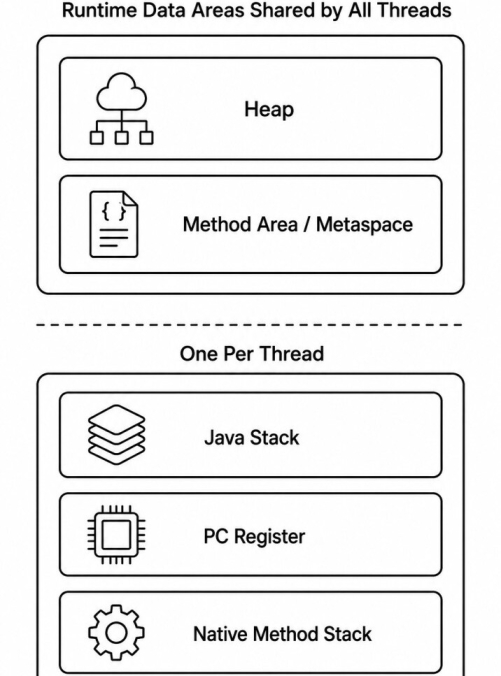
The JVM allocates several runtime data areas to store classes, objects, method calls, and execution information while a Java application is running.Some memory areas are shared by all threads, while others are created separately for each thread.
Heap
The Heap is the largest memory area in the JVM and is shared by all threads. It stores all objects and arrays created during application execution.Employee employee = new Employee();
int[] numbers = new int[100]; Employee object and the array are allocated on the heap.
Since objects may remain in memory long after the method that created them has finished executing, the JVM automatically reclaims unused objects through Garbage Collection (GC).
Method Area (Metaspace)
The Method Area stores class-level information such as class metadata, method definitions, field information, runtime constant pools, and static variables.class Employee {
static String company = "ABC Ltd";
}
Starting with Java 8, the HotSpot JVM replaced the permanent generation (PermGen) with Metaspace, which stores class metadata using native memory instead of the Java heap.
Java Stack
Each thread has its own Java Stack, which stores stack frames for every active method call. A stack frame typically contains:- Local variables
- Method parameters
- Intermediate calculation results
- Return information
public void calculate() {
    int x = 10;
    int y = 20;

    add(x, y);
}
calculate() is invoked, a new stack frame is created. Calling add() creates another frame.
As methods complete, their stack frames are automatically removed in a Last-In, First-Out (LIFO) order.
Program Counter (PC) Register
Every thread has its own Program Counter (PC) Register. It stores the address of the current bytecode instruction being executed.As the JVM executes instructions, the PC Register is continuously updated to point to the next instruction.
This enables multiple threads to execute independently without interfering with each other's execution state.
Native Method Stack
The Native Method Stack supports the execution of native methods written in languages such as C or C++ through the Java Native Interface (JNI).public native void compressFile(); Shared vs Thread-Specific Memory
Understanding which runtime areas are shared and which are thread-specific is important for understanding thread safety and application performance.| Runtime Data Area | Shared | Thread-Specific |
|---|---|---|
| Heap | Yes | No |
| Method Area / Metaspace | Yes | No |
| Java Stack | No | Yes |
| PC Register | No | Yes |
| Native Method Stack | No | Yes |
Thread-specific areas are isolated, allowing each thread to maintain its own execution state independently.
Execution Engine
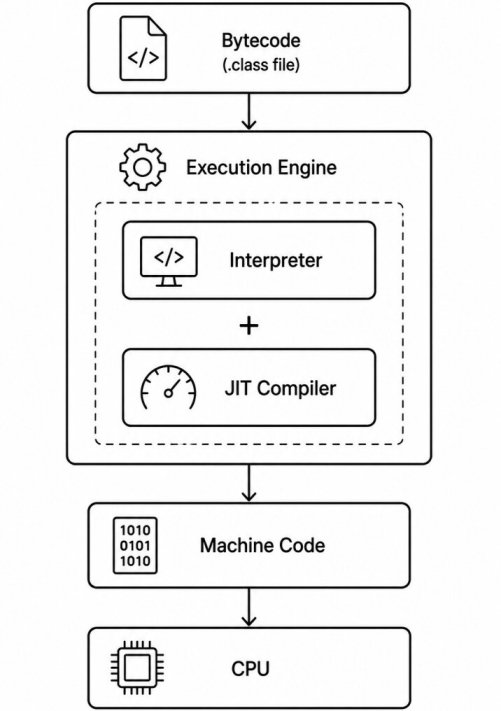
The Execution Engine is responsible for executing the bytecode loaded by the Class Loader.Since a CPU cannot execute Java bytecode directly, the Execution Engine translates the bytecode into native machine instructions that the underlying processor can understand.
Modern JVMs use a combination of an Interpreter and a Just-In-Time (JIT) Compiler to balance fast startup with high runtime performance.
Interpreter
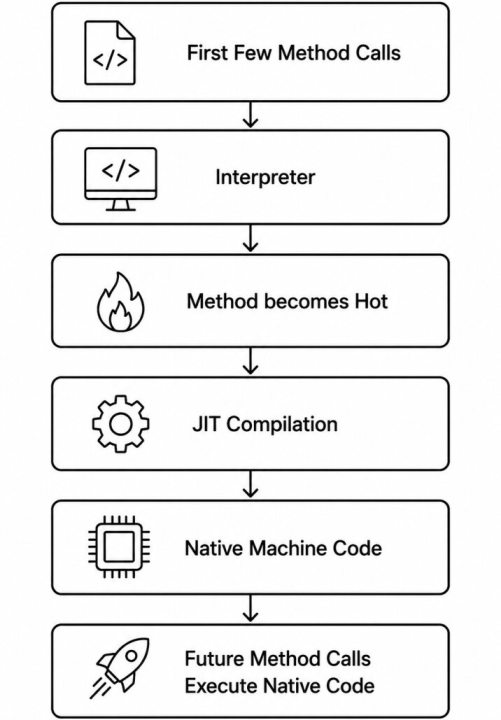
The Interpreter executes bytecode one instruction at a time. It starts running the application immediately without waiting for compilation, resulting in faster application startup.However, if the same method is executed repeatedly, the interpreter must translate the same bytecode every time, which is less efficient than executing native machine code.
Just-In-Time (JIT) Compiler
The JIT Compiler improves performance by identifying frequently executed (hot) methods and compiling their bytecode into native machine code.Once a method has been compiled, subsequent calls execute the native code directly instead of being interpreted, significantly improving execution speed.
Hot Methods
The JVM maintains execution counters for methods and loops. When a method is invoked enough times, it is classified as a hot method and becomes a candidate for JIT compilation.Compiling only hot methods avoids wasting time optimizing code that executes only once or twice.
Tiered Compilation
Modern HotSpot JVMs use Tiered Compilation, which combines two JIT compilers.C1 Compiler (Client Compiler) performs fast compilation with basic optimizations, improving startup time.
C2 Compiler (Server Compiler) performs more aggressive optimizations for methods that become heavily used, producing highly optimized machine code.
A method may first be compiled by the C1 compiler and later be recompiled by the C2 compiler as additional runtime information becomes available.
On-Stack Replacement (OSR)
Long-running loops do not need to wait until the current method finishes before benefiting from JIT compilation.Using On-Stack Replacement (OSR), the JVM can replace an interpreted loop with optimized machine code while the method is still executing.
This allows long-running computations to benefit from JIT optimizations immediately without restarting the method.
Why Java Starts Slower?
Applications written in languages such as C and C++ are compiled entirely into machine code before execution.In contrast, Java applications initially execute interpreted bytecode while the JVM analyzes the application's runtime behavior.
As methods are executed repeatedly, the JVM compiles the frequently used ones into optimized native code.
This is why Java applications often start slightly slower but achieve excellent performance after a short warm-up period.
JVM Runtime Optimizations
The JIT Compiler does much more than simply convert bytecode into machine code.It continuously analyzes the application's runtime behavior and applies a variety of optimizations to improve execution speed while preserving the program's correctness.
Since these optimizations are based on actual runtime information, the JVM can often produce more efficient machine code than a traditional ahead-of-time compiler.
A. Method Inlining
One of the most common optimizations is method inlining. Instead of performing a method call, the JIT compiler replaces the call with the method's actual code, eliminating the overhead of creating a new stack frame.int square(int x) {
return x * x;
}
int result = square(5);
int result = 5 * 5;B. Escape Analysis
Escape Analysis determines whether an object is accessible outside the method in which it is created.If the JVM determines that an object never escapes the method, it may avoid allocating the object on the heap or eliminate the allocation entirely.
public int calculate() {
    Point point = new Point(10, 20);
    return point.getX() + point.getY();
}
point never leaves the method, the JVM may optimize away the object allocation altogether.
C. Dead Code Elimination
The JIT compiler removes code that can never affect the program's output.if (false) {
System.out.println("Never Executes");
}
D. Constant Folding
Expressions involving constant values are evaluated during compilation rather than at runtime.int value = 10 * 20;int value = 200;E. Loop Optimizations
The JIT compiler applies several optimizations to frequently executed loops, including reducing redundant computations and, in some cases, loop unrolling, where multiple iterations are combined to decrease loop overhead.for (int i = 0; i < 1000; i++) {
process(i);
}
F. Lock Elimination
Synchronization introduces overhead, but sometimes the JVM can prove that a synchronized object is accessed only by a single thread.In such cases, the JIT compiler may remove the synchronization entirely.
public void execute() {
    Object lock = new Object();

    synchronized (lock) {
        System.out.println("Hello");
    }
}
G. Devirtualization
Normally, invoking an overridden method requires dynamic method dispatch to determine the correct implementation at runtime.If the JVM determines that only one implementation is possible, it can replace the virtual method call with a direct call, reducing dispatch overhead and enabling additional optimizations such as method inlining.
Bytecode
Java source code is compiled into bytecode, a platform-independent instruction set executed by the JVM. Unlike machine code, bytecode is not specific to any operating system or processor architecture.public int add(int a, int b) {
return a + b;
}
iload_1
iload_2
iadd
ireturn
iload_1 loads the first integer parameter.iload_2 loads the second integer parameter.iadd adds the two integer values.ireturn returns the result.
The JVM interprets or JIT-compiles these bytecode instructions into native machine code before execution.
This platform-independent bytecode is the key reason why Java applications can run on any operating system with a compatible JVM.
JVM Implementations
The JVM is defined by a specification rather than a single implementation. HotSpot is the most widely used JVM implementation and is included with Oracle JDK and OpenJDK.
Other implementations, such as OpenJ9 and GraalVM, also conform to the JVM specification while providing different performance characteristics.
Java Native Interface (JNI)
The Java Native Interface (JNI) is a programming interface that allows Java applications to interact with code written in native languages such as C and C++.It provides a bridge between the JVM and platform-specific libraries when functionality cannot be implemented efficiently or directly in Java.
JNI is commonly used to:
- Access operating system features.
- Reuse existing native libraries.
- Integrate with hardware devices and device drivers.
- Invoke performance-critical native code.
A native method is declared using the
native keyword.
public class Compressor {
    public native void compressFile();
}
compressFile() resides in a native library rather than in Java source code.
Although JNI is powerful, it should be used only when necessary because crossing the boundary between Java and native code introduces additional overhead and bypasses many of the JVM's safety features, such as automatic memory management.
JVM Languages
The JVM is not limited to running Java programs. Any language that compiles to JVM bytecode can execute on the JVM and take advantage of its runtime, garbage collection, JIT compiler, and extensive ecosystem.Some of the most popular JVM languages include:
| Language | Primary Use |
|---|---|
| Java | General-purpose application development |
| Kotlin | Android and server-side development |
| Scala | Functional programming and big data |
| Groovy | Scripting and automation |
| Clojure | Functional programming |
For example, a Java application can invoke Kotlin or Scala classes, and vice versa, making it possible to combine multiple JVM languages within the same project.
Final Notes
The Java Virtual Machine (JVM) is the foundation of the Java platform, providing portability, security, and high performance across different operating systems.Through components such as the Class Loader, Runtime Data Areas, and Execution Engine, the JVM transforms platform-independent bytecode into optimized native machine code while providing memory management, security, and runtime optimizations.
