By making the possibility of missing values explicit, the Optional API encourages developers to handle absent values deliberately, resulting in safer, more readable code and reducing the likelihood of NullPointerExceptions.
The Null Problem
Traditionally, Java methods often return null when no value is available.User user = repository.findById(id);
System.out.println(user.getName());User user = repository.findById(id);
if (user != null) {
System.out.println(user.getName());
}What is Optional?
Optional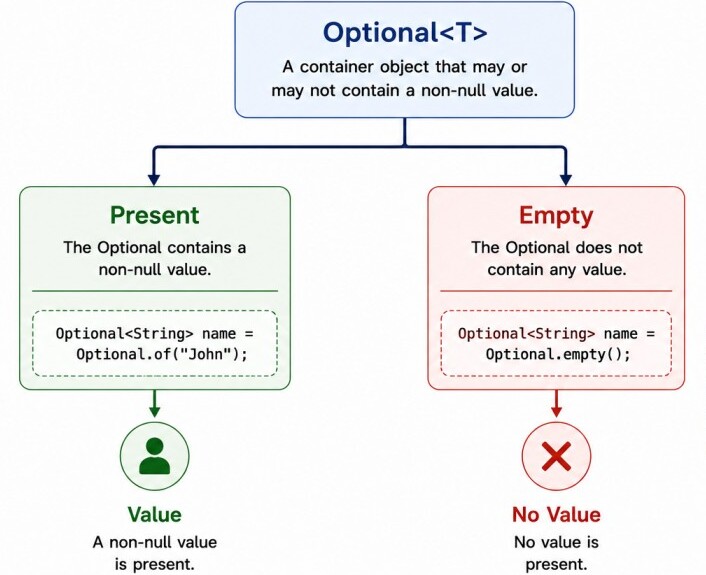
User findUser(long id);Optional<User> findUser(long id);Creating Optional Objects
There are three common ways to create an Optional.1. Optional.of() creates an Optional containing a non-null value.
Optional<String&lgt; name = Optional.of("John");2. Use Optional.ofNullable() when the value may be null.
String value = null;
Optional<String> name = Optional.ofNullable(value);3. To create an empty Optional explicitly, use Optional.empty().
Optional<String> name = Optional.empty();Checking and Retrieving Values
The simplest way to determine whether an Optional contains a value is using isPresent() or isEmpty().Optional<String> name = Optional.of("John");
if (name.isPresent()) {
System.out.println(name.get());
}For this reason, directly calling get() is generally discouraged unless the presence of a value has already been verified.
Using methods such as orElse() or orElseThrow() is usually safer than calling get().
Transforming Values (map, flatMap)
One of the biggest advantages of Optional is the ability to transform values without repeatedly checking for null.The map() method applies a transformation only if a value is present. If the Optional is empty, the result remains empty.
Optional<String> name = Optional.of("John");
Optional<Integer> length = name.map(String::length);
length.ifPresent(System.out::println);String city = Optional.of(user)
.map(User::getAddress)
.map(Address::getCity)
.orElse("Unknown");
System.out.println(city);The flatMap() method is similar to map(), except it is used when the mapping function already returns an Optional. It prevents nested Optionals such as Optional
Optional<User> user = repository.findById(id);
Optional<Address> address = user.flatMap(User::getAddress);Filtering Values
The filter() method keeps the value only if it satisfies a given condition. Otherwise, it returns an empty Optional.Optional<String> name = Optional.of("John");
Optional<String> result = name.filter(n -> n.startsWith("J"));
System.out.println(result.isPresent());Optional<String> result = Optional.of("John")
.filter(n -> n.startsWith("A"));
System.out.println(result.isEmpty());Providing Default Values
When an Optional is empty, default values can be supplied using methods such as orElse(), orElseGet(), and orElseThrow().orElse() returns the contained value if present; otherwise, it returns the specified default.
String name = Optional.ofNullable(null)
        .orElse("Guest");
System.out.println(name);String name = Optional.ofNullable(null)
.orElseGet(() -> loadDefaultUser());
System.out.println(name);To throw an exception when no value is available, use orElseThrow().
User user = repository.findById(id)
        .orElseThrow(() -> new RuntimeException(
                "User not found"
));ifPresent() and ifPresentOrElse()
Instead of explicitly checking whether a value exists, the Optional API provides methods that execute code only when a value is present.The ifPresent() method executes the given action only if the Optional contains a value.
Optional<String> name = Optional.of("John");
name.ifPresent(System.out::println);Optional<String> name = Optional.ofNullable(null);
name.ifPresentOrElse(
System.out::println,
() -> System.out.println("No value")
);Optional in Streams
Several Stream API terminal operations return an Optional because the result may not exist. For example, findFirst() returns an OptionalList<String> names = List.of("John", "Alice", "Bob");
Optional<String> first = names.stream()
.findFirst();
first.ifPresent(System.out::println);Optional<Integer> max = List.of(10, 20, 30)
.stream()
.max(Integer::compareTo);
System.out.println(max.orElse(0));Although Optional helps eliminate many NullPointerExceptions, it is not a replacement for every nullable reference. Optional should primarily be used as a method return type to indicate that a value may be absent.
Using Optional for class fields, method parameters, or collections is generally discouraged because it increases object creation and makes APIs unnecessarily complex.
In general, prefer returning an Optional from methods rather than accepting one as an input parameter.
Final Notes
The Optional API provides a clear and expressive way to represent the presence or absence of a value.By replacing ambiguous null references with an explicit container, it helps reduce NullPointerExceptions and encourages developers to think about missing values as part of the API contract.
The rich set of methods provided by Optional—including map(), flatMap(), filter(), ifPresent(), and orElse()—allows developers to process optional values in a fluent and readable manner while minimizing explicit null checks.
