The generated byte stream contains enough information for the JVM to reconstruct the original object during deserialization.
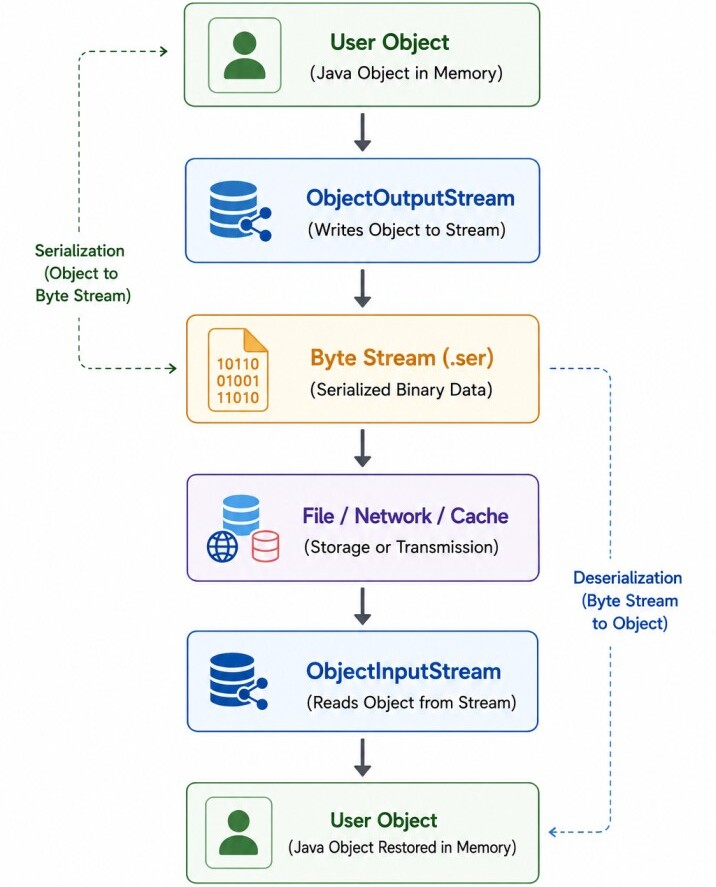
Remote Method Invocation (RMI), which exchanges objects between clients and servers; and messaging systems, where objects are transmitted through message queues and topics.
Unlike text-based formats such as JSON or XML, Java serialization produces a binary representation of an object. This binary stream is intended for Java applications and preserves object identity, inheritance relationships, and the complete object graph.
Serializable Interface (Marker Interface)
Java enables serialization through the Serializable interface located in the java.io package.public interface Serializable {
}Making a class serializable is straightforward.
import java.io.Serializable;

public class User implements Serializable {
    private String name;
    private String email;
}User user = new User();
ObjectOutputStream out = new ObjectOutputStream(
new FileOutputStream("user.ser")
);
out.writeObject(user);This prevents incomplete or inconsistent object graphs from being written to the output stream.
Serialization Process (Object → Byte Stream)
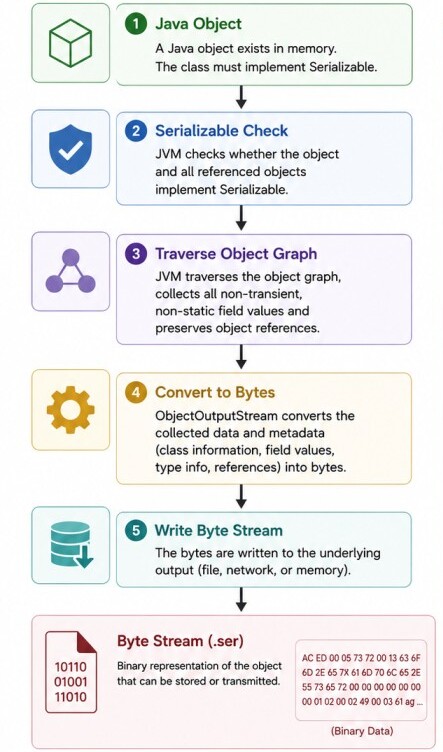
Once a class implements Serializable, the JVM can convert its objects into a binary byte stream. This process is known as serialization.During serialization, the JVM traverses the entire object graph, collects the values of all serializable fields, preserves object relationships, and writes the information into an ObjectOutputStream.
import java.io.Serializable;

public class User implements Serializable {

    private String name;
    private int age;

    public User(String name, int age) {
        this.name = name;
        this.age = age;
    }
}User user = new User("John", 30);
ObjectOutputStream out = new ObjectOutputStream(
new FileOutputStream("user.ser")
);
out.writeObject(user);
out.close();After serialization, the file user.ser contains the binary representation of the object. The binary data is intended for machine processing rather than human reading and should not be edited manually.
Deserialization Process (Byte Stream → Object)
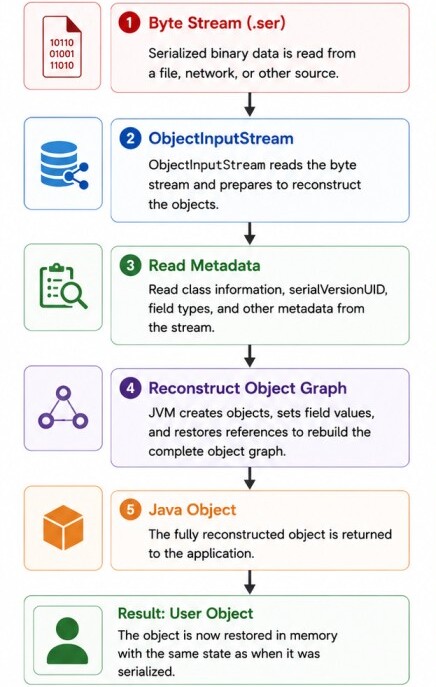
Deserialization is the reverse of serialization. The JVM reads the byte stream, reconstructs the object graph, initializes every serializable field, and returns a new object instance.Instead of creating the object by invoking constructors directly, the JVM restores the object's state from the serialized data.
ObjectInputStream in = new ObjectInputStream(
        new FileInputStream("user.ser")
);

User user = (User) in.readObject();
in.close();System.out.println(user.getName());
System.out.println(user.getAge());Output:
John
30ObjectOutputStream and ObjectInputStream wrap other input and output streams, such as file streams or network streams. Writing an object requires only a single method call.Reading it back is equally simple.ObjectOutputStream out = new ObjectOutputStream( new FileOutputStream("user.ser") ); out.writeObject(user);ObjectInputStream in = new ObjectInputStream( new FileInputStream("user.ser") ); User user = (User) in.readObject();
What is serialVersionUID?
Every serializable class has a version identifier known as serialVersionUID.This value is stored together with the serialized object and is used during deserialization to verify that the class definition is compatible with the version that originally created the object.
If the version identifier of the class does not match the one stored in the serialized data, the JVM assumes that the class structure has changed in an incompatible way and rejects the deserialization process.
The recommended approach is to declare the version explicitly.
import java.io.Serializable;

public class User implements Serializable {
    private static final long serialVersionUID = 1L;

    private String name;
    private int age;
}Although automatic generation works, even small changes to the class, such as adding a field, renaming a method, or changing modifiers, can produce a different generated value.
By default, Java serializes every non-static and non-transient field of a serializable object automatically. No additional code is required from the developer.
Custom Serialization (writeObject() and readObject())
Sometimes the default serialization mechanism is not sufficient. An application may need to encrypt sensitive data, compress information, validate values, or serialize only part of an object's state.Java allows developers to customize the serialization process by defining private writeObject() and readObject() methods.
The methods defaultWriteObject() and defaultReadObject() perform the normal serialization process.
Additional logic can be executed before or after these calls. For example, a password can be transformed before being written.
private void writeObject(
        ObjectOutputStream out
) throws IOException {
    password = encrypt(password);
    out.defaultWriteObject();
}private void readObject(
ObjectInputStream in
) throws IOException, ClassNotFoundException {
in.defaultReadObject();
password = decrypt(password);
}transient Keyword
By default, Java serializes every non-static field of a serializable object. However, some fields should never be stored in the serialized byte stream.Examples include passwords, authentication tokens, temporary data, cache entries, and calculated values.
The transient keyword tells the JVM to skip a field during serialization. Consider the following class.
public class User implements Serializable {
    private String name;
    private transient String password;
}User user = new User(
"John",
"secret123"
);
out.writeObject(user);User user = (User) in.readObject();
System.out.println(user.getName());
System.out.println(user.getPassword());John
nullstatic Fields and Serialization
Unlike instance fields, static fields belong to the class rather than to individual objects. Since serialization stores the state of an object, static fields are not included in the serialized data.Consider the following example.
public class User implements Serializable {
    private String name;
    private static String company = "OpenAI";
}User user = new User("John");
out.writeObject(user);User.company = "Google";
User restored = (User) in.readObject();
System.out.println(
restored.getCompany()
);GoogleInstead, it uses the current value of the static field because static variables are initialized as part of class loading, not object deserialization.
Serialization of Object Graphs
Serialization is not limited to a single object. When an object references other serializable objects, the JVM automatically serializes the entire object graph.For example, consider the following classes.
class Address implements Serializable {
    private String city;
}

class User implements Serializable {
    private String name;
    private Address address;
}User user = new User(
"John",
new Address("London")
);
out.writeObject(user);User user = (User) in.readObject();
System.out.println(
user.getAddress().getCity()
);LondonInheritance and Serialization
Serialization behaves differently depending on whether the parent class implements Serializable. There are two common scenarios.| Parent Class | Child Class | Result |
|---|---|---|
| Serializable | Serializable | Both parent and child fields are serialized |
| Not Serializable | Serializable | Only child fields are serialized |
class Person implements Serializable {
    protected String name;
}

class Employee extends Person {
    private int id;
}Employee employee = (Employee) in.readObject();
System.out.println(employee.name);
System.out.println(employee.getId());John
101class Person {
protected String name;
}
class Employee extends Person implements Serializable {
private int id;
}class Person {
public Person() {
System.out.println("Person Constructor");
}
}Person Constructor
name = null
id = 101Externalizable Interface
The Externalizable interface provides complete control over the serialization process.Unlike Serializable, where the JVM automatically serializes object fields, Externalizable requires the developer to explicitly write and read every field.
The interface extends Serializable and defines two methods.
public interface Externalizable extends Serializable {

    void writeExternal(
            ObjectOutput out
    ) throws IOException;

    void readExternal(
            ObjectInput in
    ) throws IOException, ClassNotFoundException;

}public class User implements Externalizable {
private String name;
private int age;
@Override
public void writeExternal(
ObjectOutput out
) throws IOException {
out.writeUTF(name);
out.writeInt(age);
}
@Override
public void readExternal(
ObjectInput in
) throws IOException {
name = in.readUTF();
age = in.readInt();
}
}When using Externalizable, the class must provide a public no-argument constructor, which the JVM invokes before calling readExternal().
Serialization Proxy Pattern
The Serialization Proxy Pattern is a safer alternative to default serialization.Instead of serializing the original object directly, the object is replaced with a separate proxy that contains only the data required to reconstruct the original object.
The original object provides a writeReplace() method.
private Object writeReplace() {
    return new UserProxy(this);
}private Object readResolve() {
return new User(
name,
age
);
}They improve security by preventing direct manipulation of serialized objects and allow only trusted representations to be serialized.
They also provide better encapsulation by hiding the internal implementation details of a class from the serialized form.
These methods make it easier to safely reconstruct immutable objects during deserialization and offer greater version flexibility, simplifying class evolution while maintaining compatibility with previously serialized data.
Security Risks of Java Serialization
Although Java serialization is convenient, it has significant security risks when deserializing data from untrusted sources. During deserialization, the JVM reconstructs objects and may invoke methods within application classes or libraries.If malicious serialized data is supplied, attackers can exploit existing classes to execute unintended operations.
For this reason, deserializing data received from unknown users, external systems, or the Internet is considered unsafe unless proper validation is performed.
In vulnerable applications, attackers may exploit classes available on the application's classpath to achieve remote code execution (RCE).
Deserialization can also lead to denial-of-service (DoS) attacks, where large or deeply nested object graphs consume excessive memory or CPU resources.
Additionally, serialized data may be subject to data tampering if it is modified before deserialization and appropriate integrity or authenticity checks are not in place.
Java provides an ObjectInputFilter to restrict which classes can be deserialized.
ObjectInputFilter filter = ObjectInputFilter.Config.createFilter(
        "com.example.*;!*"
);
ObjectInputStream in = new ObjectInputStream(
        new FileInputStream("user.ser")
);
in.setObjectInputFilter(filter);Text-based or schema-based formats such as JSON, Protocol Buffers, or Avro are typically safer and easier to evolve.
Performance Considerations
Java's built-in serialization mechanism prioritizes convenience over performance. During serialization and deserialization, the JVM performs reflection, stores class metadata, tracks object references, and maintains object identity.These additional operations increase CPU usage and produce larger serialized data.
Compared to specialized serialization libraries, Java serialization is generally very easy to use because it is built into the Java platform and requires minimal code to serialize and deserialize objects.
However, its serialization and deserialization performance is generally moderate compared to modern serialization frameworks.
The generated serialized data is also relatively large due to the inclusion of class metadata.
Additionally, Java Serialization is Java-specific and does not provide cross-language support, making it unsuitable for communication between applications written in different programming languages.
Serialization performance can often be improved by following a few simple practices. Marking unnecessary fields as transient reduces the amount of data written to the stream, resulting in smaller serialized objects.
Avoiding large object graphs minimizes the time spent traversing object references during serialization and deserialization.
Reusing serialization streams, where appropriate, reduces the overhead of repeatedly creating stream objects.
Finally, custom serialization should be used only when necessary, as the default serialization mechanism is generally simpler, more maintainable, and sufficient for most use cases.
For high-performance distributed systems, developers often choose alternative serialization formats that generate smaller payloads and require less processing.
Alternatives to Java Serialization
While Java serialization is built into the JDK, most modern applications use alternative serialization formats to achieve better interoperability, security, and performance.The choice of serialization format depends on the application's requirements. JSON is a human-readable text format widely used for REST APIs, configuration files, and web applications, with excellent cross-language support.
Protocol Buffers use a compact binary format that provides high performance and efficient communication for gRPC, microservices, and distributed systems.
Apache Avro is another binary serialization framework designed for schema evolution, making it a popular choice for Apache Kafka, data pipelines, and big data platforms.
Kryo is optimized for high-performance Java applications and offers faster serialization with smaller payloads, although it is primarily intended for Java-based systems.
Final Notes
Serialization enables Java objects to be converted into byte streams for storage or transmission and reconstructed later through deserialization.The JDK provides a simple mechanism using the Serializable interface and the ObjectOutputStream and ObjectInputStream classes.
While the default serialization mechanism is easy to use, understanding concepts such as serialVersionUID, transient fields, custom serialization, object graph traversal, inheritance, Externalizable, and the Serialization Proxy Pattern is essential for building reliable Java applications.
Modern applications should also consider the security implications of deserializing untrusted data and evaluate alternative serialization formats such as JSON, Protocol Buffers, Apache Avro, or Kryo when interoperability, performance, or security is a priority.
