It separates normal application logic from error-handling logic, making code more readable, maintainable, and robust.
try {
    int result = 10 / 0;      // Business logic
    System.out.println(result);
} catch (ArithmeticException ex) {
    System.out.println("Cannot divide by zero.");   // Error-handling logic
}What is an Exception?
An exception is an object representing an unexpected condition that interrupts the normal flow of program execution. Examples include:- Division by zero
- Accessing an invalid array index
- Opening a non-existent file
- Invalid type casting
- Null object access
When an exception occurs, the JVM creates an exception object and searches for an appropriate exception handler.
Exception Hierarchy
All exceptions inherit from java.lang.Throwable class.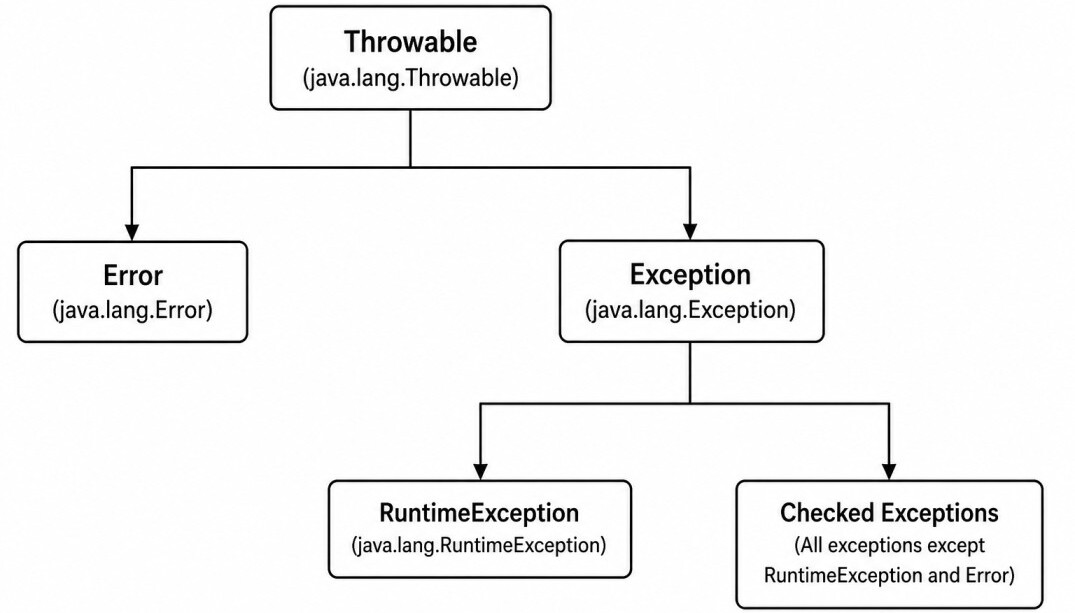
- Error class represents serious JVM problems that applications generally should not handle.
- Exception class represents conditions that applications may handle.
Error
Error represents serious problems that applications are generally not expected to recover from. These errors typically indicate failures in the JVM, insufficient system resources, or an incorrect runtime environment. Examples include:OutOfMemoryError
StackOverflowError
InternalError
VirtualMachineErrorError because the JVM may be in an unstable state.
public static void recursiveMethod() {
    recursiveMethod(); // Infinite recursion, throws StackOverflowError
}
Checked Exceptions
Checked exceptions are verified by the compiler. Methods must either handle them or declare them using throws.public void readFile() throws IOException {
// Read file
}public void readFile() {
try {
// Read file
} catch (IOException ex) {
// Handle the exception
}
}IOException
SQLException
ClassNotFoundException
ParseExceptionUnchecked Exceptions
Unchecked exceptions extend RuntimeException. The compiler does not require explicit handling. Examples include:NullPointerException
IllegalArgumentException
ArithmeticException
ArrayIndexOutOfBoundsException
NumberFormatException
ClassCastException
IllegalStateExceptionpublic void divide() {
int result = 10 / 0; // Throws ArithmeticException
}try/catch Block
try Block
Code that may throw an exception is placed inside a try block.try {
int result = 10 / 0;
}catch Block
A catch block handles a matching exception.try {
int result = 10 / 0;
} catch (ArithmeticException exception) {
System.out.println(exception.getMessage());
}Multiple Catch Blocks
A try block can have multiple catch blocks. Java executes only the first matching catch block. More specific exceptions must always appear before more general exceptions.try {
// Code
} catch (IOException exception) {
// Handle IO exception
} catch (SQLException exception) {
// Handle SQL exception
} catch (Exception exception) {
// Handle remaining exceptions
}Multi-Catch
When multiple exception types require the same handling logic, Java allows them to be combined into a single multi-catch block using the | operator.try {
// Code
} catch (IOException | SQLException exception) {
System.out.println(exception.getMessage());
}finally Block
The finally block executes regardless of whether an exception occurs. It is primarily used to release resources acquired in the try block.try {
// Open and read file
} catch (IOException exception) {
// Handle file read failure
} finally {
// Close the file
}- Closing files
- Closing database connections
- Releasing locks
- Cleaning resources
The finally block may not execute if the JVM terminates abruptly using methods such as
System.exit().
throw/throws Keyword
The throw keyword explicitly throws an exception.public void register(int age) {
if (age < 18) {
throw new IllegalArgumentException("Age must be at least 18.");
}
// Continue registration
}The throws keyword declares the exceptions that a method may propagate to its caller.
public void readFile() throws IOException {
    // Read file
}Exception Propagation
Exceptions propagate up the method call stack until they are handled by a matching catch block.void methodA() {
methodB();
}
void methodB() {
methodC();
}
void methodC() {
throw new RuntimeException("Something went wrong.");
}Exception in thread "main" java.lang.RuntimeException: Something went wrong.
at Demo.methodC(Demo.java:11)
at Demo.methodB(Demo.java:7)
at Demo.methodA(Demo.java:3)
at Demo.main(Demo.java:15)A stack trace can also be printed explicitly:
exception.printStackTrace();Try-With-Resources
Resources that implement AutoCloseable can be managed automatically using the try-with-resources statement.try (FileReader reader = new FileReader("data.txt")) {
// Read file
}try (
FileReader reader = new FileReader("input.txt");
FileWriter writer = new FileWriter("output.txt")
) {
// Read and write file
}AutoCloseable
Resources used with try-with-resources must implement AutoCloseable. When execution leaves the try block, the JVM automatically invokes theclose() method.
class MyResource implements AutoCloseable {

    @Override
    public void close() {
        System.out.println("Resource closed.");
    }
}

try (MyResource resource = new MyResource()) {
    // Use resource
}close() method is invoked automatically, even if an exception occurs inside the try block.
Custom Exceptions
Applications may define custom exceptions to represent domain-specific error conditions.1. Checked Exception
public class InvalidEmployeeException
        extends Exception {

    public InvalidEmployeeException(String message) {
        super(message);
    }
}
throw new InvalidEmployeeException("Employee ID not found.");2. Unchecked Exception
public class InvalidEmployeeException
        extends RuntimeException {

    public InvalidEmployeeException(String message) {
        super(message);
    }
}
throw new InvalidEmployeeException("Employee ID not found.");Chained Exceptions
An exception can wrap another exception by passing the original exception as its cause.public void saveEmployee() {
try {
// Save employee
} catch (SQLException exception) {
throw new RuntimeException(
"Failed to save employee.",
exception
);
}
}exception.getCause();Suppressed Exceptions
Try-with-resources may generate suppressed exceptions. If an exception occurs inside the try block and another occurs while closing a resource, the exception thrown byclose() becomes a suppressed exception.
try (MyResource resource = new MyResource()) {
    throw new RuntimeException("Primary exception");
}exception.getSuppressed();Rethrowing Exceptions
A caught exception can be rethrown after performing additional processing, such as logging or cleanup.public void readFile() throws IOException {
try {
// Read file
} catch (IOException exception) {
// Log the exception
throw exception;
}
}Exception Translation
Exception translation converts lower-level exceptions into higher-level exceptions that better represent the application's domain.try {
// Save employee to the database
} catch (SQLException exception) {
throw new EmployeeException(
"Unable to save employee.",
exception
);
}Overriding Rules
When overriding methods:- Checked exceptions may be reduced or removed.
- Checked exceptions cannot be broadened.
- Unchecked exceptions may be added freely.
A subclass may throw a more specific checked exception than its superclass.
class Parent {

    void process() throws IOException {
    }
}

class Child extends Parent {

    @Override
    void process() throws FileNotFoundException {
    }
}class Child extends Parent {
@Override
void process() {
}
}throws Exception.
Use exceptions only for exceptional situations, not for normal program flow.
Catch the most specific exception possible, preserve the original cause when wrapping exceptions, prefer try-with-resources for resource management, create meaningful custom exceptions when appropriate, avoid catchingThrowableorError, avoid swallowing exceptions silently, and include sufficient context when rethrowing or logging exceptions.
Final Notes
Java's exception handling mechanism provides a structured way to detect, propagate, and handle runtime failures while separating error-handling logic from normal application logic.A solid understanding of the exception hierarchy, checked and unchecked exceptions, propagation, try-with-resources, exception chaining, suppressed exceptions, custom exceptions, exception translation, and overriding rules enables developers to build robust, maintainable, and fault-tolerant Java applications.
