For example, a consumer cannot process data until a producer has generated it, a worker thread may need to wait until a shared resource becomes available, or several threads may need to coordinate their execution to produce a correct result.
If threads simply execute independently without any communication, they often waste CPU resources by repeatedly checking whether a condition has changed.
This technique, known as busy waiting or polling, is inefficient because threads consume processor time even when no useful work is being performed.
To solve this problem, Java provides inter-thread communication, a mechanism that allows one thread to suspend its execution until another thread explicitly signals that it can continue.
This coordination is achieved using the
wait(), notify(), and notifyAll() methods inherited from the Object class.
In this article, we will understand how these methods work, how they interact with Java's intrinsic monitor locks, and how they can be used to solve classic concurrency problems such as the Producer-Consumer problem.
Why Inter-Thread Communication?
Consider an online order processing system.One thread is responsible for receiving customer orders, while another thread packages and ships those orders. The shipping thread cannot package an order until one becomes available.
Without inter-thread communication, the shipping thread might repeatedly check whether a new order has arrived.
while (order == null) {
    // Keep checking
}Even when there is no work to perform, the thread remains active, repeatedly evaluating the same condition thousands or millions of times per second.
A much better approach is for the shipping thread to suspend itself until the producer thread creates a new order.
Once the order becomes available, the producer notifies the waiting thread, which immediately resumes execution. This approach eliminates unnecessary CPU usage and results in far more efficient applications.
Object Monitor
Every object in Java automatically owns an internal monitor, also known as an intrinsic lock.
Whenever a thread enters asynchronizedblock, it first acquires the monitor associated with that object.
Only one thread can own the monitor at any given time, while other threads attempting to acquire the same monitor must wait until it is released.Here, the thread must successfully acquire the monitor of thesynchronized (lock) { // Critical section }lockobject before executing the protected code.
In addition to maintaining ownership of the monitor, every Java object also maintains a wait set.
The wait set contains threads that have temporarily suspended their execution by invoking thewait()method on that object.
These threads remain dormant until another thread invokesnotify()ornotifyAll()on the same object.
Only one thread can own the monitor at a time, but multiple threads may simultaneously reside in the object's wait set while waiting to be notified.
The wait(), notify() and notifyAll() Methods
The methods used for inter-thread communication are defined in theObject class rather than in the Thread class.
public final void wait();
public final void notify();
public final void notifyAll();These methods can only be invoked while the calling thread owns the object's monitor.
Consequently, they must always be used inside a
synchronized block or synchronized method. Attempting to invoke them without first acquiring the monitor results in an IllegalMonitorStateException.
How Communication Works
Suppose two threads synchronize on the same shared object. One thread waits until a condition becomes true, while the other thread updates the condition and signals the waiting thread.The overall sequence of events is shown below.
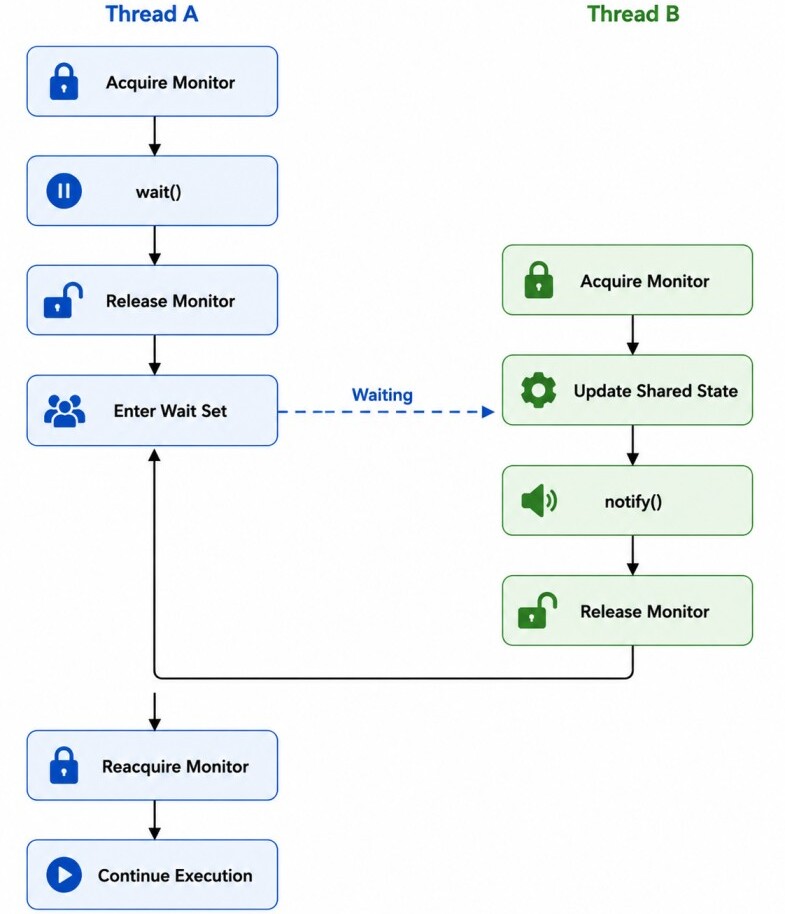
notify() does not immediately transfer execution to the waiting thread.
The notified thread first moves from the wait set to the monitor's entry queue and continues only after it successfully reacquires the monitor.
This behavior preserves the guarantees provided by synchronization and prevents multiple threads from executing the same synchronized block simultaneously.
Whywait(),notify(), andnotifyAll()belong to theObjectclass instead of theThreadclass?
The reason is that synchronization in Java is based on object monitors, not on threads themselves.
A thread always waits for a specific condition associated with a shared object, and another thread signals that same shared object when the condition changes.
Because every object has its own monitor and wait set, communication naturally belongs to the object that coordinates the threads rather than to the individual threads.
If these methods were part of theThreadclass, it would be unclear which shared resource or synchronization object the waiting and notification operations referred to.
Associating them with the shared object makes the communication mechanism both consistent and scalable.
The wait() Method
Thewait() method causes the current thread to temporarily suspend its execution and enter the WAITING state until another thread signals that it can continue.
Unlike
Thread.sleep(), which simply pauses execution while still holding any acquired locks, wait() immediately releases the object's monitor, allowing other threads to enter the synchronized block and modify the shared state.
Its method signature is:
public final void wait() throws InterruptedExceptionclass Shared {
public synchronized void waitForSignal() throws InterruptedException {
System.out.println("Waiting...");
wait();
System.out.println("Resumed");
}
}wait() executes, the thread performs the following steps:
- Releases the monitor lock.
- Enters the object's wait set.
- Transitions to the WAITING state.
- Remains suspended until notified.
- Reacquires the monitor before continuing execution.
Notice that after being notified, the thread does not continue immediately. It must first successfully reacquire the monitor before it can resume execution.
The notify() Method
Thenotify() method wakes one thread that is currently waiting in the object's wait set.
Its method signature is:
public final void notify() Instead, it must wait until the notifying thread exits the synchronized block and releases the monitor.
class Shared {
    public synchronized void signal() {
        notify();
    }
}waitForSignal() while another later invokes signal(). The waiting thread resumes only after the second thread exits the synchronized method and releases the monitor.
The notifyAll() Method
Whilenotify() wakes only one waiting thread, the notifyAll() method wakes every thread waiting on the same object's monitor.
public final void notifyAll() The remaining threads continue waiting until the monitor becomes available.
class Shared {
    public synchronized void releaseAll() {
        notifyAll();
    }
}
notify() vs notifyAll()
Usenotify()when only one waiting thread needs to proceed after the shared condition changes. This avoids waking unnecessary threads and can improve performance in situations where only a single thread can make progress.
UsenotifyAll()when multiple waiting threads may be interested in the condition or when different threads may be waiting for different conditions on the same monitor.
Waking all waiting threads ensures that each thread can recheck its own condition and prevents situations where the wrong thread is awakened and the correct one remains waiting indefinitely.
For this reason, most production-quality concurrent code prefersnotifyAll()overnotify(), even though it may wake more threads than necessary.
wait() vs sleep()
Thesleep() method belongs to the Thread class and simply pauses the currently executing thread for a specified period. During this time, the thread remains in the TIMED_WAITING state.
Importantly, if the thread already owns any monitor locks, it continues to hold them while sleeping, preventing other threads from entering the corresponding synchronized blocks.
In contrast, the
wait() method belongs to the Object class and is used specifically for inter-thread communication.
When a thread calls
wait(), it immediately releases the object's monitor, enters the object's wait set, and remains suspended until another thread invokes notify() or notifyAll() on the same object.
Only after successfully reacquiring the monitor does the waiting thread resume execution.
This difference makes
sleep() suitable for introducing delays, implementing retries, or simulating long-running operations, whereas wait() should be used whenever one thread must wait for another thread to satisfy a particular condition.
sleep() Example
public synchronized void process() throws InterruptedException {
    System.out.println("Started");
    Thread.sleep(5000);
    System.out.println("Finished");
}wait() Example
public synchronized void process() throws InterruptedException {
    System.out.println("Waiting");
    wait();
    System.out.println("Resumed");
}
Producer-Consumer Problem
One of the most well-known applications of inter-thread communication is the Producer-Consumer Problem. It models a situation where one or more producer threads generate data while one or more consumer threads process that data.A producer should pause when the shared buffer is full because there is no space available for additional items. Similarly, a consumer should wait when the buffer is empty because there is nothing to consume.
The two threads therefore need a mechanism to coordinate their execution without wasting CPU time.
Instead of repeatedly checking whether the buffer is full or empty, the producer and consumer communicate using
wait() and notifyAll().
class Buffer {

    private int item;
    private boolean available = false;

    public synchronized void produce(int value)
            throws InterruptedException {

        while (available) {
            wait();
        }

        item = value;
        available = true;

        System.out.println("Produced: " + value);

        notifyAll();
    }

    public synchronized void consume()
            throws InterruptedException {

        while (!available) {
            wait();
        }

        System.out.println("Consumed: " + item);
        available = false;
        notifyAll();
    }
}Buffer buffer = new Buffer();
Thread producer = new Thread(() -> {
try {
for (int i = 1; i <= 5; i++) {
buffer.produce(i);
}
} catch (InterruptedException e) {
Thread.currentThread().interrupt();
}
});Thread consumer = new Thread(() -> {
try {
for (int i = 1; i <= 5; i++) {
buffer.consume();
}
} catch (InterruptedException e) {
Thread.currentThread().interrupt();
}
});
producer.start();
consumer.start();Produced: 1
Consumed: 1
Produced: 2
Consumed: 2
Produced: 3
Consumed: 3
...As soon as one thread changes the buffer's state, it calls
notifyAll(), allowing the waiting thread to wake up and continue processing.
One of the most common mistakes is using an
if statement instead of a while loop around wait().
The condition must always be checked again after the thread wakes up because waking does not guarantee that the required condition is still true.
Another thread may have acquired the monitor first and modified the shared state before the current thread resumed execution.
Additionally, the JVM permits spurious wakeups, where a waiting thread may wake up without receiving a corresponding
notify() or notifyAll().
Using a
while loop ensures that the thread rechecks the condition and waits again if necessary, making the program correct and reliable.
Conclusion
Thewait(), notify(), and notifyAll() methods provide Java's fundamental mechanism for inter-thread communication.
Unlike synchronization, which controls exclusive access to shared resources, these methods enable threads to coordinate their execution by waiting for and signaling changes in shared conditions.
