In software applications, data must be protected both while it is stored and while it is transmitted across networks.
Encryption at Rest protects data stored in databases, file systems, object storage, and backups, while Encryption in Transit protects data moving between clients, applications, and services.
Both forms of encryption are essential for securing sensitive information such as customer records, payment details, passwords, and business data against unauthorized access.
Why Do We Need Encryption?
Suppose an e-commerce application stores customer information and payment details.Without encryption, anyone gaining access to the database files or intercepting network traffic could read sensitive information directly.
+----------+----------------------+----------------------+-------------------------+
| Name     | Address              | Credit Card          | Email                   |
+----------+----------------------+----------------------+-------------------------+
| John Doe | 123 Main Street      | 4111 1111 1111 1111  | john@example.com        |
+----------+----------------------+----------------------+-------------------------+
+----------------------------------+----------------------------------+
| Name                             | John Doe                         |
+----------------------------------+----------------------------------+
| Address                          | 7F8A9C2D1E6B...                  |
+----------------------------------+----------------------------------+
| Credit Card                      | 9F4A82C7B1D54E8A...              |
+----------------------------------+----------------------------------+
| Email                            | 3B7C5E91A2F4...                  |
+----------------------------------+----------------------------------+
Encryption at Rest
Encryption at Rest protects data stored on physical media such as database files, SSDs, hard disks, object storage, and backups.The data is automatically encrypted before being written to storage and decrypted when authorized applications access it. If someone steals the storage device or backup files, the data remains unreadable without the encryption keys.
Encryption at Rest is commonly used for:
Databases (PostgreSQL, MySQL, SQL Server, etc.)
Relational databases commonly support Encryption at Rest by encrypting the underlying database files stored on disk.Depending on the database platform, this is typically enabled using Transparent Data Encryption (TDE) or operating system and cloud storage encryption.
For example, SQL Server and Oracle provide built-in TDE, while PostgreSQL deployments commonly rely on encrypted storage volumes such as Amazon EBS, Azure Managed Disks, or operating system disk encryption.
Once enabled, the database automatically encrypts data before writing it to disk and transparently decrypts it when authorized applications read the data.
For example, a Spring Boot application stores customer information in a PostgreSQL database.
@Entity
public class Customer {

    @Id
    private Long id;
    private String name;
    private String email;
    private String creditCard;
}
customerRepository.save(customer);
Object Storage (Amazon S3, Azure Blob Storage, etc.)
Object storage services such as Amazon S3, Azure Blob Storage, and Google Cloud Storage support Encryption at Rest by automatically encrypting objects before they are written to storage.To enable this feature, encryption is typically configured on the storage bucket using either provider-managed keys (for example, Amazon S3 Managed Keys) or customer-managed keys stored in a key management service such as AWS KMS.
AWS KMS (Amazon Web Services Key Management Service) is a managed service that lets you create and control the cryptographic keys used to encrypt and sign your data, integrated with services like Amazon S3, EBS, and RDS.Once enabled, every uploaded object is automatically encrypted. The objects are transparently decrypted when accessed by authorized users or applications.
For example, a Spring Boot application uploads customer invoices to Amazon S3.
public void uploadInvoice(MultipartFile file) {
    amazonS3.putObject(
            "invoice-bucket",
            file.getOriginalFilename(),
            file.getInputStream(),
            new ObjectMetadata());
}
Alternatively, the application can explicitly request encryption during upload.
ObjectMetadata metadata = new ObjectMetadata();
PutObjectRequest request =
        new PutObjectRequest(
                "invoice-bucket",
                file.getOriginalFilename(),
                file.getInputStream(),
                metadata)
        .withSSEAwsKeyManagementParams(
                new SSEAwsKeyManagementParams());
amazonS3.putObject(request);
Block Storage (Amazon EBS, Azure Managed Disks, etc.)
Block storage services such as Amazon EBS and Azure Managed Disks support Encryption at Rest by encrypting entire storage volumes.Since databases, virtual machines, and file systems are typically hosted on these volumes, all data written to disk is automatically encrypted.
Encryption is usually enabled when the storage volume is created by selecting a provider-managed encryption key or a customer-managed key from a key management service such as AWS KMS or Azure Key Vault.
Once enabled, every read and write operation is transparently encrypted and decrypted by the cloud platform.
For example, a Spring Boot application stores customer data in a PostgreSQL database running on an encrypted Amazon EBS volume.
@Entity
public class Customer {

    @Id
    private Long id;
    private String name;
    private String email;
    private String creditCard;
}
customerRepository.save(customer);
Spring Boot, PostgreSQL, and the operating system continue to read and write data normally while the cloud platform transparently encrypts and decrypts the underlying storage blocks.
File Systems (Encrypted Disks, NAS Storage)
File systems can also implement Encryption at Rest by encrypting the entire disk or file system.Common examples include BitLocker on Windows, LUKS on Linux, and encrypted NAS (Network Attached Storage) systems.
Encryption is typically enabled when configuring the storage device or operating system.
Once enabled, every file written to the file system is automatically encrypted and transparently decrypted when accessed by authorized users or applications.
For example, a Spring Boot application stores uploaded documents on an encrypted file system.
public void saveDocument(
        MultipartFile file)
        throws IOException {

    Path path = Paths.get(
            "/data/uploads",
            file.getOriginalFilename());

    Files.copy(
            file.getInputStream(),
            path);
}
Encryption in Transit
Encryption in Transit protects data while it travels across networks between clients, applications, databases, and external services.Without transport encryption, attackers monitoring network traffic could intercept sensitive information such as usernames, passwords, access tokens, payment details, SQL queries, or business data.
Modern applications prevent this by using TLS (Transport Layer Security), the protocol behind HTTPS.
Before any application data is exchanged, the client and server establish a secure connection through a process known as the TLS Handshake.
During the handshake, the communicating parties authenticate each other, negotiate the encryption algorithms, and securely establish a shared session key.
Once the handshake completes, every request and response is encrypted using this session key.
TLS (Transport Layer Security)
TLS (Transport Layer Security) is the industry-standard protocol that secures communication over networks.It is the technology behind HTTPS and is widely used to protect communication between browsers, Spring Boot applications, databases, microservices, message brokers, and external APIs.
The following diagram illustrates a simplified TLS handshake.
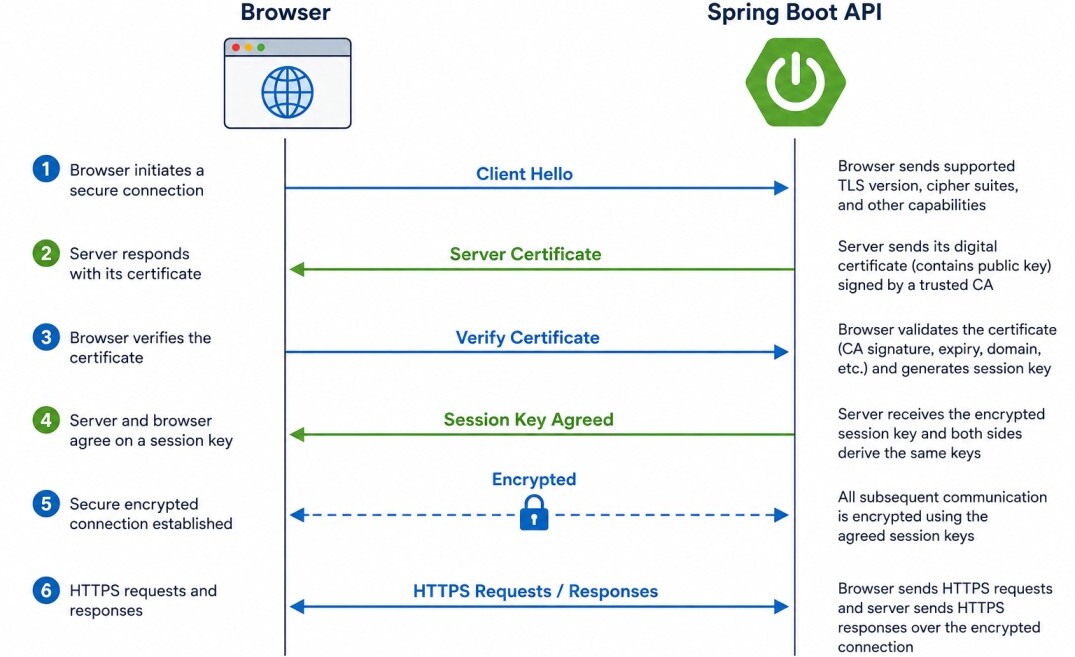
Once the handshake completes, both parties use this session key to encrypt outgoing data and decrypt incoming data for the remainder of the connection.
Public and Private Keys
Modern TLS and digital certificates rely on asymmetric cryptography, which uses a pair of mathematically related keys: a Public Key and a Private Key.The Public Key can be freely shared with anyone and is included in the server's Digital Certificate. The Private Key is kept secret by the server and never leaves it.
When a client connects over HTTPS, it obtains the server's Public Key from the digital certificate.
The client uses the server's public key to verify the server's identity. Together, the client and server then perform a secure key exchange to establish a shared session key.
Once the session key has been established, the public and private keys are no longer used for application data.
Instead, all subsequent communication uses the shared session key because symmetric encryption is significantly faster than asymmetric cryptography.
        Spring Boot API
      +------------------+
      |  Private Key 🔒  |
      |  Public Key      |
      +------------------+
              |
     Digital Certificate
     (Contains Public Key)
              |
              v
           Browser
              |
      Shared Session Key
              |
              v
    Encrypted Communication
Why can't an attacker generate his own public/private key pair?
Because the server's Public Key is contained within a Digital Certificate signed by a trusted Certificate Authority (CA), an attacker cannot simply generate a new key pair and impersonate the server.
Clients trust only certificates issued by trusted Certificate Authorities, preventing attackers from presenting forged identities.
Digital Certificates
A Digital Certificate is an electronic document that proves the identity of a server or application.It contains the server's Public Key along with information such as the domain name, issuing organization, validity period, and the digital signature of a trusted Certificate Authority (CA).
When a client connects to an HTTPS endpoint, the server presents its digital certificate as part of the TLS handshake. The client verifies the certificate before establishing the encrypted connection.
If the certificate is valid, the client trusts that it is communicating with the intended server and proceeds to establish the secure TLS session.
Otherwise, the connection is rejected or the user is presented with a security warning.
Certificate Authorities (CA)
A Certificate Authority (CA) is a trusted organization that verifies the identity of a server or organization before issuing a digital certificate.Operating systems, browsers, and HTTP clients maintain a built-in list of trusted Certificate Authorities. When a server presents its certificate, the client verifies that it has been digitally signed by one of these trusted CAs.
Common public Certificate Authorities include Let's Encrypt, DigiCert, GlobalSign, and Sectigo. Organizations may also operate their own internal Certificate Authorities to secure communication within private networks.
Certificates that are self-signed or issued by an untrusted Certificate Authority are not trusted by default, causing browsers and HTTP clients to display security warnings.
JKS and PKCS12
Spring Boot stores server certificates and private keys in a KeyStore. The two most common KeyStore formats are JKS (Java KeyStore) and PKCS12 (.p12 or .pfx).JKS is Java's traditional KeyStore format, while PKCS12 is an open industry standard supported by Java and many other platforms.
Modern Spring Boot applications typically prefer PKCS12 because it offers better interoperability across different operating systems, web servers, and cloud platforms.
A KeyStore typically contains the server's Private Key, the corresponding Digital Certificate, and the Certificate Chain required to establish trust with clients.
+----------------------+
|      KeyStore        |
+----------------------+
| Private Key          |
| Server Certificate   |
| Certificate Chain    |
+----------------------+
When an HTTPS connection is established, the web server uses the private key and corresponding certificate from the KeyStore to secure the TLS connection.
HTTPS in Spring Boot
Spring Boot applications enable HTTPS by configuring an SSL/TLS certificate.The embedded web server (such as Tomcat, Jetty, or Undertow) automatically uses this certificate to establish secure TLS connections with clients.
The server certificate and its corresponding private key are typically stored in a Java KeyStore (JKS) or a PKCS12 (.p12) file.
server.port=8443
server.ssl.enabled=true
server.ssl.key-store=classpath:keystore.p12
server.ssl.key-store-password=password
server.ssl.key-store-type=PKCS12
In production environments, the server certificate is typically issued by a trusted Certificate Authority (CA) such as Let's Encrypt, DigiCert, or GlobalSign.
Clients can then securely establish HTTPS connections with the application by validating the server's certificate during the TLS handshake.
HTTPS with Apache Reverse Proxy
In production environments, a Spring Boot application is often deployed behind an Apache HTTP Server or Nginx acting as a Reverse Proxy.Instead of configuring HTTPS directly in Spring Boot, the SSL/TLS certificate is installed on the web server.
When a client sends an HTTPS request, Apache performs the TLS handshake, validates the certificate, decrypts the incoming traffic, and then forwards the request to the Spring Boot application.
Communication between Apache and Spring Boot may use plain HTTP if both run on the same trusted server or private network, or HTTPS if end-to-end encryption is required.
          HTTPS
Browser -----------> Apache HTTP Server
                         |
                  Reverse Proxy
                         |
                   HTTP / HTTPS
                         |
                         v
                  Spring Boot API
<VirtualHost *:443>
    ServerName api.example.com

    SSLEngine on
    SSLCertificateFile /etc/ssl/certs/server.crt
    SSLCertificateKeyFile /etc/ssl/private/server.key

    ProxyPass / http://localhost:8080/
    ProxyPassReverse / http://localhost:8080/
</VirtualHost>
This approach centralizes SSL/TLS certificate management, supports multiple applications behind a single web server, and provides additional features such as load balancing, caching, request filtering, and compression.
HTTPS with AWS ALB + EKS
In AWS, Spring Boot applications running on Amazon EKS (Kubernetes) are commonly exposed through an Application Load Balancer (ALB), while Amazon Route 53 provides DNS resolution for the application's domain name.When a user accesses https://api.example.com, the DNS request is first resolved by Route 53, which returns the address of the Application Load Balancer.
The client then establishes an HTTPS connection with the ALB, where the TLS handshake is performed using an SSL/TLS certificate managed by AWS Certificate Manager (ACM).
After decrypting the HTTPS request, the ALB forwards it to the appropriate Kubernetes Service, which routes the request to one of the available Spring Boot pods.
Communication between the ALB and the Kubernetes cluster may use plain HTTP within the private VPC or HTTPS when end-to-end encryption is required.
             DNS Lookup
Browser -----------------> Route 53
                              |
                              v
                     Application Load Balancer
                       (TLS Termination)
                              |
                       HTTP / HTTPS
                              |
                              v
                   Kubernetes Service
                              |
                              v
                     Spring Boot Pod(s)
The Kubernetes Ingress resource associates the application with the ALB and the ACM certificate.
apiVersion: networking.k8s.io/v1
kind: Ingress
metadata:
  annotations:
    alb.ingress.kubernetes.io/scheme: internet-facing
    alb.ingress.kubernetes.io/certificate-arn: arn:aws:acm:...
spec:
  ingressClassName: alb
  rules:
    - host: api.example.com
      http:
        paths:
          - path: /
            pathType: Prefix
            backend:
              service:
                name: order-service
                port:
                  number: 80
Summary
Encryption at Rest protects data stored in databases, storage systems, and backups, while Encryption in Transit protects data moving across networks using protocols such as TLS.Modern Spring Boot applications typically use HTTPS for client communication, TLS for database connections, and cloud-managed encryption for storage services such as Amazon RDS, Amazon S3, and Amazon EBS.
Although encryption protects the confidentiality of data, it should be combined with proper authentication, authorization, secure key management, and secure coding practices to provide comprehensive application security.
