The system should deliver messages with low latency, support millions of concurrent users, synchronize conversations across devices, and remain highly available even during infrastructure failures.
Requirements
Functional Requirements
The WhatsApp Messenger system should satisfy the following functional requirements.1. Send and receive one-to-one messages.
2. Support group conversations.
3. Exchange images, videos, documents, and voice messages.
4. Display online status, typing indicators, and last seen.
5. Support message acknowledgements and read receipts.
6. Deliver push notifications for offline users.
7. Synchronize conversations across multiple devices.
8. Support message history retrieval.
Non-Functional Requirements
In addition to the functional requirements, the system should satisfy the following non-functional requirements.1. Very low message delivery latency.
2. High availability.
3. Horizontal scalability.
4. Support hundreds of millions of concurrent connections.
5. Fault tolerance.
6. Reliable message delivery.
7. Strong security and privacy.
API Design
The WhatsApp Messenger system can expose the following REST APIs to exchange messages, upload media, and manage conversations.Send Message
Request:POST /api/v1/messages
{
"conversationId": "conv_10231",
"receiverId": "user_1002",
"message": "Hello!"
}{
"messageId": "msg_987654321",
"status": "SENT"
}Retrieve Messages
Request:GET /api/v1/conversations/conv_10231/messages?limit=50[
{
"messageId": "msg_100",
"sender": "user_1",
"text": "Hello",
"timestamp": "2026-08-04T09:00:00Z"
}
]Upload Media
Request:POST /api/v1/media {
"mediaId": "media_9832",
"url": "https://storage.example.com/media/9832"
}Create Group
Request:POST /api/v1/groups
{
"name": "System Design",
"members": [
"user1",
"user2",
"user3"
]
}{
"groupId": "grp_101"
}High-Level Architecture
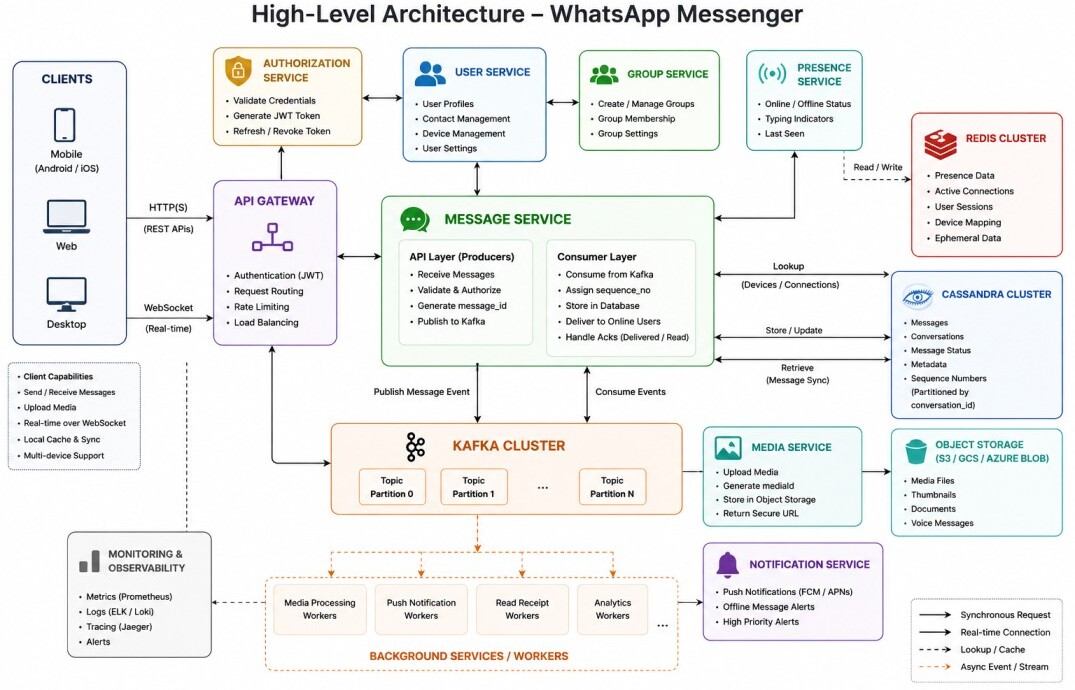
The following diagram illustrates the high-level architecture of a WhatsApp Messenger.The system consists of Client (Web/Mobile), API Gateway, and services such as the User Service, Group Service, Authorization Service, Message Service, Presence Service, Media Service and Notification Service.
Client
The client application runs on Android, iOS, Web, or Desktop platforms.When the application starts, the user signs in using their credentials. After successful authentication, the client receives an access token (JWT), which is securely stored and included in all subsequent requests.
The client communicates with backend services using both HTTP and WebSocket connections. HTTP is used for request-response operations such as retrieving conversation history, uploading media, creating groups, updating profile information, and downloading attachments.
A persistent WebSocket connection with the Message Service is used for real-time communication, allowing the server to instantly deliver incoming messages.
When sending images, videos, documents, or voice messages, the client first uploads the file to the Media Service using an HTTP request.
The Media Service stores the file in Object Storage and returns a unique mediaId. The client then sends a normal chat message containing the mediaId instead of transmitting the binary file through the Message Service.
Recipients download media directly from object storage using secure URLs, reducing the load on the messaging servers.
To improve responsiveness, the client maintains a local database containing recent conversations, media metadata, and pending outgoing messages.
This allows users to continue viewing previous conversations while offline and automatically synchronize missing messages once connectivity is restored.
API Gateway
The API Gateway acts as the single entry point for all client requests.During login, the client sends its credentials to the API Gateway, which forwards the request to the Authorization Server. The Authorization Server validates the user's credentials with the User Service, generates a signed JWT, and returns it to the client through the API Gateway.
For every subsequent HTTP request and WebSocket connection, the client includes the JWT for authentication. The API Gateway validates the token and forwards the request to the appropriate backend service.
For real-time messaging, the client establishes a persistent WebSocket connection by sending an HTTP request with an Upgrade: websocket header.
GET /ws HTTP/1.1
Host: api.example.com
Upgrade: websocket
Connection: Upgrade
Authorization: Bearer <JWT>
The Message Service updates the serverId in Redis whenever a client establishes a WebSocket connection. The same Redis entry is subsequently refreshed by the Presence Service using periodic heartbeat messages sent by the client.
Key:
presence:user_1001:device_1

Value:
{
  "lastHeartbeat":"2026-08-04T10:15:30Z",
  "serverId":"msg-server-12",
  "device":"Android",
  "typing":false
}
User Service
The User Service manages user profiles, account information, contact details, profile pictures, privacy settings, and user preferences.It provides APIs to retrieve and update profile information, manage contacts, and maintain account-related metadata.
The User Service stores persistent user information in the primary database and is accessed whenever user profile information is displayed or modified.
Database Design
USERS
--------------------------------------------------------------------------------------------
id | phone_number | name | profile_picture | about | privacy_settings  | created_at | updated_at

CONTACTS
--------------------------------------------------------------------------------------------
user_id | contact_user_id | display_name | created_at

USER_DEVICES
--------------------------------------------------------------------------------------------
id | user_id | device_type | device_name | registered_at | last_active_at
Message Service
The Message Service is the core component of the messaging platform.It receives outgoing messages from clients, validates sender permissions, assigns identifiers, stores messages, and delivers them to recipients.
When a client sends a message, the Message Service first generates a globally unique message_id using a distributed ID generator such as Snowflake.
This identifier uniquely represents the message across the entire system and is used for acknowledgements, read receipts, synchronization, retries, and deduplication.
After generating the globally unique message_id, the Message Service publishes the message to Kafka using the conversation_id as the partition key.
Since Kafka guarantees that all messages for the same conversation are processed by a single consumer in FIFO order, the consumer can safely assign the next sequence_no without requiring distributed locks or centralized coordination.
Conversation A
Seq 1  → Hello
Seq 2  → How are you?
Seq 3  → See you soon.
If the recipient has one or more online devices, the Message Service retrieves their corresponding serverId entries from Redis and forwards the message to the appropriate Message Service instances, which immediately push it over the existing WebSocket connections.
If the recipient is offline, the message remains stored in the database until the recipient reconnects. When the client synchronizes, it requests all messages with a sequence_no greater than the last synchronized value, ensuring that no messages are missed.
Database Design
Distributed NoSQL databases such as Cassandra are commonly used because they provide horizontal scalability and high write throughput.Messages are partitioned using the conversation_id, while the sequence_no is used as the clustering key to store messages in chronological order.
CREATE TABLE messages (
    conversation_id TEXT,
    sequence_no BIGINT,
    message_id BIGINT,
    sender_id TEXT,
    content JSON,
    media_id TEXT,
    status TEXT,
    message_type ENUM,
    delivered_at TIMESTAMP,
    read_at TIMESTAMP,
    created_at TIMESTAMP,
    PRIMARY KEY ((conversation_id), sequence_no)
);
Group Messaging
Sending a message to a group follows a similar process, except the message must be delivered to multiple recipients.After validating the sender and generating a globally unique message_id, the Message Service publishes the message to Kafka using the conversation_id (or group_id) as the partition key.
Background Message Service consumers process the event sequentially and retrieve the group membership from the Group Service.
The membership list may be cached in Redis to avoid querying the Group Service for every incoming group message.
They then assign the next sequence_no, store the message in the database, and deliver it to online group members over their existing WebSocket connections.
Offline members receive the message when they reconnect and synchronize their conversations.
Multi-Device Synchronization
A user may be signed in from multiple devices such as a mobile phone, tablet, desktop application, or web browser.When a message is sent, the Message Service delivers it not only to the recipient's active devices but also synchronizes it across all of the sender's own connected devices, ensuring that every device displays the same conversation history.
The User Service maintains the list of registered devices associated with each user.
The Message Service retrieves the online devices from the Presence Service before delivering messages over existing WebSocket connections.
If one or more devices are offline, the message remains stored in the database.
When those devices reconnect, they synchronize all messages whose sequence_no is greater than their last synchronized value, ensuring that every device eventually reaches the same conversation state.
Message Status
Every message progresses through three delivery states.✓ Sent
✓✓ Delivered
✓✓ Read (Blue)
When the recipient's device successfully receives the message, it sends a Delivered event to the Message Service. The service updates the message status in the database and, if the sender is currently online, immediately notifies the sender over the existing WebSocket connection.
When the recipient opens the conversation, the client sends a Read event to the Message Service. The service updates the message status and, if the sender is online, pushes the read receipt over the existing WebSocket connection.
If the sender is offline, the updated message status remains stored in the database.
When the sender reconnects, the client synchronizes all pending status updates along with any new messages, ensuring that delivery and read receipts remain consistent across devices.
Presence Service
The Presence Service maintains the real-time presence of connected users.Each connected client periodically sends a heartbeat (for example, every 30 seconds), which the Presence Service updates the corresponding Redis entry along with the Message Service instance currently handling the user's WebSocket connection and other temporary presence information.
Key:
presence:user_1001:device_1

Value:
{
  "lastHeartbeat":"2026-08-04T10:15:30Z",
  "serverId":"msg-server-12",
  "device":"Android",
  "typing":false
}
The serverId identifies the Message Service instance currently managing the user's WebSocket connection, allowing incoming messages to be routed directly to the correct server without searching the entire cluster.
Temporary states such as typing are also maintained in Redis and automatically expire after a short period if no further updates are received.
Whenever another user opens a conversation, the Message Service retrieves the recipient's presence information from Redis to display Online, Offline, Last Seen, or Typing... without querying the primary database.
Push Notifications
When a recipient is offline, the messaging platform cannot immediately deliver new messages over a persistent connection.Instead, the Notification Service sends push notifications through platform-specific notification providers such as Firebase Cloud Messaging (FCM) for Android and Apple Push Notification Service (APNs) for iOS.
Rather than including the complete message inside the notification, only minimal information such as the sender's name, conversation identifier, or a generic notification is transmitted.
Once the user opens the application, the client reconnects to the messaging infrastructure and retrieves all pending messages from the Message Service.
High Availability
A messaging platform must remain available even if individual servers fail.Multiple instances of every backend service run behind a Load Balancer, eliminating single points of failure. If one Message Service instance becomes unavailable, incoming traffic is automatically redirected to healthy instances.
Critical infrastructure components such as Redis, Kafka, object storage, and databases are also deployed with replication. If a primary database node fails, a replica can immediately continue serving requests with minimal interruption.
For globally distributed deployments, services can be deployed across multiple geographic regions.
Users are automatically connected to the nearest healthy region, reducing latency while also providing disaster recovery if an entire region becomes unavailable.
Client applications automatically re-establish their WebSocket connections to another healthy Message Service instance after a failure.
Scalability
Messaging traffic can vary dramatically throughout the day, with millions of users sending messages simultaneously.The application layer scales horizontally by adding additional instances of stateless services such as the API Gateway, Message Service, Media Service, Presence Service, and Notification Service.
Any instance can process any new HTTP request, while long-lived WebSocket connections remain bound to the Message Service instance that accepted them until they reconnect.
Distributed databases partition message data across multiple nodes using the conversation_id as the partition key.
As the number of conversations grows into the billions, additional database nodes can be added without modifying application logic.
Redis clusters scale independently for cached data, while Kafka partitions enable message processing throughput to increase simply by adding additional consumers.
Security
Messaging platforms handle highly sensitive user conversations and therefore require strong security throughout the system.Every request is authenticated before accessing backend services, and all communication between clients and servers is encrypted using TLS.
Modern messaging platforms also employ End-to-End Encryption (E2EE), where messages are encrypted on the sender's device and decrypted only on the recipient's device. Encryption keys are generated and stored only on client devices.
Since the server stores only encrypted message payloads, backend services cannot read user conversations even though they are responsible for storing and forwarding messages.
Media files can similarly be encrypted before being uploaded to object storage, ensuring that only authorized recipients possessing the appropriate encryption keys can access the original content.
Conclusion
A WhatsApp Messenger appears simple from the user's perspective, but supporting internet-scale messaging requires careful consideration of real-time communication, persistent connections, distributed message storage, asynchronous processing, efficient caching, and horizontal scalability.By combining technologies such as WebSockets, Redis, Kafka, distributed databases, and object storage, the system can reliably deliver billions of messages while maintaining low latency and high availability.
