This improves cache hit rate, ensures data consistency across instances, and reduces unnecessary database queries.
One of the most popular distributed caching solutions is Redis.
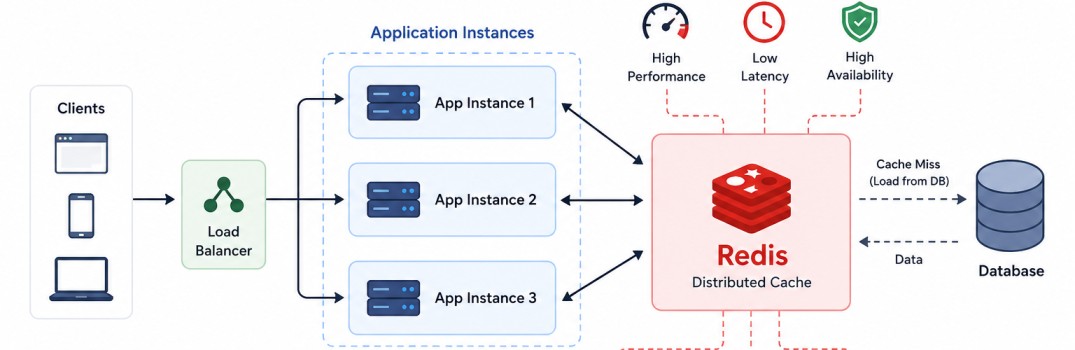
Why Distributed Caching?
Suppose an application is deployed with four instances behind a load balancer. A request for customer 100 reaches Application 1, which loads the customer from the database and stores it in its local cache.The next request for the same customer may be routed to Application 3. Since its local cache is empty, it again queries the database even though the data was already cached by another instance.
As the number of application instances increases, maintaining separate caches leads to lower cache hit rates, higher memory consumption, and increased load on the database.
             Load Balancer
                   |
       +-----------+-----------+
       |           |           |
       v           v           v
   +-------+   +-------+   +-------+
   | App 1 |   | App 2 |   | App 3 |
   +-------+   +-------+   +-------+
       |           |           |
   Local Cache Local Cache Local Cache
       |           |           |
       +-----------+-----------+
                   |
                   v
               Database
             Load Balancer
                   |
       +-----------+-----------+
       |           |           |
       v           v           v
   +-------+   +-------+   +-------+
   | App 1 |   | App 2 |   | App 3 |
   +-------+   +-------+   +-------+
       |           |           |
       |           |           |
       +-----------+-----------+
                   |
             +------------+
             |   Redis    |
             +------------+
                   |
                   v
               Database
How Redis Works?
Redis stores data entirely in memory (RAM), allowing most operations to complete in microseconds instead of the milliseconds typically required for database queries.Applications communicate with Redis over the network using its lightweight Redis Serialization Protocol (RESP) and simple commands such as GET, SET, and DEL.
Data is stored as key-value pairs, where each key uniquely identifies a value.
A common practice is to use descriptive keys such as customer:100, product:500, or order:12345, making cached data easy to organize and retrieve.
For example, storing customer information in Redis can be done using the following command.
SET customer:100 "{...customer json...}"GET customer:100DEL customer:100SETEX customer:100 3600 "{...customer json...}"Although Redis is an in-memory data store, it can optionally persist data to disk for recovery after a restart.
Redis Data Structures
Although Redis is often used as a simple key-value cache, it supports several native data structures, including Strings, Hashes, Lists, Sets, Sorted Sets, Bitmaps, HyperLogLog, Streams, and Geospatial indexes.Some commonly used examples include storing cached JSON using Strings, user profiles with Hashes, message queues with Lists, unique tags with Sets, leaderboards using Sorted Sets, and event streams with Streams.
SET customer:100 "{...json...}"          # String

HSET customer:100 name "John" age 30     # Hash

LPUSH orders order1                      # List

SADD roles ADMIN USER                    # Set

ZADD leaderboard 1000 Alice              # Sorted Set

XADD orders * customer 100 amount 500    # Stream
Common Redis Commands
The following commands are among the most frequently used when working with Redis in production applications.| Command | Purpose |
|---|---|
| SET key value | Store a value. |
| GET key | Retrieve a value. |
| DEL key | Delete a key. |
| EXPIRE key seconds | Set a TTL on a key. |
| TTL key | Check the remaining TTL. |
| INCR key | Increment a numeric value. |
| DECR key | Decrement a numeric value. |
| HSET key field value | Store a field in a hash. |
| HGET key field | Retrieve a field from a hash. |
| LPUSH key value | Add an element to the beginning of a list. |
| SADD key value | Add one or more elements to a set. |
| ZADD key score value | Add an element with a score to a sorted set. |
Redis Pipelining
Normally, each Redis command requires a separate network round trip between the application and the Redis server.When many commands are executed one after another, network latency can become a significant bottleneck even though Redis itself is extremely fast.
With pipelining, multiple commands are sent to Redis together without waiting for the response to each individual command.
Redis executes the commands in order and returns all responses in a single network round trip, significantly improving throughput.
Without pipelining:
Application            Redis
     |                   |
GET key1  -------------> |
     | <------------- Value1
     |
GET key2  -------------> |
     | <------------- Value2
     |
GET key3  -------------> |
     | <------------- Value3
Application            Redis
     |                  |
GET key1                |
GET key2 -------------> |
GET key3                |
     |                Value1
     | <------------- Value2
     |                Value3
Typical Read Flow
A distributed cache is commonly used with the Cache Aside strategy, where the application is responsible for reading from and writing to the cache. Client
|
v
Application
|
v
Redis
/ \
Hit Miss
| |
v v
Return Database
Data |
v
Store in Redis
|
v
Return Data
If the data is found (a cache hit), Redis returns it immediately, avoiding a database query and significantly reducing response time.
If the data is not found (a cache miss), the application retrieves it from the database, stores it in Redis for future requests, and then returns the response to the client.
Subsequent requests for the same data are served directly from Redis until the cache entry expires or is invalidated.
Cache Warming
Cache warming is the process of preloading frequently accessed data into Redis before user requests arrive.Instead of waiting for the first request to populate the cache, applications load commonly accessed data during startup or through scheduled background jobs.
Cache warming helps reduce initial cache misses, lowers database load after deployments or restarts, and improves application response times for frequently accessed data.
Cache Eviction
Since memory is limited, Redis removes data when it reaches its configured maximum memory limit.This process is known as cache eviction. Without an eviction policy, Redis may reject new write operations once the configured memory limit is reached.
Redis supports multiple eviction policies to determine which keys should be removed. One of the most commonly used is Least Recently Used (LRU), where keys that have not been accessed recently are evicted first.
Another popular policy is Least Frequently Used (LFU), which removes keys that have been accessed the fewest times.
Redis also supports random eviction and expiration-based eviction, where only keys with a configured TTL (Time To Live) are considered for removal.
The appropriate policy depends on the application's access patterns, data lifetime, and available memory.
For redis.conf:
# Maximum memory Redis can use
maxmemory 2gb

# Eviction policy
maxmemory-policy allkeys-lru
Cache Invalidation
One of the biggest challenges in distributed caching is ensuring that cached data remains consistent with the database.When data is updated or deleted, the corresponding cache entry must also be updated or removed. Otherwise, applications may continue serving stale data.
The most common approaches are:
1. Delete on update – Remove the cache entry immediately after updating the database. The next read reloads fresh data into Redis.
2. Update cache – Update both the database and Redis together.
3. TTL expiration – Allow entries to expire automatically after a configured duration.
Choosing the appropriate strategy depends on the application's consistency requirements and update frequency.
Redis Persistence
Although Redis is primarily an in-memory data store, it can optionally persist data to disk.Persistence allows Redis to recover data after a restart or system failure, making it suitable not only as a cache but also as a primary data store for certain use cases.
Redis supports two persistence mechanisms. RDB (Redis Database) creates point-in-time snapshots of the entire dataset at configurable intervals.
Since snapshots are taken periodically, some recently written data may be lost if Redis crashes before the next snapshot.
AOF (Append Only File) records every write operation by appending it to a log file. When Redis restarts, it replays these operations to reconstruct the dataset.
AOF provides better durability than RDB but requires more disk space and introduces slightly higher write overhead.
Redis can also use both RDB and AOF together, which is a common production configuration. RDB provides faster backups and quicker recovery, while AOF minimizes data loss by recording recent write operations.
When Redis is used purely as a distributed cache, persistence is often disabled because cached data can be rebuilt from the database after a restart.
This reduces disk I/O and improves performance, making it the preferred configuration for many caching workloads.
Configuring Persistence
Redis persistence is configured in the redis.conf file or by passing command-line options when starting Redis.RDB snapshots are enabled using the save directive, which specifies when Redis should create a snapshot.
# Save after 1 change in 15 minutes
save 900 1

# Save after 10 changes in 5 minutes
save 300 10

# Save after 10,000 changes in 60 seconds
save 60 10000
AOF is enabled by turning on append-only mode.
appendonly yes
appendfilename "appendonly.aof"

# Flush to disk every second (recommended)
appendfsync everysec
Other options are always (maximum durability but slower) and no (OS decides when to flush).
To use both RDB and AOF, simply enable both configurations. On restart, Redis prefers the AOF file because it typically contains the most up-to-date data.
If Redis is used only as a cache, persistence is often disabled because cached data can be rebuilt from the database.
# Disable RDB snapshots
save ""

# Disable AOF
appendonly no
Redis Clustering
A single Redis server can become a bottleneck as application traffic and data volume grow.Redis supports clustering, which distributes data automatically across multiple Redis nodes, allowing the cache to scale horizontally without requiring application changes.
      Applications
            |
            v
   +-------------------+
   |   Redis Cluster   |
   +-------------------+
   | Node 1 | Node 2   |
   | Node 3 | Node 4   |
   +-------------------+
            |
            v
        Database
This ensures that data is distributed evenly across the cluster.
When an application performs a GET or SET operation, the Redis client automatically determines which node owns the corresponding hash slot and sends the request directly to that node.
This routing is transparent to the application.
To improve high availability, each primary node can have one or more replica nodes. Replicas continuously synchronize data from their primary node and can automatically take over if the primary fails, minimizing downtime.
As the workload increases, additional Redis nodes can be added to the cluster. Redis automatically redistributes hash slots among the nodes, allowing storage capacity and throughput to grow with the cluster size.
Redis Cluster is the preferred deployment model for large-scale production systems because it provides horizontal scalability, fault tolerance, and high throughput while eliminating the single point of failure associated with a standalone Redis server.
Redis Sentinel vs Redis Cluster
Redis Sentinel and Redis Cluster solve different problems and are often confused. Sentinel focuses on high availability, while Cluster focuses on both horizontal scaling and high availability.| Feature | Redis Sentinel | Redis Cluster |
|---|---|---|
| Primary Purpose | High Availability | Horizontal Scaling + High Availability |
| Dataset | Entire dataset on every primary | Partitioned across multiple nodes |
| Scaling | Vertical | Horizontal |
| Failover | Automatic | Automatic |
| Data Distribution | No | Yes (Hash Slots) |
        Application
             |
             v
        Redis Sentinel
             |
    +--------+--------+
    |                 |
 Primary          Replica
Use Redis Cluster when the dataset or request volume exceeds the capacity of a single server and the application requires both horizontal scaling and high availability.
          Application
               |
               v
        Redis Cluster
      +------+------+------+
      | P1   | P2   | P3   |
      | R1   | R2   | R3   |
      +------+------+------+
Redis Transactions
Redis supports transactions, allowing multiple commands to be executed as a single unit.Once EXEC is issued, Redis executes all queued commands sequentially without interleaving commands from other clients.
MULTI
SET customer:100 "John"
INCR customerCount
EXEC
If the transaction should not be executed, it can be canceled before execution using the DISCARD command.
MULTI
SET customer:100 "John"
INCR customerCount

DISCARD
If any watched key is modified by another client before EXEC is called, Redis aborts the transaction, allowing the application to retry with the latest data.
WATCH account:100

MULTI
DECRBY account:100 500
EXEC
Distributed Locking
Redis is commonly used to implement distributed locks, ensuring that only one application instance can perform a particular operation at a time.This is useful when multiple application instances share the same resources and concurrent execution could lead to duplicate or inconsistent results.
SET lock:order123 unique-token NX EX 30
The unique-token identifies the owner of the lock and helps ensure that only the process that acquired the lock can safely release it.
Distributed locks are commonly used for distributed scheduling, leader election, preventing duplicate order processing, avoiding concurrent updates, and ensuring that only one application instance executes a scheduled job or critical business operation at a time.
Redis Pub/Sub
Redis supports a lightweight Publish/Subscribe (Pub/Sub) messaging model, allowing applications to exchange real-time messages without directly communicating with each other.Publishers send messages to a channel, and all subscribers listening to that channel receive the message immediately.
# Publisher
PUBLISH orders "Order #100 created"

# Subscriber
SUBSCRIBE orders
Since messages are delivered only to currently connected subscribers and are not persisted, Pub/Sub is best suited for transient, real-time communication rather than reliable message processing.
Summary
Redis is commonly used to cache data that is read frequently but changes relatively infrequently. Common examples include product catalogs, customer profiles, application configuration, pricing information, and session data.It is also widely used to store user sessions, authentication tokens, rate-limiting counters, and frequently accessed API responses, where extremely low latency is essential.
Using Redis as a distributed cache significantly reduces database load by serving repeated requests directly from memory, resulting in faster response times and improved application scalability.
Redis supports horizontal scaling through clustering and provides high availability using replication and automatic failover.
However, a distributed cache introduces an additional network hop between the application and the database. Although Redis is extremely fast, accessing it over the network is still slower than reading from local memory.
Applications must also implement proper cache invalidation strategies to prevent serving stale data.
Additionally, because Redis stores data primarily in memory, the amount of data that can be cached is limited by the available RAM.
