async def keyword, it ultimately relies on the Event Loop for execution.
In this article, we will explore how the Event Loop works and understand why it is the foundation of FastAPI's concurrency model.
The Event Loop is a scheduler that continuously monitors and executes asynchronous tasks while efficiently handling I/O operations.
How the Event Loop Solves Blocking I/O?
In a web application, a request may need to query a database, call another microservice, access Redis, read a file, or wait for a network response before it can continue processing.Consider a database query:
def get_user():
    user = database.fetch_user()
    return user
When thousands of requests arrive concurrently, creating one thread per request becomes expensive because every thread consumes additional memory and operating system resources.
The Event Loop solves this problem by allowing a single thread to manage many requests concurrently.
Imagine three requests arriving at the same time: Request A, Request B, and Request C.
In a traditional synchronous server, each request typically occupies its own thread. In contrast, an asynchronous server uses a single event loop to coordinate all three requests.
Whenever one request pauses while waiting for an I/O operation, the event loop immediately switches to another request that is ready to execute.
As a result, multiple requests continue making progress without requiring a separate thread for each one.
The Lifecycle of a Coroutine
Consider the following coroutine:async def fetch_user():
user = await database.get_user()
return user
fetch_user() is called, the function does not execute immediately. Instead, Python creates a coroutine object.
At this stage, the coroutine represents work that has been created but not yet scheduled for execution. Before any code inside the coroutine runs, it must be scheduled by the Event Loop.
Once scheduled, execution begins.
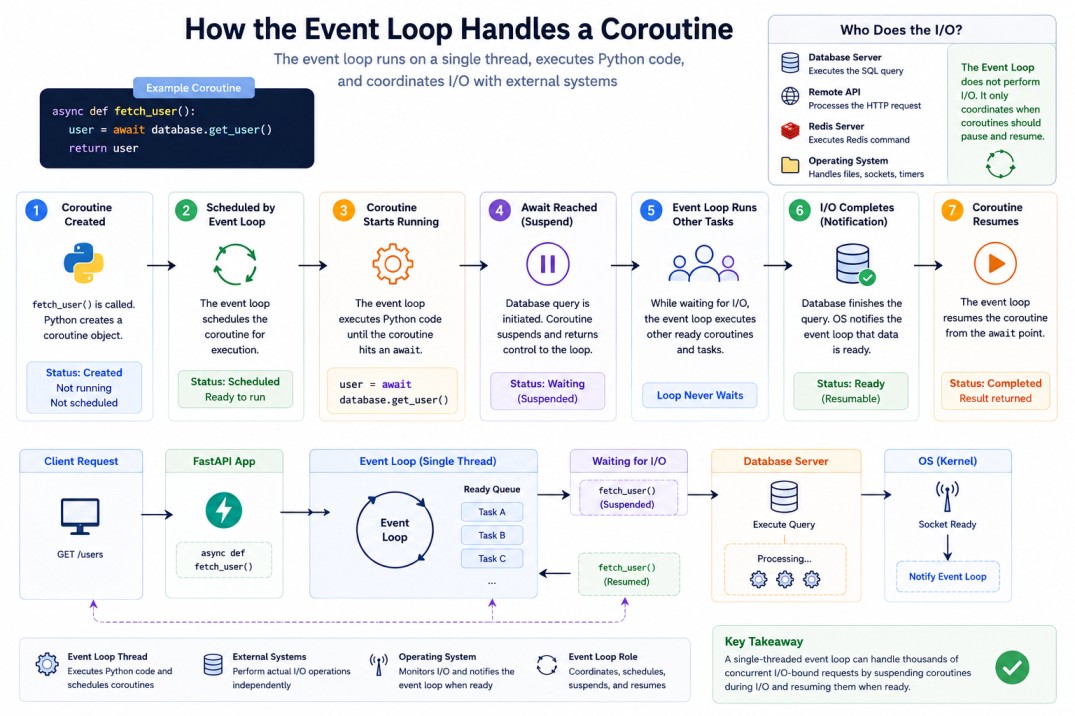
user = await database.get_user(). Since the database operation may take time, the coroutine cannot continue immediately.
The Event Loop suspends the coroutine and returns control to itself, allowing other coroutines to execute while the database query is in progress.
The Event Loop never waits. Whenever a coroutine pauses, it immediately schedules another coroutine that is ready to run.When the database query completes, the Event Loop schedules the suspended coroutine again.
Execution resumes exactly where it paused, the remaining statements execute, and the result is returned to the caller.
What Happens During await?
When Python encounters await database.fetch_user(), the following sequence of events occurs:
1. The current coroutine pauses.
2. Control returns to the Event Loop.
3. The Event Loop schedules other coroutines that are ready to execute.
4. The database operation continues in the background.
5. When the database operation completes, the operating system notifies the Event Loop that the operation has completed.
6. The Event Loop schedules the suspended coroutine again.
7. Execution resumes immediately after the
await statement.
This allows a single thread to continue making progress on other tasks while I/O operations are in progress.
How Does the Event Loop Know When to Resume a Coroutine?
The Event Loop continuously monitors operating system events, such as socket readiness, network responses, file operation completion, and timer expiration.When an awaited operation completes, the operating system notifies the Event Loop, which marks the corresponding coroutine as ready to run.
Internally, the Event Loop maintains a queue of ready tasks. It repeatedly selects the next task, executes it until it either completes or reaches another
await, and then moves on to the next ready task.
This scheduling cycle repeats continuously, allowing thousands of I/O-bound operations to make progress efficiently using a single thread.
Why time.sleep() Breaks FastAPI?
Consider:
import time

@app.get("/users")
async def get_users():
    time.sleep(5)
    return {"status": "done"}
time.sleep() blocks the current thread instead of yielding control to the Event Loop.
During those five seconds, the coroutine cannot make progress, and the Event Loop cannot schedule other coroutines. As a result, other requests handled by the same Event Loop must wait.
The correct approach is to use
await asyncio.sleep().
import asyncio

@app.get("/users")
async def get_users():
    await asyncio.sleep(5)
    return {"status": "done"}
await statement, allowing the Event Loop to continue processing other requests while the timer is running.
Important: blocking call inside an async function still blocks the Event Loop.
How Uvicorn Uses the Event Loop?
When a request arrives, Uvicorn receives it and submits the corresponding coroutine to the Event Loop for execution. The Event Loop schedules execution of the corresponding coroutine.
This architecture allows FastAPI to handle large numbers of concurrent requests efficiently.
Who Actually Performs the I/O Operations?
The Event Loop does not perform I/O operations itself.It simply coordinates asynchronous tasks, while the actual I/O work is performed by the operating system and external systems such as databases, file systems, and network services.
Consider the following example:
user = await database.get_user()
Instead of waiting for the response, the Event Loop immediately resumes another coroutine that is ready to run.
When the database server finishes processing the query, the database driver receives the response and the operating system notifies the Event Loop that the operation has completed.
The Event Loop then schedules the suspended coroutine, and execution resumes immediately after the
await statement.
When the Event Loop Is Not Enough?
Consider:async def calculate():
total = 0
for i in range(500000000):
total += i
return total
For CPU-intensive workloads, consider using multiprocessing, ProcessPoolExecutor, or distributed workers.
The Event Loop excels at managing waiting. It does not make CPU-heavy computations faster.
Conclusion
The Event Loop is the engine that powers asyncio and FastAPI.It continuously schedules coroutines, monitors I/O operations, suspends tasks that are waiting, and resumes them when work becomes available.
Once you understand the Event Loop, it becomes much easier to understand how FastAPI efficiently handles thousands of concurrent requests.
