1. Introduction to Seaborn
Seaborn is specifically designed for statistical data visualization. It integrates closely with Pandas DataFrames and supports complex visualizations with minimal code.Key Features:
- Built-in themes and color palettes- Easy handling of categorical data
- Advanced statistical plotting
- Seamless integration with Pandas
- Simplified syntax compared to Matplotlib
2. Installation
You can install Seaborn using pip:pip install seaborn3. Importing Libraries
import seaborn as sns
import matplotlib.pyplot as plt
4. Built-in Datasets
Seaborn provides several built-in datasets for practice.df = sns.load_dataset('tips')
print(df.head())
Common datasets:
- tips- iris
- titanic
- flights
5. Basic Plot: Scatter Plot
import seaborn as sns
import matplotlib.pyplot as plt
df = sns.load_dataset('tips')
print(df.head())
sns.scatterplot(x='total_bill', y='tip', data=df)
plt.show()
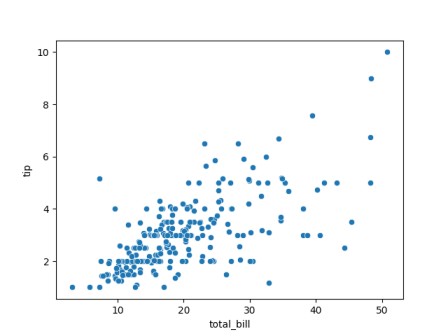
Output:
   total_bill   tip     sex smoker  day    time  size
0       16.99  1.01  Female     No  Sun  Dinner     2
1       10.34  1.66    Male     No  Sun  Dinner     3
2       21.01  3.50    Male     No  Sun  Dinner     3
3       23.68  3.31    Male     No  Sun  Dinner     2
4       24.59  3.61  Female     No  Sun  Dinner     4
Use Case:
Identify relationships between variables6. Line Plot
import seaborn as sns
import matplotlib.pyplot as plt

df = sns.load_dataset('tips')
print(df.head())

sns.lineplot(x='size', y='total_bill', data=df)
plt.show()
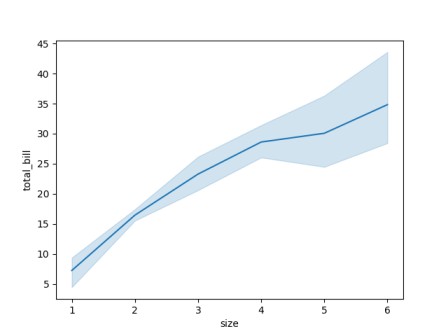
Output:
   total_bill   tip     sex smoker  day    time  size
0       16.99  1.01  Female     No  Sun  Dinner     2
1       10.34  1.66    Male     No  Sun  Dinner     3
2       21.01  3.50    Male     No  Sun  Dinner     3
3       23.68  3.31    Male     No  Sun  Dinner     2
4       24.59  3.61  Female     No  Sun  Dinner     4
Use Case:
Trend analysis7. Bar Plot
import seaborn as sns
import matplotlib.pyplot as plt

df = sns.load_dataset('tips')
print(df.head())

sns.barplot(x='day', y='total_bill', data=df)
plt.show()
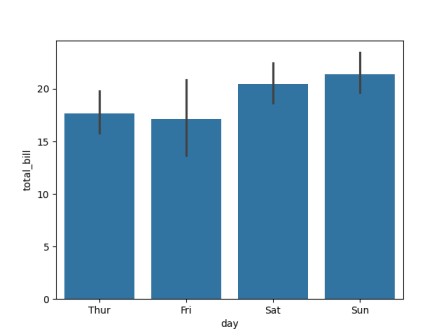
Output:
   total_bill   tip     sex smoker  day    time  size
0       16.99  1.01  Female     No  Sun  Dinner     2
1       10.34  1.66    Male     No  Sun  Dinner     3
2       21.01  3.50    Male     No  Sun  Dinner     3
3       23.68  3.31    Male     No  Sun  Dinner     2
4       24.59  3.61  Female     No  Sun  Dinner     4
Features:
- Automatically calculates mean values- Shows confidence intervals
8. Histogram and Distribution Plot
import seaborn as sns
import matplotlib.pyplot as plt

df = sns.load_dataset('tips')
print(df.head())

sns.histplot(df['total_bill'], kde=True)
plt.show()
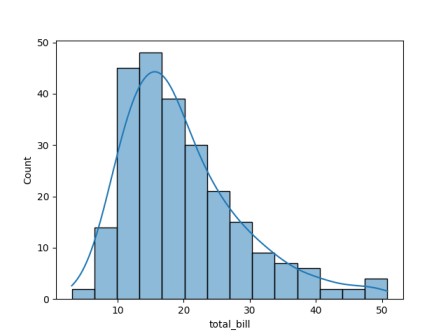
Output:
   total_bill   tip     sex smoker  day    time  size
0       16.99  1.01  Female     No  Sun  Dinner     2
1       10.34  1.66    Male     No  Sun  Dinner     3
2       21.01  3.50    Male     No  Sun  Dinner     3
3       23.68  3.31    Male     No  Sun  Dinner     2
4       24.59  3.61  Female     No  Sun  Dinner     4
Key Concepts:
- Distribution of data- KDE (Kernel Density Estimation)
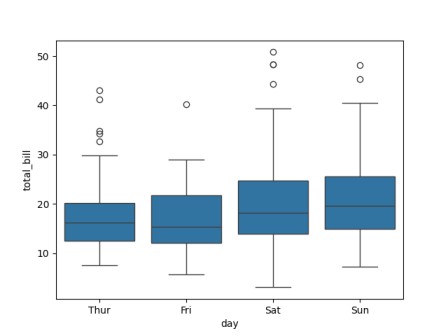
9. Box Plot
import seaborn as sns
import matplotlib.pyplot as plt

df = sns.load_dataset('tips')
print(df.head())

sns.boxplot(x='day', y='total_bill', data=df)
plt.show()
Output:
   total_bill   tip     sex smoker  day    time  size
0       16.99  1.01  Female     No  Sun  Dinner     2
1       10.34  1.66    Male     No  Sun  Dinner     3
2       21.01  3.50    Male     No  Sun  Dinner     3
3       23.68  3.31    Male     No  Sun  Dinner     2
4       24.59  3.61  Female     No  Sun  Dinner     4
Use Case:
- Detect outliers- Understand data spread
10. Violin Plot
import seaborn as sns
import matplotlib.pyplot as plt

df = sns.load_dataset('tips')
print(df.head())

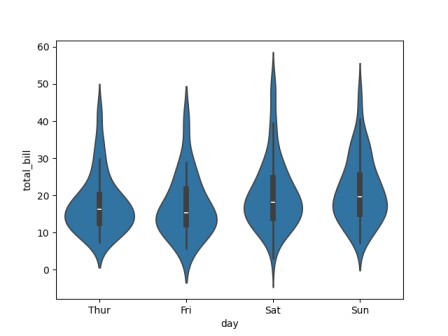
sns.violinplot(x='day', y='total_bill', data=df)
plt.show()
Output:
   total_bill   tip     sex smoker  day    time  size
0       16.99  1.01  Female     No  Sun  Dinner     2
1       10.34  1.66    Male     No  Sun  Dinner     3
2       21.01  3.50    Male     No  Sun  Dinner     3
3       23.68  3.31    Male     No  Sun  Dinner     2
4       24.59  3.61  Female     No  Sun  Dinner     4
Advantage:
Combines box plot and distribution11. Pair Plot
import seaborn as sns
import matplotlib.pyplot as plt

df = sns.load_dataset('tips')
print(df.head())

sns.pairplot(df)
plt.show()

Output:
   total_bill   tip     sex smoker  day    time  size
0       16.99  1.01  Female     No  Sun  Dinner     2
1       10.34  1.66    Male     No  Sun  Dinner     3
2       21.01  3.50    Male     No  Sun  Dinner     3
3       23.68  3.31    Male     No  Sun  Dinner     2
4       24.59  3.61  Female     No  Sun  Dinner     4
Use Case:
Visualize relationships across multiple variables12. Heatmap
import seaborn as sns
import matplotlib.pyplot as plt

df = sns.load_dataset('tips')
print(df.head())

corr = df.corr(numeric_only=True)
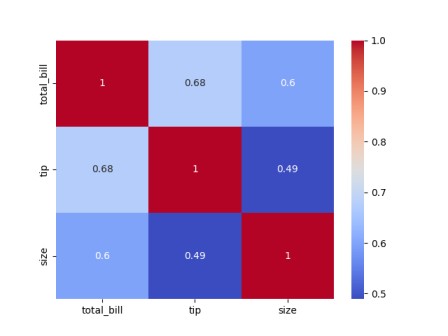
sns.heatmap(corr, annot=True, cmap='coolwarm')
plt.show()
Output:
    total_bill   tip     sex smoker  day    time  size
0       16.99  1.01  Female     No  Sun  Dinner     2
1       10.34  1.66    Male     No  Sun  Dinner     3
2       21.01  3.50    Male     No  Sun  Dinner     3
3       23.68  3.31    Male     No  Sun  Dinner     2
4       24.59  3.61  Female     No  Sun  Dinner     4
Use Case:
Display correlation matrix13. Customization in Seaborn
Themes
sns.set_style("darkgrid")Available styles:
- white- dark
- whitegrid
- darkgrid
- ticks
Color Palettes
sns.set_palette("pastel")
Popular palettes:
- deep- muted
- bright
- pastel
14. Working with Categorical Data
import seaborn as sns
import matplotlib.pyplot as plt

df = sns.load_dataset('tips')
print(df.head())

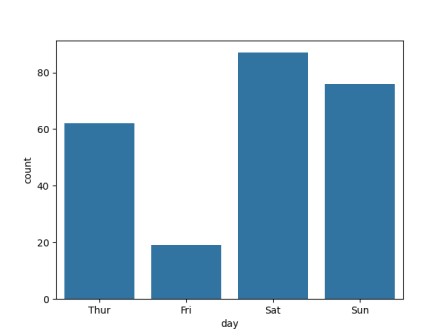
sns.countplot(x='day', data=df)
plt.show()
Output:
   total_bill   tip     sex smoker  day    time  size
0       16.99  1.01  Female     No  Sun  Dinner     2
1       10.34  1.66    Male     No  Sun  Dinner     3
2       21.01  3.50    Male     No  Sun  Dinner     3
3       23.68  3.31    Male     No  Sun  Dinner     2
4       24.59  3.61  Female     No  Sun  Dinner     4
Use Case:
Count occurrences of categories15. FacetGrid (Advanced)
import seaborn as sns
import matplotlib.pyplot as plt

df = sns.load_dataset('tips')
print(df.head())

g = sns.FacetGrid(df, col="time")
g.map(sns.scatterplot, "total_bill", "tip")
plt.show()
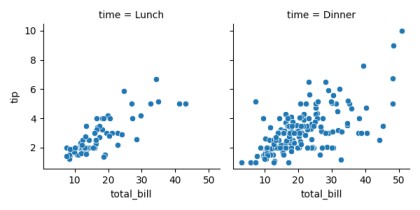
Output:
   total_bill   tip     sex smoker  day    time  size
0       16.99  1.01  Female     No  Sun  Dinner     2
1       10.34  1.66    Male     No  Sun  Dinner     3
2       21.01  3.50    Male     No  Sun  Dinner     3
3       23.68  3.31    Male     No  Sun  Dinner     2
4       24.59  3.61  Female     No  Sun  Dinner     4
Use Case:
Multi-plot visualization by categories16. Advantages of Seaborn
- Simple syntax for complex visualizations- Built-in support for statistical analysis
- Attractive default designs
- Tight integration with Pandas
17. Limitations of Seaborn
- Less control compared to Matplotlib- Limited for highly customized plots
- Depends on Matplotlib backend
18. Best Practices
- Choose the right plot type for your data- Use color wisely to highlight insights
- Avoid clutter and over-plotting
- Always label axes and titles
- Combine Seaborn with Matplotlib for customization
19. Seaborn vs Matplotlib
| Feature | Seaborn | Matplotlib |
|---|---|---|
| Level | High-level | Low-level |
| Ease of Use | Easy | Moderate |
| Default Styling | Attractive | Basic |
| Flexibility | Moderate | High |
