async and await syntax.
It enables a single thread to handle many I/O-bound operations concurrently by switching to other tasks whenever one task is waiting for an operation, such as a database query or network request, to complete.
In this article, we will explore asyncio from first principles and learn how coroutines, tasks, futures, and the event loop work together to provide concurrency in Python.
Why Asyncio Exists?
Before asyncio, Python applications typically handled concurrent work using threads. Consider a service that retrieves user information from a database.def get_user():
data = database.fetch_user()
return data
Asyncio was introduced to solve this problem by allowing applications to perform other useful work while waiting for I/O operations, such as database queries or network requests, to complete.
Asyncio provides concurrency, not parallelism. Most asyncio applications execute on a single thread using cooperative task switching.
Concurrency means multiple tasks make progress during the same period of time. Parallelism means multiple tasks execute simultaneously.
What is a Coroutine?
The foundation of asyncio is the coroutine.A coroutine is a special type of function that can pause and resume its execution, allowing other coroutines to run while it waits for an operation to complete.
Often described as "lightweight threads" or "functions you can pause," they allow you to write complex, non-blocking asynchronous code in a clean, sequential style.
A coroutine is created using the
async def keyword.
async def fetch_user():
    return {
        "id": 1,
        "name": "John"
    }
result = fetch_user()
print(result)
<coroutine object fetch_user>
What is Event Loop?
The Event Loop is the heart of asyncio.Every asyncio program runs on an event loop, which is responsible for scheduling tasks, resuming paused coroutines, monitoring I/O operations, and managing execution order.
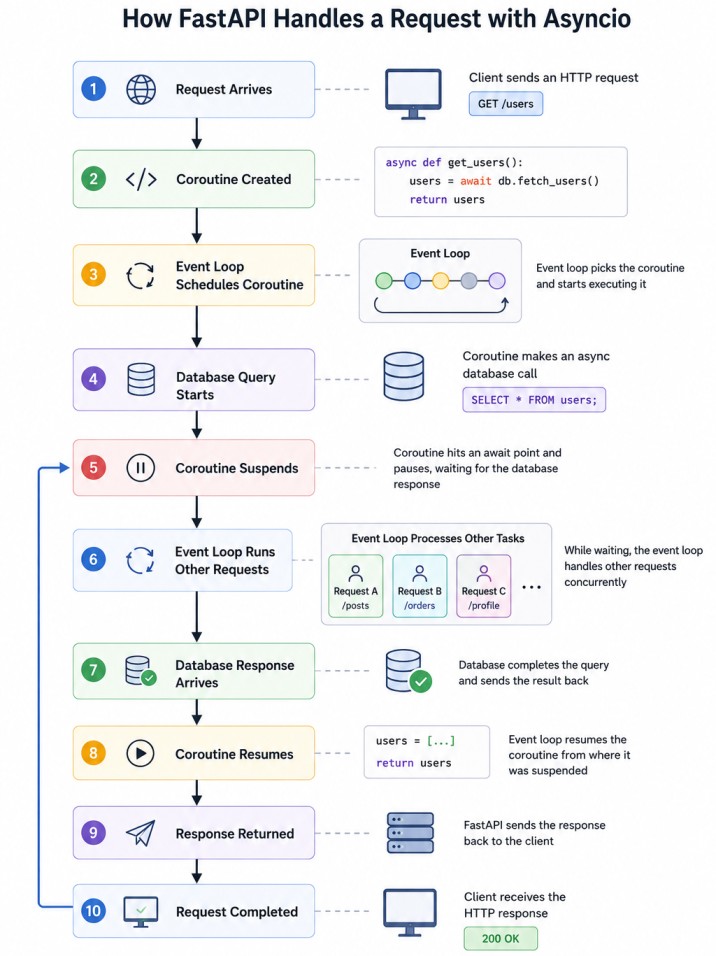
Whenever a coroutine reaches an await point, control returns to the event loop. The event loop then schedules another coroutine that is ready to execute.
This allows many operations to make progress without requiring thousands of threads.
What is await?
Theawait keyword is one of the most important concepts in asyncio.
import asyncio
async def process():
    print("Start")

    await asyncio.sleep(5)

    print("End")
The coroutine is suspended, and the event loop is free to execute other ready tasks until the awaited operation completes.
What Happens Inside FastAPI?
Consider the following endpoint.@app.get("/users")
async def get_users():
users = await database.fetch_users()
return users
What are Tasks?
A Task schedules a coroutine to run independently under the control of the event loop.import asyncio
async def work():
return "done"
task = asyncio.create_task(work())
Think of it as a scheduled coroutine. Without a task, a coroutine simply exists. With a task, the event loop can execute it.
Running Multiple Tasks Concurrently
Consider three API calls.async def service_a():
await asyncio.sleep(2)
async def service_b():
await asyncio.sleep(2)
async def service_c():
await asyncio.sleep(2)
await service_a()
await service_b()
await service_c()
Concurrent execution:
await asyncio.gather(
    service_a(),
    service_b(),
    service_c()
)
Understanding Futures
A Future represents a value that may become available later.future = asyncio.Future()
Result Not Available
future.set_result("completed")
Asyncio Does Not Help CPU-Bound Workloads
Consider:async def calculate():
total = 0
for i in range(100000000):
total += i
return total
The coroutine performs only CPU-intensive work and never reaches an await expression, so it never yields control back to the event loop.
As a result, asyncio provides little or no performance benefit for this workload.
Asyncio is extremely effective for I/O-bound workloads but provides minimal benefit for CPU-intensive operations.
For CPU-heavy workloads, consider using multiprocessing, process pools, or distributed workers.
One of the most common mistakes is calling blocking functions inside asynchronous code. Example:This blocks the event loop. Because time.sleep() blocks the current thread, the event loop cannot execute any other coroutines during this period.import time async def bad(): time.sleep(5)
A better approach:The second version allows other tasks to execute while waiting.import asyncio async def good(): await asyncio.sleep(5)
Conclusion
Asyncio is the foundation of modern asynchronous Python applications and plays a critical role in FastAPI.Coroutines define units of asynchronous work, Tasks schedule those coroutines for execution, Futures represent results that become available later, and the Event Loop coordinates everything.
Together, these components enable Python applications to handle thousands of I/O-bound operations efficiently using a single thread.
