FastAPI is a modern, high-performance web framework used to build APIs with Python 3.8+ based on standard Python type hints.
Architecture
A typical FastAPI request travels through the following layers, from the client request to the final response.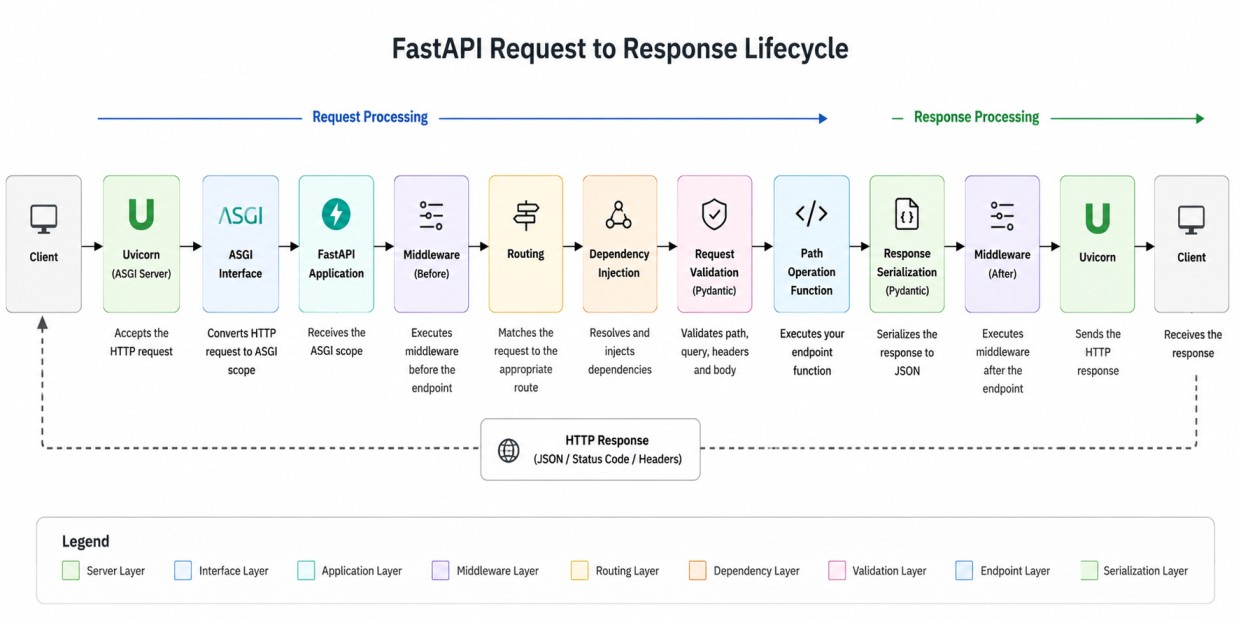
Step 1: Client Sends an HTTP Request
Everything begins when a client sends an HTTP request.GET /users/1 HTTP/1.1
Host: localhost:8000curl. Example:
curl http://localhost:8000/users/1An ASGI (Asynchronous Server Gateway Interface) server is a Python standard that enables web servers to communicate with asynchronous web applications and frameworks.
It acts as the modern successor to WSGI, allowing you to handle multiple concurrent connections and real-time protocols like WebSockets.
Step 2: Uvicorn Receives the Request
Most FastAPI applications are started using Uvicorn.uvicorn main:app --reloadUvicorn opens network sockets, accepts HTTP connections, parses incoming requests, and converts them into ASGI messages for the FastAPI application.
Step 3: Uvicorn Converts HTTP Request into ASGI Messages
Uvicorn converts the HTTP request into ASGI messages, including an ASGI scope that contains request metadata.{
"type": "http",
"method": "GET",
"path": "/users/1",
"headers": [...]
}ASGI is a specification that defines communication between asynchronous Python web servers and applications.
Step 4: FastAPI Receives the Request
Let's create a simple application.from fastapi import FastAPI
app = FastAPI()Step 5: Middleware Execution Begins
Before routing happens, FastAPI executes all configured middleware. Example:from fastapi import FastAPI, Request
app = FastAPI()
@app.middleware("http")
async def log_request(request: Request, call_next):
print("Request received")
response = await call_next(request)
print("Response generated")
return response
Common use cases for middleware include logging, authentication, generating or propagating correlation IDs, collecting metrics, and request tracing.
Step 6: Route Matching
After middleware execution begins, FastAPI attempts to locate the matching route.@app.get("/users/{user_id}")
async def get_user(user_id: int):
return {"id": user_id}GET /users/1, FastAPI checks the incoming URL against the routes defined in the application.
It finds that the request matches the route
/users/{user_id} and automatically extracts the value from the URL, assigning 1 to the user_id parameter.
The corresponding path operation function is then executed using this value.
If FastAPI cannot find any route that matches the requested URL, it immediately returns a
404 Not Found response to the client.
Step 7: Dependency Injection Resolution
Before the endpoint executes, FastAPI resolves all dependencies. Example:from fastapi import Depends
async def get_db():
return "database"
@app.get("/users")
async def get_users(db=Depends(get_db)):
return {"db": db}Step 8: Request Validation Using Pydantic
FastAPI relies heavily on Pydantic. Consider:from pydantic import BaseModel
class UserRequest(BaseModel):
name: str
age: int
@app.post("/users")
async def create_user(user: UserRequest):
    return user
{
    "name": "John",
    "age": 30
}
Invalid request:
{
    "name": "John",
    "age": "abc"
}{
"detail": [...]
}Step 9: Endpoint Execution
The endpoint executes only after FastAPI completes routing, dependency resolution, and request validation. Once these steps are successful, the endpoint function is called. Example:@app.get("/users/{id}")
async def get_user(id: int):
return {
"id": id,
"name": "John"
}Common activities performed inside an endpoint include database access, Kafka publishing, Redis interaction, and external API calls. This is where most application logic resides.
Step 10: Response Serialization
FastAPI now converts Python objects into JSON.return {
"id": 1,
"name": "John"
}Response:
{
    "id": 1,
    "name": "John"
}Step 11: Response Model Validation
FastAPI validates the response before returning it.class UserResponse(BaseModel):
id: int
name: str
@app.get("/users/{id}",
response_model=UserResponse)
async def get_user(id: int):
return {
"id": id,
"name": "John"
}Step 12: Exception Handling
If an exception occurs:from fastapi import HTTPException
@app.get("/users/{id}")
async def get_user(id: int):
raise HTTPException(
status_code=404,
detail="User not found"
)Response:
{
    "detail": "User not found"
}Step 13: Middleware Executes Again
After endpoint completion: Request → Middleware (Before) → Endpoint → Middleware (After) → ResponseThis stage is often used for response logging, metrics collection, and tracing.
Step 14: Uvicorn Sends Response to Client
FastAPI returns the response to Uvicorn.Uvicorn creates HTTP response packets, writes the response data to network sockets, and sends the response back to the client.
Example:
HTTP/1.1 200 OK
Content-Type: application/json

{
    "id": 1,
    "name": "John"
}End-to-End Example
from fastapi import FastAPI
from fastapi import Depends
from pydantic import BaseModel

app = FastAPI()

class UserResponse(BaseModel):
    id: int
    name: str

async def get_db():
    return "db_connection"


@app.middleware("http")
async def logging(request, call_next):
    print("Incoming request")
    response = await call_next(request)
    print("Outgoing response")
    return response

@app.get(
    "/users/{user_id}",
    response_model=UserResponse
)
async def get_user(
        user_id: int,
        db=Depends(get_db)
):
    return {
        "id": user_id,
        "name": "John"
    }
Conclusion
In a FastAPI application, every request passes through multiple layers, each responsible for a specific part of request processing.These layers include Uvicorn, middleware, routing, dependency injection, Pydantic validation, endpoint execution, response serialization, and finally response delivery to the client.
