A strong answer begins by clarifying scope. Chat systems can vary dramatically depending on requirements. Some products focus only on one-to-one messaging, while others require groups, media sharing, typing indicators, read receipts, message edits, reactions, status stories, bots, voice/video calling, disappearing messages, or enterprise compliance.
Understanding Requirements
In a time-limited interview, define the scope first. Assume we are designing a system that supports:1. One-to-one messaging
2. Group chat
3. Online presence
4. Message delivery acknowledgments
5. Read receipts
6. Push notifications
7. End-to-end encryption awareness
That scope is large enough to demonstrate system thinking.
Functional Requirements
1. The system should allow a user to register, authenticate, discover contacts, and send text or media messages.2. A sender expects messages to reach recipients quickly, even when recipients are offline. If the recipient is offline, the message should be stored and delivered later.
3. Users should see whether the message was sent, delivered, or read.
4. Group messaging must support many participants.
5. Users may use multiple devices such as mobile and web simultaneously.
Non-Functional Requirements
1. Scalability: The application must scale to millions of concurrent connections.2. Low Latency: Message delivery should be fast, ideally within milliseconds to low seconds.
3. Reliability: Data loss should be extremely rare.
4. Fault Tolerance: The system should survive server failures.
5. Resilience: Network interruptions are common on mobile devices, so reconnection logic must be robust.
6. Security: Privacy and encryption are central.
Capacity Estimation
Suppose the platform has 100 million daily active users. If each user sends 40 messages per day, the system processes:Total Messages per Day = 100 million × 40 = 4 billion messages/day
To calculate average throughput:
Messages per Second = 4,000,000,000 / 86,400 ≈ 46,296 messages/second
So, the system handles an average of approximately 46K messages per second.
During traffic spikes such as evenings, weekends, or events, peak load may be 3x to 5x higher:
Peak Throughput ≈ 140K to 230K messages/second
Concurrent active connections may reach several million because chat applications typically maintain persistent socket connections for real-time messaging.
If even 5% of daily active users are online simultaneously:
Concurrent Connections = 100 million × 5% = 5 million live connections
These estimates justify designing the system with horizontal scalability, load-balanced connection servers, message queues, and distributed storage.
If you state scale assumptions clearly in interviews, your later architecture decisions appear justified rather than arbitrary.
Request Flow
When a user opens https://web.chat.com (or a WhatsApp-like web app) in the browser, the flow typically works like this if hosted on AWS:1. DNS Resolution: The browser needs the server IP. It checks local cache, otherwise queries DNS. If managed by AWS Route 53, it returns the best endpoint (nearest/healthy).
Browser → DNS Resolver → Route 53 → CloudFront / API Gateway → ALB2. HTTPS Connection: The browser establishes a secure HTTPS/TLS connection to the resolved endpoint, typically CloudFront for static content.
3. Static Frontend Load: The HTML, CSS, JavaScript files are served via CloudFront (backed by S3). The frontend app loads in the browser.
Browser ← CloudFront (S3 origin)4. App Bootstraps: JavaScript initializes the app and renders login / QR pairing UI.
5. API Calls (via API Gateway): The frontend makes HTTPS API calls for login, config, profile, contacts, etc.
Browser → API Gateway → ALB → User/Auth Service6. WebSocket Connection (Real-Time): The browser establishes a persistent connection for chat.
Browser → ALB → Gateway Servers → Chat Service7. Real-Time Messaging: Messages, typing indicators, presence, and read receipts flow through:
Client ↔ Gateway ↔ Chat Service ↔ Queue ↔ Other Services8. Data Fetching: Chat history, contacts, and metadata are fetched via APIs:
Browser → API Gateway → Chat/User Service → DB/CacheHigh-Level Architecture
At a high level, the system consists of mobile/web clients connecting to the platform through persistent connections such as WebSocket or custom TCP protocols.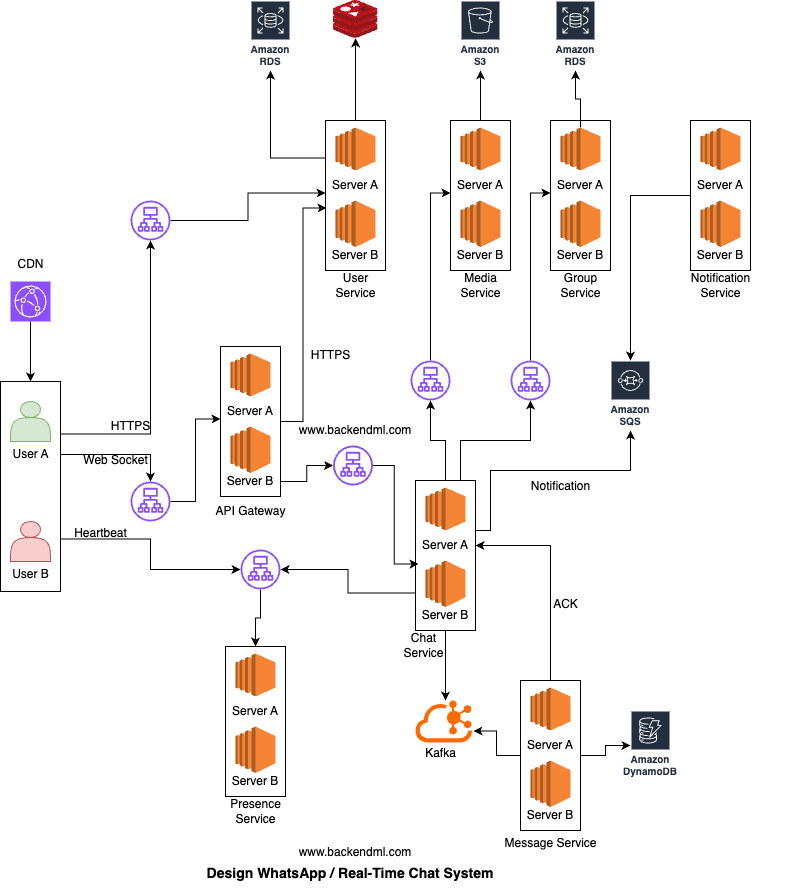
Major Components
The major components are:Client
From the client perspective, the system interacts with four different flows depending on the type of operation being performed.When a user opens https://web.chat.com (or a WhatsApp-like web app) in the browser, the HTML, CSS, and JavaScript files are served via a CDN. The frontend app loads in the browser.
For actions like registration, login, token retrieval, profile updates, and contact management, the client makes standard HTTPS request-response API calls to the User/Auth Service.
When User A sends a message to User B, the client packages the payload with conversation ID, sender ID, timestamp, and a temporary client message ID (for retry/deduplication). The client establishes a persistent, bidirectional WebSocket connection with the Gateway. Once connected and authenticated, the client can continuously send and receive messages without reopening connections.
The client also keeps sending heartbeats to the Presence Service to track online/offline state, last seen timestamp, and active devices for each user in near real time.
CDN / Edge Layer
CDN / Edge Layer serves static assets such as HTML, CSS, JavaScript, and images from edge locations that are closer to users, significantly reducing latency and offloading traffic from backend servers. It caches content across globally distributed edge nodes to ensure fast and reliable delivery.Example: AWS CloudFront delivers web app assets from Amazon S3 or origin servers with low latency and high availability worldwide.
API Gateway / Connection Gateway
The client (mobile/web) first connects to the API Gateway / Connection Gateway, which acts as the entry point for all real-time traffic. In an AWS setup, this layer sits behind a Load Balancer (ALB) and consists of multiple gateway instances handling connections at scale.The gateway is responsible for establishing and maintaining WebSocket/TCP connections, validating authentication tokens (JWT/session), managing heartbeats and reconnections, and routing requests to backend services like Chat Service. It ensures only authenticated users can maintain persistent connections.
The client sends a login request with user credentials to the User/Auth Service over HTTPS. The User/Auth Service validates the credentials. If the login is successful, the service generates a JWT token and sends it back to the client, which stores it for future authenticated requests.
The client establishes a WebSocket connection to the Gateway, sending the JWT token as part of the connection request. The Gateway validates the token, either locally or by consulting the User/Auth Service. Once verified, the connection is accepted, and the Gateway notifies the client that it is connected.
When sending a message, the client transmits it over the WebSocket connection to the Gateway, which forwards it to the Chat Service for processing. The Chat Service then routes the message back through the Gateway to the recipient client, enabling real-time communication.
User/Auth Service
User Service is responsible for user identity and account lifecycle, handling registration, authentication, profile management, session tokens, and contact discovery. All communication with this service happens over HTTPS, ensuring secure request-response interactions.During registration, the client creates an account using phone or email and verifies identity via OTP. The client first calls /send-otp over HTTPS, where the OTP is temporarily stored in Redis with a TTL. It then calls /verify-otp, and upon successful verification, the user is created in the database.
For login, the client sends a request to /login with credentials (OTP or password), which are validated before generating a JWT token. A session is also stored in Redis, and the token is returned to the client. A /logout request invalidates the session.
In addition, the User Service handles profile management, allowing users to fetch their details using /me and update information like name, photo, and preferences via /profile.
It also supports contact discovery, where the client uploads hashed contact numbers through /contacts/sync, and the service matches them against registered users in the database and returns the results.
Sample Schema:
-- Users table
{
    id,
    phone_number,
    email,
    name,
    profile_pic_url,
    status (active/blocked),
    created_at,
    updated_at
}

-- Auth credentials table (optional if password-based login)
{
    user_id,
    password_hash,
    password_salt,
    last_password_change
}

-- OTP table (temporary, TTL-based in Redis ideally)
{
    key (phone/email),
    otp_code,
    expires_at
}

-- Sessions table (can be in Redis for fast access)
{
    session_id,
    user_id,
    jwt_token,
    device_id,
    created_at,
    expires_at
}

-- Indexes
(phone_number)  -- fast lookup during login
(email)         -- alternative login lookup
(user_id)       -- session + auth joins
Chat Service
The Gateway forwards messaging requests to the Chat Service, which is responsible for message validation, sequencing, and orchestration (not heavy connection handling).The Chat Service first validates the request by checking the sender’s permissions (ensuring the user is a valid member and not blocked or muted). It then fetches the relevant conversation or group metadata and assigns both a globally unique message ID and a per-conversation sequence number to maintain proper message ordering.
After validation, the Chat Service performs a durable write using an asynchronous pipeline. It publishes a MessageCreated event to a Kafka / Queue. A downstream Message Service (consumer) processes this event and persists the message in a database such as DynamoDB or Cassandra. Once stored, an ACK is sent back to the Chat Service, confirming successful persistence.
Once the Chat Service receives the ACK confirming that the message is safely persisted, it sends a sent acknowledgment to the sender through the Gateway.
The Chat Service then determines the recipients of the message. In a 1:1 chat, this involves a direct lookup of the target user, while in a group chat, the Chat Service queries the Group Service to fetch the list of members (e.g., B, C, D, E).
Before attempting delivery, it checks the recipient's presence status by consulting the Presence Service, which determines whether a user is online based on recent heartbeat signals received via the Gateway.
If the recipient is online, the Chat Service sends the message through the Gateway to the recipient's active socket connection. The recipient client responds with a delivery acknowledgment, which flows back through the Gateway to the Chat Service. The Chat Service then notifies the sender, via the Gateway, that the message has been delivered.
If the recipient is offline, the Chat Service does not attempt real-time delivery. Instead, it triggers an asynchronous notification flow by publishing a MessageCreated event to a Queue. A downstream Notification Service consumes this event and sends a push notification via platforms like FCM or APNs to the user’s device.
Message Service
The Message Service is responsible for durable storage and retrieval of chat messages. It consumes message events from Kafka, persists them in a scalable database, and supports efficient queries such as fetching recent messages.It ensures high write throughput, data durability, and per-conversation ordering, while keeping the Chat Service lightweight and stateless.
For example, it can be implemented as a Spring Boot consumer service running on ECS / EKS, consuming from Kafka and storing messages in DynamoDB or Cassandra, partitioned by conversation_id.
Sample Schema:
-- Messages table (Cassandra)

CREATE TABLE messages_by_conversation (
    conversation_id UUID,              -- Partition Key
    message_seq BIGINT,                -- Clustering Key (per-conversation sequence)
    message_ts TIMEUUID,               -- For time-based ordering/debugging
    message_id UUID,
    sender_id UUID,
    content TEXT,
    media_url TEXT,
    message_type TEXT,                 -- text/image/video
    created_at TIMESTAMP,
    PRIMARY KEY (conversation_id, message_seq)
) WITH CLUSTERING ORDER BY (message_seq DESC);

-- Notes:
-- Partition Key: conversation_id → keeps all messages of a conversation together
-- Clustering Key: message_seq → guarantees strict ordering within a conversation
-- message_ts (TIMEUUID) → helps with time-based queries/debugging (optional but useful)

-- Example Queries:

-- Fetch last 50 messages
SELECT * FROM messages_by_conversation
WHERE conversation_id = ? LIMIT 50;

-- Pagination (older messages)
SELECT * FROM messages_by_conversation
WHERE conversation_id = ?
AND message_seq < ? LIMIT 50;
The partition key should be conversation_id because all messages of a conversation need to go to the same partition to preserve ordering and enable efficient reads.
The timestamp (or a sequence number) should be used as the sort/clustering key, so messages within a conversation are stored in sorted order, allowing fast retrieval of recent messages and proper pagination.
Presence Service
The Presence Service can treat the existence of the key in the in-memory store (e.g., Redis) as online, and the absence of the key (after TTL expiry) as offline. This simplifies the design and avoids redundant data.A cleaner data structure would be:
Key: user:{userId}

Value (Hash):
- last_seen: timestamp
- devices: [device1, device2]
Group Service
The Group Service manages group memberships, roles (admin/member), permissions, and group metadata such as name, icon, and settings. It also provides efficient member lookup for message fan-out and validates actions like adding/removing users or sending messages.Example: a Spring Boot service using PostgreSQL on AWS RDS for strong relational consistency and queries like "get all members of group G1".
A typical schema design can be:
-- Groups table
{
    id,
    name,
    icon_url,
    created_by,
    created_at,
    settings (JSON)
}

-- Group members table
{
    group_id,
    user_id,
    role (admin/member),
    joined_at,
    status (active/removed)
}

-- Indexes
(group_id)   -- fast member lookup for fan-out
(user_id)    -- fetch all groups of a user
Notification Service
Notification Service sends push notifications to users who are offline or not actively connected. It consumes message events from a queue, determines the target devices, and triggers platform-specific notifications without blocking the main message flow.Example: Spring Boot worker consuming events from AWS SQS and sending notifications via FCM (Android) and APNs (iOS).
Media Service
Media Service handles image/video/file uploads and downloads without overloading chat servers. It generates pre-signed S3 URLs so clients can upload/download files directly from storage, while the service manages access control, metadata, and file references used in messages.Example: Spring Boot service generating pre-signed URLs for AWS S3, where the client uploads the file directly and then sends the file reference in the chat message.
Messaging Flow
One-to-One Messaging
In a private chat, one sender sends a message to one recipient. This is the simplest and most common messaging flow.Example: User A sends "Hello" to User B1. User A client sends message request
2. Gateway authenticates request
3. Chat service generates message_id
4. Message stored in database / queue
5. Server sends Sent ACK to User A
6. If User B online:
Push message to User B socket
Else:
Keep message pending
7. User B device sends Delivered ACK
8. If User B opens chat:
Send Read ACK
9. User A UI updated
User A -> Server -> B-Mobile
                 -> B-Web
Group Chat Messaging
In a group chat, one sender sends a message to many participants. This introduces fan-out complexity. Example:User A sends "Meeting at 5" to Group G1
Members: A, B, C, D, E
1. User A sends message to Group G1
2. Gateway authenticates request
3. Validate User A is group member
4. Generate message_id
5. Store canonical message
6. Send Sent ACK to User A
7. Fan-out delivery to members: B, C, D, E
8. Online users receive instantly
9. Offline users receive later on reconnect
10. Delivery / Read receipts collected
Delivered: B, C
Read: B
B online  -> instant delivery
C offline -> pending
D offline -> pending
Ordering of Messages
When users chat, they naturally expect the conversation timeline to reflect the sequence in which messages were sent and received.For example, if one user asks a question and another user replies, the reply should appear after the question, not before it. Maintaining this order becomes challenging in distributed systems because messages travel through networks with variable latency, servers process requests asynchronously, and users may send messages at nearly the same time.
Providing a single global order for every message sent by every user worldwide is extremely expensive and usually unnecessary. To achieve global ordering, every message across all chats would need to pass through a centralized sequencing system. This creates bottlenecks, increases latency, and limits scalability.
Therefore, most chat systems avoid global ordering and instead guarantee per conversation ordering. Per conversation ordering means messages are guaranteed to appear in correct sequence within a specific chat, whether it is one-to-one or group chat.
Each conversation is treated independently. So: Chat A between User1 and User2 has its own message order. Chat B between User3 and User4 has a separate order. There is no need to compare timestamps between Chat A and Chat B.
This approach is simpler, faster, and scales well.
When a message reaches the server, the server assigns a unique sequence number or uses a monotonic timestamp for that conversation. Example:
Conversation C1

Msg1 -> Seq 101
Msg2 -> Seq 102
Msg3 -> Seq 103
Sometimes two users send messages at nearly the same moment.Example:
User A sends "Hello"
User B sends "Hi"
User A -> Seq 104
User B -> Seq 105
1. Hello
2. Hi
Using only client-side timestamps creates problems:Because of retries or network delays, clients may receive messages out of order temporarily. For example: Seq 110 arrives first Seq 109 arrives later The client should reorder locally before rendering or briefly hold later messages until missing sequence numbers arrive.
- Device clocks may be incorrect
- Users may manually change time zones
- Offline devices may reconnect later
- Two devices may have slightly different times
Therefore, the server is considered the source of truth for message ordering.
Ordering is more complex in group chats because many users may send messages simultaneously. Still, the same principle applies: the server assigns a single sequence stream per conversation. Example:
Group G1
User A -> Seq 201
User C -> Seq 202
User B -> Seq 203
Message Status: Sent, Delivered, and Read
Simply pressing "send" is not enough. The platform should clearly indicate whether the message was sent, delivered, or read.These statuses are implemented through a chain of acknowledgment events (ACKs) exchanged between client devices and backend servers.
Sent
A message is marked as sent when the client successfully transmits it to the backend server and the server acknowledges acceptance.This usually means:
- Message request reached server
- Authentication passed
- Message persisted or queued safely
- Server returned success response
Once the sender receives this acknowledgment, the UI marks the message as Sent. At this stage, the recipient may still be offline.
Delivered
A message is marked as delivered when the recipient's device receives the message payload successfully. This usually requires a device acknowledgment from the recipient client. Example:Server pushes message to User B
User B device sends ACK
Status = Delivered
- Delivered to at least one active device, or
- Delivered to all linked devices
depending on product design.
When User B's client receives the payload successfully, it sends a delivery acknowledgment back. Now the sender sees Delivered.
If User B is offline, this step happens later when they reconnect.
Read
A message is marked as read when the recipient opens the chat and the message becomes visible or is explicitly acknowledged as seen. Example:User B opens conversation
Client sends read receipt for seq 250
Status = Read
Typical status tracking may use:
Receipts(
  message_id,
  status,
  delivered_at,
  read_at
)
Handling Offline Users
When a recipient is disconnected, the system should not discard incoming messages. Instead, all undelivered messages remain securely stored in the backend message store until the user reconnects. For example:User A sends message to User B
User B is offline
1. Accept message from User A
2. Persist message in database / queue
3. Mark status = Pending / Undelivered
4. Wait for User B to reconnect
Once the offline user reconnects, the client establishes a new socket/session and sends its per-conversation sync state, such as the last acknowledged sequence number for each chat (or last synced timestamp). Example:
Chat C1 -> last_ack_seq = 250
Chat C2 -> last_ack_seq = 90
Chat C3 -> last_ack_seq = 410
For Chat C1 -> fetch seq > 250  => 251, 252, 253
For Chat C2 -> fetch seq > 90   => 91, 92
For Chat C3 -> fetch seq > 410  => 411
{
  C1: 250,
  C2: 90,
  C3: 410
}
[
  {chat:C1, seq:251},
  {chat:C1, seq:252},
  {chat:C2, seq:91},
  {chat:C3, seq:411}
]
Group Chat Scaling
In a group chat, the same message may need to reach 10 users, 500 users, or even millions of members depending on the product.This creates a fan-out problem, where one write operation expands into many downstream deliveries. 1 message sent to group of 500 users=> ~500 delivery events Two classic strategies are commonly used.
1. Fan-out on Write
In fan-out on write, when a group message arrives, the system immediately creates recipient-specific inbox entries or delivery tasks for all members. Example: User sends message M1 to Group G1 (500 members) System immediately creates:Inbox(User1, M1)
Inbox(User2, M1)
Inbox(User3, M1)
.
.
.
Inbox(User500, M1)
Advantages: Reads are very fast because each user already has precomputed inbox entries, allowing messages to load instantly. It is also easy to show unread counts since the data is already available for every user. This provides a good user experience, especially for active groups where users expect quick updates. In addition, chat opening time is faster because messages do not need to be fetched or processed at runtime.
Disadvantages: Writes become expensive because every new message must be copied or referenced into multiple user inboxes. Large groups create huge write amplification, significantly increasing system load. Storage usage also rises due to duplicated inbox metadata across many users. Furthermore, sudden viral groups can overload write pipelines, causing delays or performance issues.
This model is common for small and medium-sized groups where quick reads matter more than write cost.
2. Fan-out on Read
In fan-out on read, the system stores only one canonical copy of the group message. It does not immediately generate per-user inbox entries. Instead, when a user opens the group, the system calculates which messages that user has not yet seen. Example:Store once: GroupMessages( group_id = G1, msg_id = M1)When User27 opens chat: Fetch messages after User27 cursorDisadvantages: Reads are slower because much of the processing work shifts to read time when users open chats. Query logic becomes more expensive, as the system must assemble messages and user states dynamically. Calculating unread counts is harder since they are not precomputed for each user. Additionally, opening highly active groups may create latency spikes due to the heavy read workload at peak times.
This model is suitable for massive broadcast-style communities.
Presence and Typing Indicators
Presence refers to showing whether a user is online, offline, last seen, or currently active on the platform.If millions of connected users send heartbeat signals every few seconds to indicate they are still active, the backend may receive millions of updates continuously. For example, if 5 million users send a heartbeat every 10 seconds, the system must process around 500,000 updates per second.
Because of this high update rate, presence data is usually not stored in traditional databases. Instead, it is maintained in fast in-memory datastores such as Redis-like systems, where reads and writes are extremely fast.
A common approach is to store presence with TTL (Time To Live) expiry. Example:
user_101 -> online (expires in 30 sec)
user_205 -> online (expires in 30 sec)
Presence systems may also maintain: online / offline status and last seen timestamp.
Typing indicators are even more temporary. When a user starts typing, the other participant may briefly see "typing...". This information is useful only for a few seconds and should never be stored permanently.
Typing events are usually sent as lightweight transient signals through low-latency pub/sub channels or socket events. Example:
User A typing in Chat C1 → publish typing event to User BPush Notifications
Push notifications are used when a user is offline, the application is closed, running in the background, or the device does not currently have an active socket connection to the chat servers. Since real-time delivery through persistent connections is not possible in these situations, the system relies on mobile platform notification services.For Android devices, notifications are commonly delivered through Firebase Cloud Messaging (FCM) provided by Google. For iPhone devices, notifications are delivered through Apple Push Notification Service (APNs) provided by Apple. Typical flow:
1. User A sends message to User B
2. User B is offline
3. Chat backend stores message
4. Notification service sends push request to FCM / APNs
5. Device receives notification
6. User opens app
7. App reconnects and syncs messages securely
Push notifications usually contain only minimal metadata such as sender name, unread count, or generic text like "New Message." Sensitive message content is often avoided or limited based on privacy settings.
Reliability and Availability
To achieve high availability, services should be deployed across multiple availability zones or even multiple regions. If one data center, zone, or network path fails, traffic can automatically shift to healthy infrastructure. Example:Region A
- Zone 1
- Zone 2
- Zone 3
Databases should use replication so that data remains available even if a node crashes. Primary-replica or multi-primary architectures may be used depending on consistency and latency needs.
Connection gateways should sit behind load balancers. This allows incoming traffic to be distributed across many gateway nodes and enables unhealthy nodes to be removed automatically. Example:
Clients
   ↓
Load Balancer
   ↓
Gateway-1
Gateway-2
Gateway-3
Retry logic is also essential because transient failures happen frequently in distributed systems. A request may fail due to timeout, packet loss, or temporary overload. Clients or services often retry automatically.
However, retries introduce a major problem: duplicate message delivery. Example:
1. Client sends message M1
2. Server stores message
3. ACK lost due to timeout
4. Client retries sending M1
Without safeguards, the recipient may receive the same message twice.
For this reason, many chat systems use at-least-once delivery. This means the platform guarantees messages are delivered one or more times, but duplicates may occasionally occur.
To handle duplicates safely, clients and servers use idempotency. A repeated request with the same message ID should produce the same result rather than creating a new message. Example:
message_id = abc123

First request  -> stored
Retry request  -> detected duplicate, ignored
Exactly-once delivery sounds ideal because each message would be delivered once and only once. However, in distributed systems this is difficult and expensive due to retries, crashes, network partitions, and acknowledgment failures. That is why most real-world messaging systems prefer: At-least-once delivery + deduplication + idempotent processing
This provides strong reliability with practical scalability.
Database Choices
Different types of data have different access patterns, consistency needs, and scale requirements.Relational databases are ideal for structured business data that requires strong consistency, transactions, and joins. These databases are commonly used for user accounts, billing records, subscriptions, admin tools, payment history, contact relationships, compliance data, and configuration metadata. Relational systems are useful when data integrity is critical.
NoSQL wide-column stores are better suited for chat messages because messaging workloads involve extremely high write throughput and simple retrieval patterns.
NoSQL wide-column stores are distributed, column-oriented databases that use column families to store large, sparse datasets across multiple servers. They differ from relational databases by allowing rows to have different columns, offering high scalability for analytical, logging, and IoT data.Typical message queries are:
Unlike relational databases, not every row needs to contain data for every column, allowing flexibility. Key examples include Apache Cassandra, HBase, and Google Bigtable.
Highly scalable horizontally by partitioning data across many nodes. These databases can store multiple versions of a value, each marked with a timestamp.
1. Fetch messages for conversation C1
2. Fetch latest 50 messages
3. Fetch messages after sequence 250
These access patterns are predictable and do not require complex joins. Since chat systems may store billions of messages, distributed NoSQL databases scale horizontally much more efficiently.
Object storage should be used for large binary files such as images, videos, voice notes, and documents. Storing media directly inside databases is expensive and inefficient.
Typically, the chat message stores only a reference URL or object key, while the file itself resides in object storage.
Caching in WhatsApp / Chat System
User Profile Cache can store frequently accessed user information such as name, profile picture, privacy settings, and last seen preferences. This avoids repeated database lookups whenever chats are opened.Conversation List Cache can store a user's recent chat list with latest message preview and timestamps. Since users open the home screen frequently, this is one of the hottest read paths. Example:
cache:user:101:chat_listcache:chat:C1:recent_messagesuser:101 -> online (TTL 30 sec)Session / Connection Cache can map active users to gateway servers or socket sessions, helping route incoming messages quickly. Example:
user:101 -> gateway-12Contact Discovery
Once authenticated, users need to find people they already know. Contact discovery helps map a phone's address book to registered platform users. Typical flow:1. User grants contacts permission
2. App hashes phone numbers locally
3. Uploads hashed contacts
4. Backend matches against registered users
5. Returns matched contacts
The user then sees which friends are already on the platform. Why Hash Contacts? Instead of uploading raw contact lists, systems often hash or privacy-protect identifiers before matching to reduce exposure of personal data.
Contacts(
  user_id,
  contact_user_id
)
Data Loss, Server Failures, and Reconnection Logic
Data Loss Prevention
To reduce Data loss risk, messages should be durably persisted before the sender receives success confirmation. Flow:1. User sends message M1
2. Server validates request
3. Store M1 in database / durable queue
4. Replicate to secondary node (optional)
5. Send ACK to sender
This means the system should avoid acknowledging messages before they are safely written. If a retry occurs after timeout, the same message ID prevents duplicates.
Server Failures
Servers can fail due to crashes, deployments, hardware issues, memory leaks, or network outages. Chat systems must assume failures will happen regularly.To handle this, services are deployed redundantly behind load balancers. Example:
Load Balancer
   ↓
Gateway-1
Gateway-2
Gateway-3
Databases should use replicas so reads/writes can fail over to healthy nodes. Example:
Primary DB fails → Promote replica → Resume traffic