Handling this volume of data reliably, efficiently, and at scale requires a robust event streaming platform. This is where Apache Kafka has become the industry standard.
Kafka is used by organizations such as Netflix, LinkedIn, Uber, Airbnb, Amazon, and many other large-scale enterprises to build event-driven architectures and real-time data pipelines.
In this article, we will explore the core architectural components of Kafka, including Brokers, Topics, Partitions, Replication, and Controllers. By the end of this article, you will understand how Kafka stores data, distributes workload, handles failures, and ensures high availability.
Kafka Architecture?
Traditional messaging systems often struggled with scalability and throughput when dealing with massive volumes of data. Organizations needed a system capable of handling millions of messages per second while providing durability, fault tolerance, and horizontal scalability.Kafka was originally developed at LinkedIn to solve these challenges. Unlike traditional message queues that remove messages after consumption, Kafka stores messages on disk for a configurable retention period. This design enables multiple consumers to read the same data independently and replay historical events whenever required.
Kafka combines the capabilities of a messaging system, event streaming platform, and distributed commit log into a single architecture.
At a high level, a Kafka cluster consists of multiple servers called brokers. Producers publish messages to topics, while consumers read messages from topics.
The architecture looks like this:
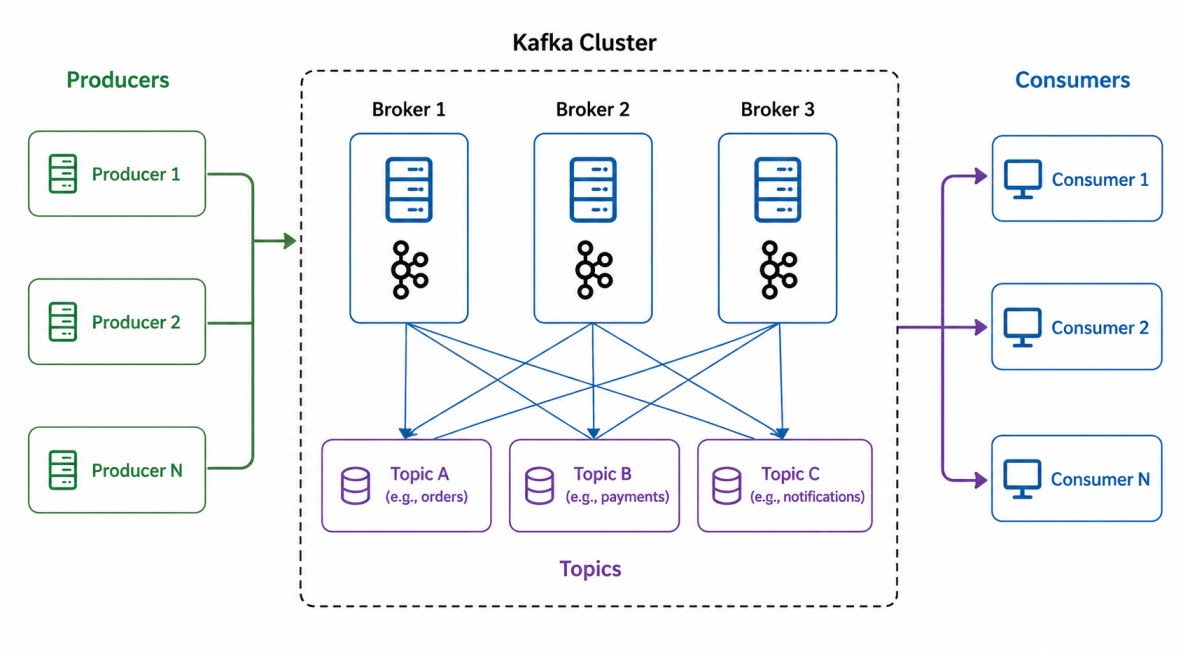
What is a Kafka Broker?
A Broker is a Kafka server responsible for storing data and serving client requests.A Kafka cluster typically contains multiple brokers. Each broker manages a subset of partitions and handles read and write operations for those partitions.
Consider a cluster with three brokers:
Broker-1
Broker-2
Broker-3
The broker performs several critical responsibilities:
1. Message Storage: Kafka stores messages on disk instead of keeping them only in memory. This allows Kafka to retain data for days, weeks, or even months.
2. Handling Producer Requests: Producers connect to brokers and publish messages.
3. Handling Consumer Requests: Consumers fetch messages from brokers.
4. Replication Management: Brokers maintain replicas of partitions to ensure fault tolerance.
5. Cluster Coordination: One broker acts as the controller and manages cluster metadata.
A single broker can host partitions from hundreds or thousands of topics
Understanding Topics & Partitions
A Topic is a logical category used to organize messages. Think of a topic as a database table. Producers write records into a topic, and consumers read records from that topic.When an order is placed in an e-commerce application, the producer may publish the event to the "orders" topic. The topic itself does not store data directly. Instead, data is stored inside partitions.
This distinction is extremely important because partitions are the real unit of scalability in Kafka.
A Partition is an ordered, immutable sequence of records. Each topic is divided into one or more partitions.
Consider an orders topic with three partitions:
orders
 ├── Partition-0
 ├── Partition-1
 └── Partition-2
For example:
Partition-0
--------------
Order-1
Order-4
Order-7

Partition-1
--------------
Order-2
Order-5
Order-8

Partition-2
--------------
Order-3
Order-6
Order-9
Order-1
Order-4
Order-7
However, Kafka does not guarantee ordering across multiple partitions. This is one of the most frequently asked Kafka interview questions.
Every message within a partition receives a unique identifier called an Offset. Example:
Partition-0

Offset 0 -> Order-1
Offset 1 -> Order-4
Offset 2 -> Order-7
Offset 3 -> Order-10
Unlike traditional queues, Kafka does not delete messages after consumption. Instead, consumers simply remember the offset they have already processed.
This design enables replaying historical data whenever needed.
How Kafka Assigns Messages to Partitions
Kafka uses a partitioning strategy to determine where a message should be stored.If a producer sends a message with a key:
ProducerRecord<String, String> record =
    new ProducerRecord<>(
        "orders",
        "customer-123",
        "Order Created"
    );
hash(key) % numberOfPartitions
If no key is provided, Kafka uses its default partitioning strategy. Modern Kafka producers typically use a sticky partitioner, which sends messages to the same partition for a short period and then switches to another partition. This approach improves batching efficiency and increases throughput.
For example, with three partitions:
Message-1 -> Partition-0
Message-2 -> Partition-0
Message-3 -> Partition-0
Message-4 -> Partition-1
Message-5 -> Partition-1
Why Partitions Matter?
Partitions provide the foundation for Kafka's scalability. Imagine a topic with only one partition.orders
└── Partition-0
orders
 ├── Partition-0
 ├── Partition-1
 ├── Partition-2
 └── Partition-3
A senior engineer should always think carefully about partition count because increasing partitions later may impact ordering guarantees and partition distribution.
Understanding Replication
If a broker crashes, what happens to the data? Without replication, all messages stored on that broker would be lost.Kafka solves this problem using Replication. Each partition can have multiple replicas distributed across different brokers. Consider a cluster:
Broker-1
Broker-2
Broker-3
Partition-0

Leader  -> Broker-1
Replica-1 -> Broker-2
Replica-2 -> Broker-3
Replication is the foundation of Kafka's fault tolerance. The number of replicas maintained for a partition is called the Replication Factor. Example:
Replication Factor = 3
1 Leader Replica (Replica-0)
2 Follower Replicas (Replica-1, Replica-2)
Each partition has exactly one Leader and zero or more Followers. All producer and consumer traffic goes through the leader. Followers continuously copy data from the leader. This ensures replicas remain synchronized.
In-Sync Replicas (ISR)
Kafka maintains a list called the In-Sync Replica (ISR) set. ISR contains replicas that are fully caught up with the leader. Example:Leader -> Broker-1 (Replica-0)
Follower -> Broker-2 (Replica-1)
Follower -> Broker-3 (Replica-2)
ISR = [Replica-0, Replica-2]
Interviewers frequently ask about ISR because it demonstrates understanding of Kafka's durability guarantees.
Kafka Controllers
The Kafka Controller is a specialized Kafka broker responsible for managing the state of partitions and replicas across the entire cluster.While every broker can read and write data, only one broker acts as the active Controller at any given time.
1. Elects Leaders: When a partition leader broker crashes, the Controller selects a new leader from the remaining synchronized replicas (ISR).
2. Tracks Cluster Changes: It monitors the cluster via ZooKeeper (in older versions) or KRaft (in newer versions) to detect when brokers join or leave.
3. Manages Metadata: It coordinates topic creation, partition deletion, and replica reassignments.
4. Broadcasts Updates: It syncs the latest cluster metadata to all other brokers so they know which broker holds the leader replica for every partition.
Historically, Kafka used Apache ZooKeeper to manage cluster metadata. ZooKeeper stored information about: Cluster state, brokers, topics, controllers, and leader assignments. However, managing ZooKeeper added operational complexity.How the Controller is Chosen?
Modern Kafka versions use KRaft (Kafka Raft Metadata Mode). KRaft eliminates ZooKeeper entirely. Benefits include: Simpler deployment, lower operational overhead, faster controller elections, and improved scalability.
Today, most new Kafka deployments are based on KRaft mode.
ZooKeeper Mode (Older): The first broker to start up creates an ephemeral node in ZooKeeper called /controller. If that broker dies, the node disappears, and the remaining brokers race to create it again. The winner becomes the new Controller.
KRaft Mode (Kafka 3.0+): ZooKeeper is replaced by an internal consensus quorum. A dedicated group of brokers acts as a controller quorum, using the Raft protocol to elect a leader controller faster and more reliably.
Message Flow in Kafka
Let's walk through a complete message flow.1. A producer publishes an order event:
ProducerRecord<String, String> record =
    new ProducerRecord<>(
        "orders",
        "customer-101",
        "Order Created"
    );

producer.send(record);
3. The message is written to the partition leader.
4. Followers replicate the message.
5. The leader acknowledges the producer.
6. Consumers read the message from the leader.
7. Consumers commit offsets after successful processing.
This entire process happens within milliseconds in a healthy cluster.
When designing Kafka-based systems, partition count is one of the most important decisions. Too few partitions limit throughput. Too many partitions increase metadata overhead and rebalance time.
Replication factor should usually be three in production systems to balance availability and resource utilization.
Message keys should be chosen carefully because they directly impact partition distribution and ordering guarantees.
Monitoring consumer lag is essential because growing lag often indicates processing bottlenecks or resource constraints.
Kafka is optimized for sequential disk writes and append-only logs, which is one of the primary reasons it can achieve extremely high throughput.
Kafka Interview Questions
Why Kafka uses partitions?- Partitions enable horizontal scalability, parallel processing, and increased throughput.
Kafka guarantees message ordering?
- Kafka guarantees ordering only within a partition, not across multiple partitions.
What is replication factor?
- Replication factor determines how many copies of data Kafka maintains and directly affects fault tolerance.
Difference between leaders and followers.
- Producers and consumers communicate only with leaders, while followers replicate data and act as failover candidates.
ZooKeeper versus KRaft.
- Modern Kafka deployments increasingly use KRaft because it eliminates ZooKeeper and simplifies cluster management.
