Despite its widespread adoption, many engineers interact with Kubernetes only through commands such as:
kubectl apply -f deployment.yaml
kubectl get pods
kubectl logs pod-name
What happens when you run kubectl apply?Instead of merely discussing theory, we'll build a small deployment together, observe Kubernetes in action, and then connect our observations to the internal architecture of the platform.
Many engineers can explain that a Deployment gets created. Far fewer can explain how the request travels through the Kubernetes control plane, how the Deployment is stored, how Pods are scheduled, and how containers eventually start running on a worker node.
By the end of this article, you should have a solid understanding of:
1. Why Kubernetes was created and the problems it solves
2. The concepts of desired state, actual state, and reconciliation
3. How a Kubernetes cluster is organized
4. The responsibilities of the Control Plane and Worker Nodes
5. How Deployments, ReplicaSets, and Pods work together
6. How Kubernetes automatically recovers from failures
7. The role of the reconciliation loop in maintaining cluster health
8. The architectural foundation upon which the rest of Kubernetes is built
More importantly, you'll develop the mental model required to reason about Kubernetes rather than simply memorizing commands.
The Problem Kubernetes Was Created to Solve
Imagine that your organization operates fifty services. Each service runs multiple instances across several servers. Some services require more CPU during peak traffic hours. Others need additional memory. A few must remain highly available even when entire servers fail.Without orchestration software, operations teams become responsible for managing tasks such as:
1. Deciding where applications should run
2. Restarting failed processes
3. Replacing unhealthy servers
4. Scaling applications
5. Managing networking
6. Performing rolling deployments
As infrastructure grows, these responsibilities become increasingly difficult to manage manually.
Containers solved application packaging and portability problems, but they did not solve operational complexity.
- Running ten containers on a laptop is easy.
- Running ten thousand containers across hundreds of servers is not.
Kubernetes was created to automate these operational concerns.
Rather than asking engineers to manage individual containers, Kubernetes allows engineers to describe their desired outcome while the platform handles execution. This concept forms the foundation of Kubernetes.
Desired State vs Actual State
At its core, Kubernetes is a desired-state system. Consider the following Deployment:apiVersion: apps/v1
kind: Deployment
metadata:
name: nginx-demo
spec:
replicas: 3
selector:
matchLabels:
app: nginx
template:
metadata:
labels:
app: nginx
spec:
containers:
- name: nginx
image: nginx
Create Pod 1
Create Pod 2
Create Pod 3
Instead, we simply declare: I want three replicas. This declaration becomes the desired state. Suppose one of those Pods crashes. The actual state now becomes:
Desired Pods: 3
Running Pods: 2
Every major Kubernetes component exists primarily to support this reconciliation process.
Setting Up a Local Cluster
Before discussing architecture, let's create a cluster that we can observe. You may use Docker Desktop, Minikube, Kind, or any Kubernetes distribution of your choice. Verify that your cluster is operational:kubectl cluster-infoKubernetes control plane is running at https://127.0.0.1:6443kubectl get nodesNAME STATUS ROLES AGE VERSION
lima-rancher-desktop Ready control-plane 130d v1.35.0+k3s3
1. Control Plane Nodes
2. Worker Nodes
Understanding the distinction between these two categories is essential for understanding Kubernetes architecture.
Understanding Cluster Architecture
At a high level, every Kubernetes cluster can be visualized as follows: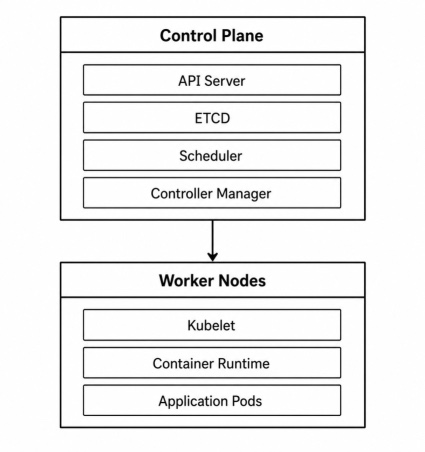
- The control plane makes decisions.
- Worker nodes execute those decisions.
When a Deployment is created, the control plane determines where workloads should run, how many replicas should exist, and how failures should be handled. The worker nodes are responsible for actually running containers.
This separation of responsibilities is one of the key reasons Kubernetes can scale effectively.
Let's Create Our First Deployment. Create a file named "deployment.yaml" with the following content:
apiVersion: apps/v1
kind: Deployment

metadata:
  name: nginx-demo

spec:
  replicas: 3

  selector:
    matchLabels:
      app: nginx

  template:
    metadata:
      labels:
        app: nginx

    spec:
      containers:
        - name: nginx
          image: nginx
kubectl apply -f deployment.yamldeployment.apps/nginx-demo createdkubectl get deployments
NAME READY UP-TO-DATE AVAILABLE AGE
nginx-demo 3/3 3 3 32s
kubectl get replicasets

NAME                    DESIRED   CURRENT   READY   AGE
nginx-demo-56c45fd5ff   3         3         3       54s
kubectl get pods

NAME                          READY   STATUS    RESTARTS   AGE
nginx-demo-56c45fd5ff-fwxpt   1/1     Running   0          68s
nginx-demo-56c45fd5ff-h7jkk   1/1     Running   0          68s
nginx-demo-56c45fd5ff-jvgjb   1/1     Running   0          68s
This behavior introduces one of the most important concepts in Kubernetes: the reconciliation loop.
Reconciliation Loop
One of the most important concepts in Kubernetes is the reconciliation loop. Every controller in Kubernetes continuously compares the current state of the cluster with the desired state stored in the Kubernetes API. When a mismatch is detected, the controller takes corrective action.For example, suppose one of the Pods created by our Deployment crashes unexpectedly. Let's simulate that. First, identify one of the running Pods:
kubectl get podskubectl delete pod nginx-demo-56c45fd5ff-fwxptkubectl get pods -wNAME READY STATUS RESTARTS AGE
nginx-demo-56c45fd5ff-jvgjb 1/1 Running 0 15m
nginx-demo-56c45fd5ff-qq46z 1/1 Running 0 56s
nginx-demo-56c45fd5ff-trgm6 0/1 ContainerCreating 0 2s
nginx-demo-56c45fd5ff-trgm6 1/1 Running 0 4s
A Quick Summary
At this point, it is useful to summarize the responsibilities of the two major parts of a Kubernetes cluster.The Control Plane acts as the brain of the cluster. It receives requests, stores cluster state, schedules workloads, and continuously monitors the system to ensure that desired state is maintained.
The Worker Nodes act as the execution layer. They run application containers and report status information back to the control plane.
So far, we've treated the control plane as a black box. We know that Deployments somehow become Pods, but we haven't yet explored the component responsible for receiving and processing every request in the cluster.
In the next article, we'll open that black box and examine the most important component in Kubernetes: The API Server.
